

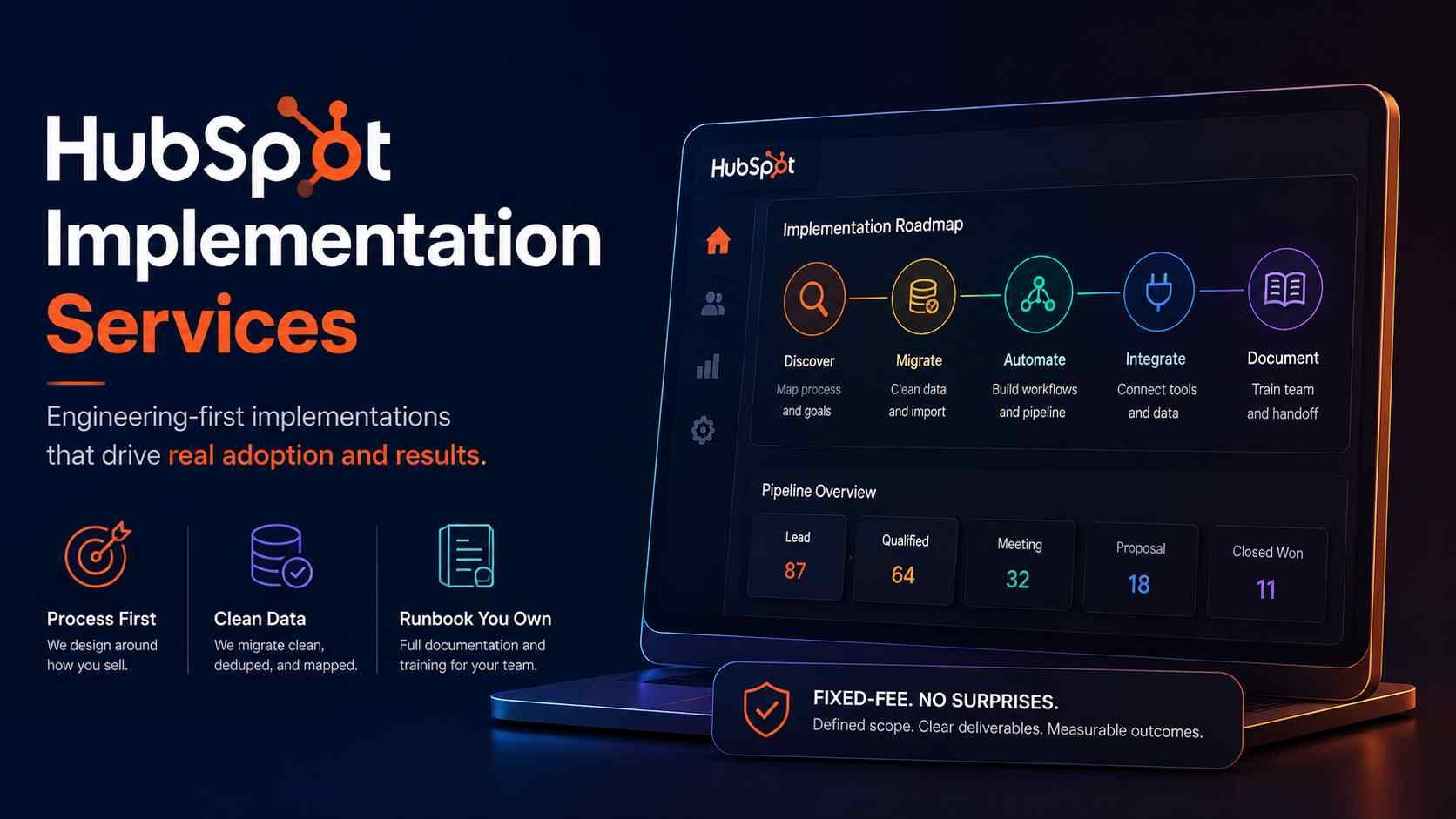
We are Automation Consulting Services (ACS). We build operations infrastructure built with engineering discipline for $10M-$50M operators who need the back office to scale faster than headcount.
We are not a HubSpot partner, and that is deliberate. We are a verified Attio Expert Partner and a Zapier Certified Solutions Partner.
Because HubSpot pays us nothing, we publish positions that HubSpot Diamond and Elite partners cannot. We bring more than ten years of software development experience. We have shipped 500+ workflows, reclaimed 10,000+ hours, and saved clients $2 million and counting.
The honest verdict
Most HubSpot implementations are configuration exercises dressed up as strategy. Partners activate features, migrate messy data, and call it done. Six months later, the sales team lives in spreadsheets again. HubSpot is fastest to ship and most expensive to live with.
The platform is genuinely good. The failure sits in the process work that most implementations skip. Pay for process design, clean data migration, and documentation you own. Do not pay for partner tier badges or capability you will not use until $25M+. For a full platform breakdown, see our HubSpot implementation page.
What a HubSpot implementation actually includes
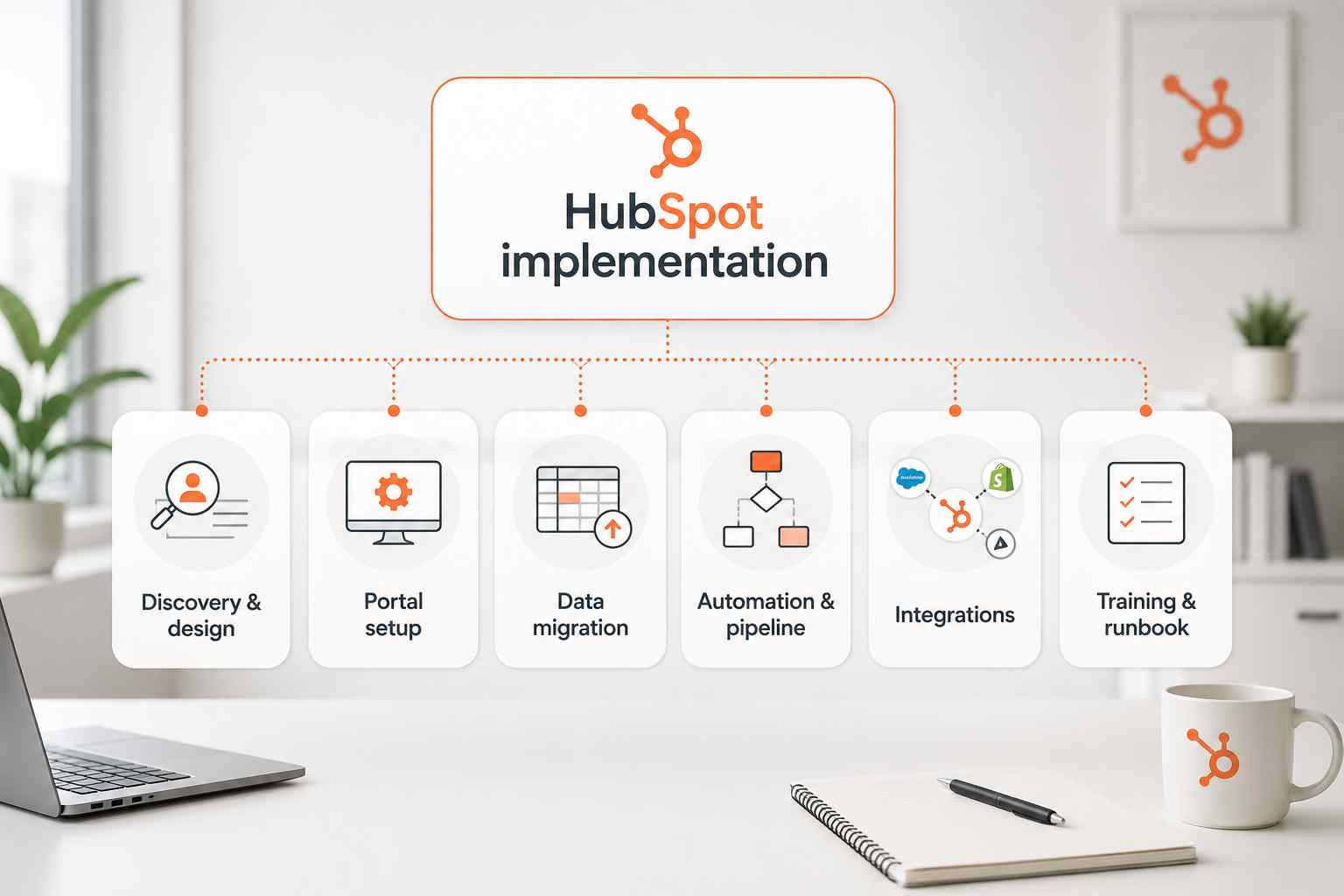
A real implementation is six distinct workstreams. Most quotes cover three of them and skip the rest.
Discovery and process design (the work most implementations skip)
This is the work that separates a working CRM from expensive shelfware. Before any configuration, someone maps how you actually sell. Not the playbook version. The real version, documented with your reps. Most CRMs become glorified spreadsheets within twelve months because nobody did this step.
Discovery defines your lifecycle stages, your pipeline logic, and your data model. It sets exit criteria for every deal stage. It aligns marketing and sales on what qualifies a lead. Skip this, and you build on sand.
The pipeline will not match reality, and your forecast becomes noise. Discovery is the highest-leverage money you will spend.
Portal setup and configuration
Portal setup covers account settings, user roles, permissions, and lifecycle stages. It includes property architecture, record layouts, and role-based views. Discipline matters most here. Adding fields as needs arise creates a museum of dead fields.
Every property should carry a documented purpose and a naming convention. Standard HubSpot properties should be used before custom ones. Sloppy configuration compounds forever. A clean portal stays legible two years later. A messy one needs a rebuild.
Data migration from legacy systems
Moving dirty data does not fix data problems. It relocates them somewhere harder to find. Migration from Salesforce, Pipedrive, or spreadsheets starts with deduplication and standardization.
You prune obsolete records, fix invalid emails, and map every field before export. HubSpot uses email and domain for deduplication and associations. Import order matters.
Companies before contacts before deals, or associations break. A Salesforce migration adds complexity because the two systems use different data models. Salesforce separates Leads, Contacts, and Accounts.
HubSpot treats everyone as a Contact tied to a Company. That gap requires redesign, not a lift-and-shift. Budget one to two weeks for cleanup before anything moves.
Workflow automation and pipeline architecture
This is where engineering discipline pays off. Pipeline stages without exit criteria become forecasting fiction. Every stage needs documented entry and exit rules tied to buyer actions, not rep opinions.
Name stages after what the buyer did, not what the rep did. Five to seven stages fit most B2B motions. Default stage probabilities are not your win rates.
Recalculate them after three months of clean data. Workflow automation handles routing, follow-up, and lifecycle transitions. Every workflow needs error notifications and an owner.
Orphaned automations that break silently are worse than no automation. Required fields without a workflow are validation theater, not hygiene. Enforcement has to be built, not assumed.
Integration setup and API work
HubSpot earns its keep when it becomes the place everything connects. If your team switches between five tabs to answer one question, adoption dies. Integration setup connects email, calendar, and the tools your team lives in.
The HubSpot integration marketplace covers common connections natively. Deeper needs require API work. HubSpot deprecated legacy API keys in November 2022, so Private Apps and OAuth are the supported paths now.
Native connectors hit Salesforce API rate limits above roughly 50,000 records. Larger migrations need a custom approach. This workstream is where our Zapier and integration background does the heavy lifting.
Training, handoff, and runbook documentation
The system only works if the team uses it. One-on-one and small-group training beats generic webinars. Adoption correlates directly with enablement quality. The deliverable that almost no partner ships is a runbook. A runbook documents every workflow, its trigger, and its expected outcome.
It lets your team maintain the system without a consultant on retainer. Without documentation, teams cannot change a pipeline stage or build a report alone. That is the exact dependency trap you are trying to escape. Documentation should ship with the build, not as an upcharge.
What HubSpot implementation actually costs (structure, not specific prices)
HubSpot cost has three layers. Most operators budget for one and get surprised by the other two.
The mandatory onboarding fee HubSpot requires
HubSpot requires onboarding for Professional and Enterprise tiers across Sales Hub, Marketing Hub, and Service Hub. This is a one-time fee, billed upfront in year one, and it is non-negotiable for direct purchases. It covers a dedicated onboarding specialist who guides setup.
Marketing Hub onboarding costs more than Sales or Service Hub, and Enterprise costs more than Professional. The fee does not cover process design, custom automation, or complex migration.
You can route it through a certified partner instead of HubSpot directly. The onboarding fee gets you configured. It does not get you a revenue process.
The implementation partner engagement (variable)
This is the largest and most variable line. It ranges widely based on hubs, data complexity, and integration depth. A simple Sales Hub setup with clean data is a short, low-cost engagement. A multi-hub Enterprise build with Salesforce migration is a multi-month project.
The cost driver is not the software. It is the process design and the data. This is also where billing structure matters most, which we cover in the red flags section below.
The ongoing costs most operators underestimate
The subscription is not static. HubSpot per-seat cost compounds painfully past 10 users. Sales Hub and Service Hub charge per seat, so a growing team multiplies the bill fast. The HubSpot marketing contacts trap catches operators who don't budget for contact list growth.
Marketing Hub bills on contacts you actively market to, and the tier upgrades automatically when you cross a threshold. Renewal pricing uses your peak contact count over the term, so a brief spike costs you all year.
Add-ons creep in: extra dashboards, more calling minutes, dedicated IP, and AI credits. Someone also has to administer the portal, internally or outsourced.
What the total cost of ownership actually looks like
Model three years, not one. Year one includes onboarding, the partner build, and the subscription. Years two and three bring seat growth, contact growth, add-on creep, and renewal uplift. The three-year TCO of HubSpot at scale routinely exceeds the sticker price several times over.
This mechanism sits behind our position that HubSpot is fastest to ship and most expensive to live with. Model your seat count and contact growth honestly before you sign. Compare it against alternatives in our Pipedrive vs HubSpot and HubSpot vs Salesforce breakdowns.
HubSpot partners: what the tier system means (and doesn't)
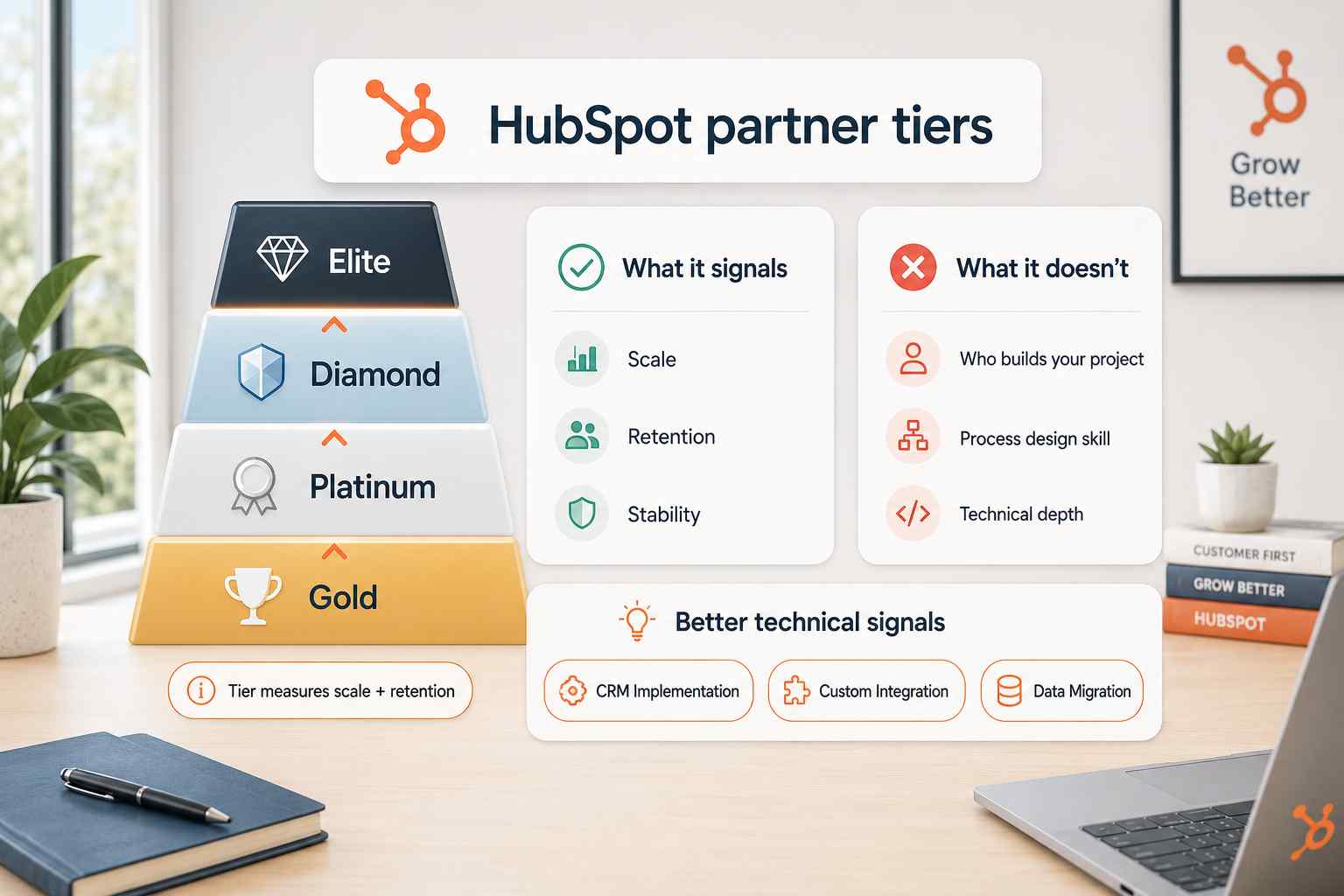
The badge on a partner site is written for the partner, not for you. Here is how to read it.
The HubSpot Solutions Partner Program tiers explained
HubSpot ranks solutions partners in four named tiers. From lowest to highest they are Gold, Platinum, Diamond, and Elite. There is no Silver tier in the current program. Partners earn tiers on points tied to recurring revenue they source and manage.
As of January 15, 2026, Diamond requires at least 75% gross revenue retention and Elite requires 80%. That GRR metric replaced the older customer-dollar-retention measure. Tier measures scale and retention. It does not measure the technical depth of your specific build.
What Diamond/Elite status actually guarantees
A higher tier tells you the partner is large and keeps its clients. That is a real signal. It means the firm has sold a lot of HubSpot and retained the customers. It correlates with a greater likelihood of holding formal accreditations.
Elite is invitation-only, requires a large minimum count of team certifications, and fewer than one percent of partners ever reach it.
Those facts signal stability and staying power. If your project is straightforward, a tiered partner will handle it competently.
What it doesn't guarantee
Tier tells you nothing about who builds your project. It says nothing about process design skill or data engineering depth. Accreditations, which are separate and harder to earn, are a better technical signal.
The CRM Implementation, Custom Integration, and Data Migration accreditations mean more than the tier badge.
A partner also earns tier by selling HubSpot, which is a structural conflict. A HubSpot Solutions Partner is paid by HubSpot's success incentives to keep you on HubSpot. That partner cannot tell you a different CRM fits better.
We can, because HubSpot pays us nothing. See our CRM pillar plus our Attio and Pipedrive breakdowns for honest alternatives.
When independent consultants outperform partners
Independents win when the project is engineering-heavy and process-first. When you need custom API work, complex migration, or genuine platform neutrality, tier status is irrelevant.
An independent firm with software depth often ships cleaner infrastructure than a marketing agency dabbling in HubSpot. Ask which hubs the firm has built more than ten times in the last eighteen months. Vague answers are a yellow flag.
Red flags in HubSpot implementation proposals
This is the section HubSpot partners cannot publish, because several of these red flags describe how partners are structured to work. Read every proposal against this list.
Vague deliverables and undefined scope
Some firms keep scope vague on purpose. Phrases like "custom strategy" and "flexible support" hide the absence of defined deliverables. A credible proposal specifies exactly what you receive. Number of training sessions. Hours of configuration.
Named deliverables at each milestone. If every cost question gets "we will figure that out as we go," walk. Vague scope is how scope creep and surprise invoices begin.
Hourly billing without a capped budget
Hourly billing pays consultants to think slowly. It rewards the vendor for taking longer and punishes you for their inefficiency. Open-ended hourly engagements have no ceiling and no accountability for outcomes.
A fixed-fee engagement puts the delivery risk on the firm, where it belongs. If a proposal quotes an hourly rate with no capped budget and no fixed scope, treat it as a red flag. You are buying an outcome, not a timesheet.
No runbook or handoff documentation
If the proposal has no documentation deliverable, you are buying a dependency. When the engagement ends, you will not be able to change a workflow or build a report without calling them back.
That is by design for firms that sell ongoing retainers. Ask directly what documentation ships at handoff. A one-line answer means there is no runbook.
Junior consultants delivering under a senior sales pitch
The person who pitches you is often not the person who builds. Senior strategists win the deal, then junior consultants deliver templated work. Ask who does the actual configuration and migration. Ask to speak with them before signing. If the delivery team is anonymous, assume the work is templated.
No post-launch support commitment
Go-live is the start of adoption, not the end of the project. Proposals that end at launch leave you alone during the exact window when problems surface. Ask how the firm measures success after go-live, not just at it. A short hypercare period should sit in scope. No post-launch commitment signals a build-and-vanish model.
Configuration-only work without process design
This is the most common and most damaging red flag. A configuration-only scope activates features without designing the process underneath. It produces a technically functional portal that does not match how you sell.
Partners default to HubSpot's generic pipeline template instead of your actual motion. That is the root cause of the adoption failures we get called to fix. If the scope has no discovery and no process work, it is not an implementation. It is a setup.
When to implement HubSpot yourself vs hire outside
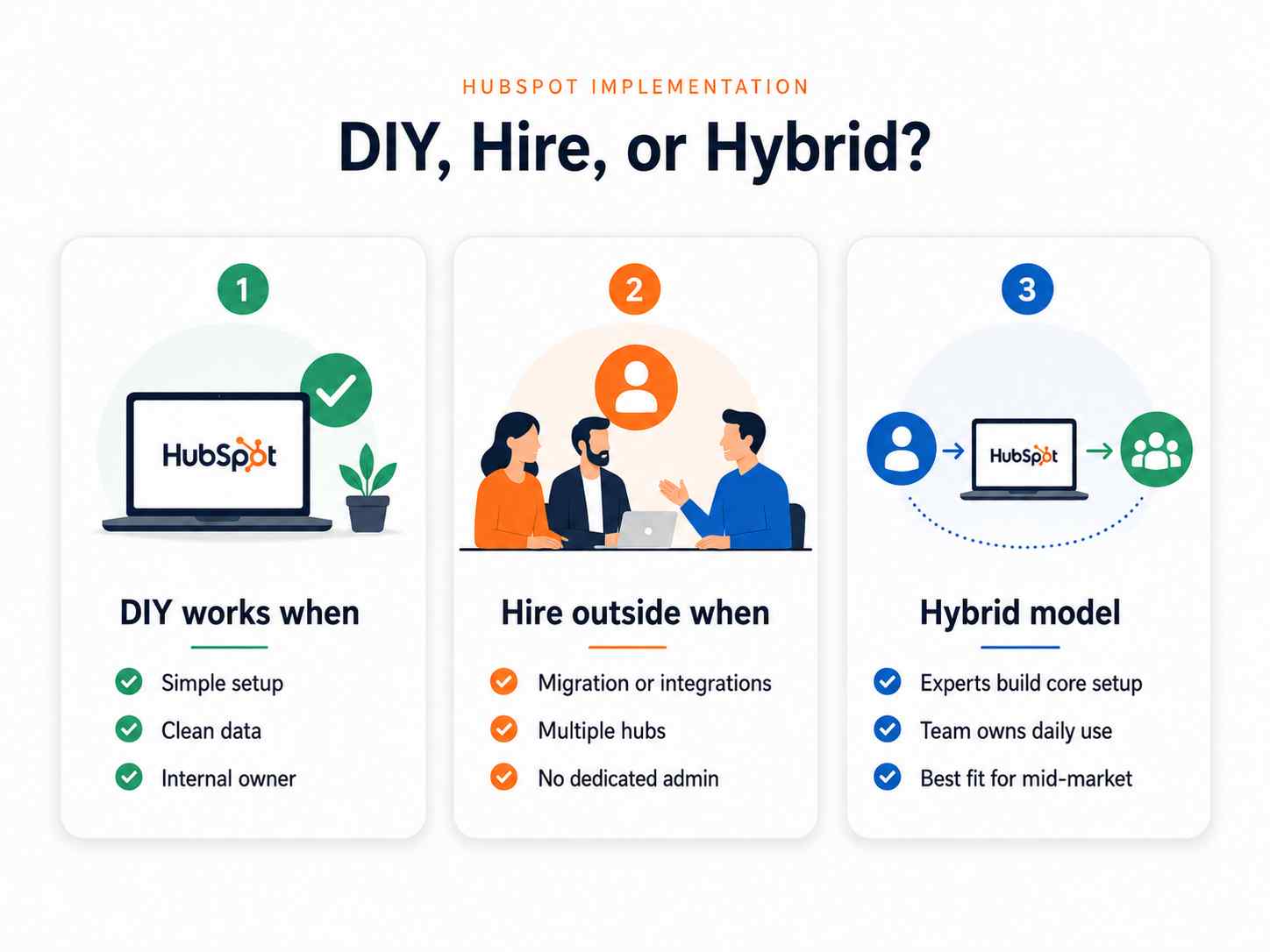
Not every operator needs outside help. Here is the honest split.
DIY works when...
DIY works when your setup is simple, and your data is clean. A single Sales Hub, a straightforward pipeline, and a contact list under 10,000 records is manageable in-house.
It works when you have a capable internal admin with time to own it. HubSpot Academy is genuinely good, and the free tools are generous. If you have process clarity and an owner, do it yourself.
Hire outside when...
Hire outside when the project involves migration, integrations, or multiple hubs. A Salesforce migration, custom API work, or an Enterprise multi-hub build exceeds most internal teams.
Hire outside when you lack a dedicated admin, or when your process is contested and undocumented. Most enterprise CRM implementations pay for capability the operator will not use until $25M+. Buy the scope you need now, not the scope a partner wants to sell.
The hybrid approach that usually fits mid-market
Most $10M-$50M operators fit a hybrid model. Outside experts design the architecture, migrate the data, and build the core automation. Your internal team owns daily operation using the runbook.
This keeps ownership in-house while getting the engineering right the first time. It avoids both the DIY mess and the permanent-retainer trap. This is the model we build toward on every engagement.
How ACS approaches HubSpot implementation
We treat operations as infrastructure and engineer it the way software is engineered. Every engagement starts with paid, refundable discovery. Discovery produces a written audit, a ranked bottleneck list, and a recommended scope.
If the real bottleneck is not automation, we say so and refund the fee. Our builds are fixed-fee, never hourly, so the delivery risk sits with us. Every engagement closes with a runbook your team owns.
We implement HubSpot, Salesforce, Pipedrive, Attio, and Close, so our recommendation is not captive to one vendor. Because we are not a HubSpot partner, we tell you when HubSpot is the wrong choice.
Our case studies span operators from $1.5M to $25M, including a $25M fencing contractor and a $10M supplement manufacturer.
Review our pricing structure and partnerships to see how we work.
Frequently asked questions
How much does HubSpot implementation actually cost?
It has three layers: the mandatory HubSpot onboarding fee for Professional and Enterprise tiers, the variable partner engagement, and ongoing subscription costs that grow with seats and marketing contacts.
The partner engagement is the largest line and scales with data complexity and integration depth. Model three-year total cost of ownership, not year one, because per-seat and contact costs compound. See our pricing page for how we structure fixed-fee builds.
How long does a HubSpot implementation take?
A simple Sales Hub setup runs about four to six weeks. A full CRM Suite with Marketing Hub takes eight to twelve weeks. An Enterprise multi-hub build with migration runs three to six months.
The biggest time sink is not technical. It is decision latency and data cleanup, both preventable with disciplined pre-work.
Do I need a HubSpot Diamond Partner?
No. Diamond status signals scale and client retention, not the technical depth of your build. For engineering-heavy projects, accreditations like CRM Implementation and Data Migration matter more than tier.
An independent firm with software depth and platform neutrality often outperforms a tiered partner on complex work.
Can I implement HubSpot myself?
Yes, when your setup is simple, your data is clean, and you have a dedicated internal admin. HubSpot Academy and the free tools support DIY well. Hire outside once migration, custom integrations, or multiple hubs enter the picture, or when your sales process is undocumented and contested.
What's the HubSpot mandatory onboarding fee?
HubSpot requires a one-time onboarding fee for Professional and Enterprise tiers on Sales, Marketing, and Service Hub. It is billed upfront in year one and covers a dedicated onboarding specialist.
It does not cover process design, custom automation, or complex data migration. You can route it through a certified partner instead of HubSpot directly.
How do I choose a HubSpot implementation consultant?
Demand defined deliverables, a fixed-fee or capped budget, and a runbook at handoff. Confirm who does the actual build, not just who pitches. Require a post-launch support commitment and real process design, not configuration only.
A neutral firm that implements multiple CRMs can tell you when HubSpot is the wrong fit.
What are the biggest HubSpot implementation mistakes?
Skipping discovery and process design, migrating dirty data, and building pipeline stages with no exit criteria. Over-customizing with fields nobody uses. Launching orphaned automations with no owner.
Treating go-live as the finish line instead of the start of adoption. Every one of these is preventable with engineering discipline.
Next steps
You have three ways to move forward with us.
Book a paid discovery diagnostic. You get a written audit, a ranked bottleneck list, and a recommended scope, refundable if the real problem is not automation. Start at our pricing page.
Read the HubSpot implementation detail. Our HubSpot page covers the platform, the tradeoffs, and where it fits.
Review the proof. Our case studies show real infrastructure we have shipped for $10M-$50M operators.