

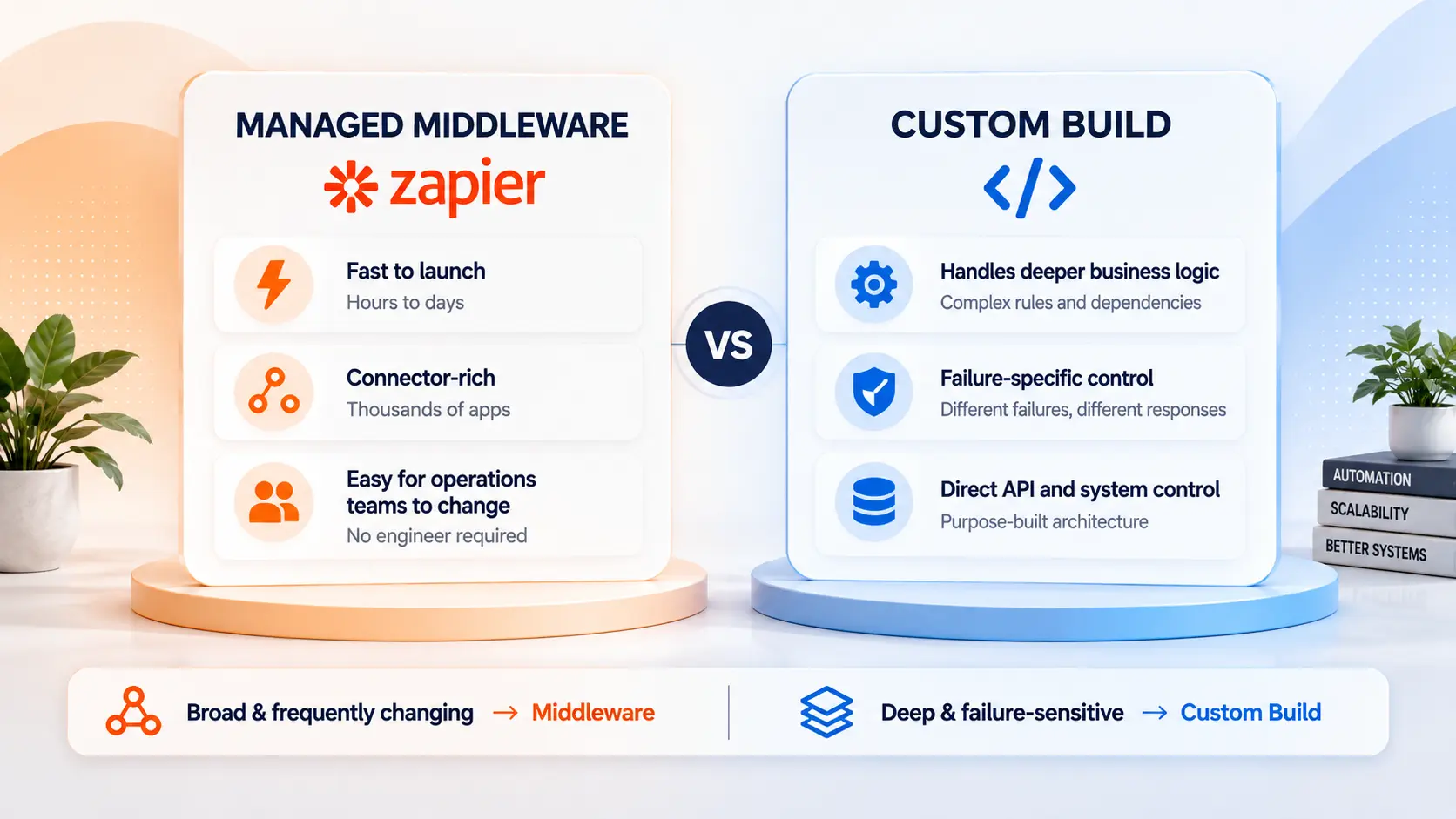
Cost on its own is not one of those situations, because a rising bill is usually a complexity problem rather than a volume one. Automation Consulting Services is a Zapier Certified Solutions Partner that also ships custom integration builds.
Where Middleware Actually Sits
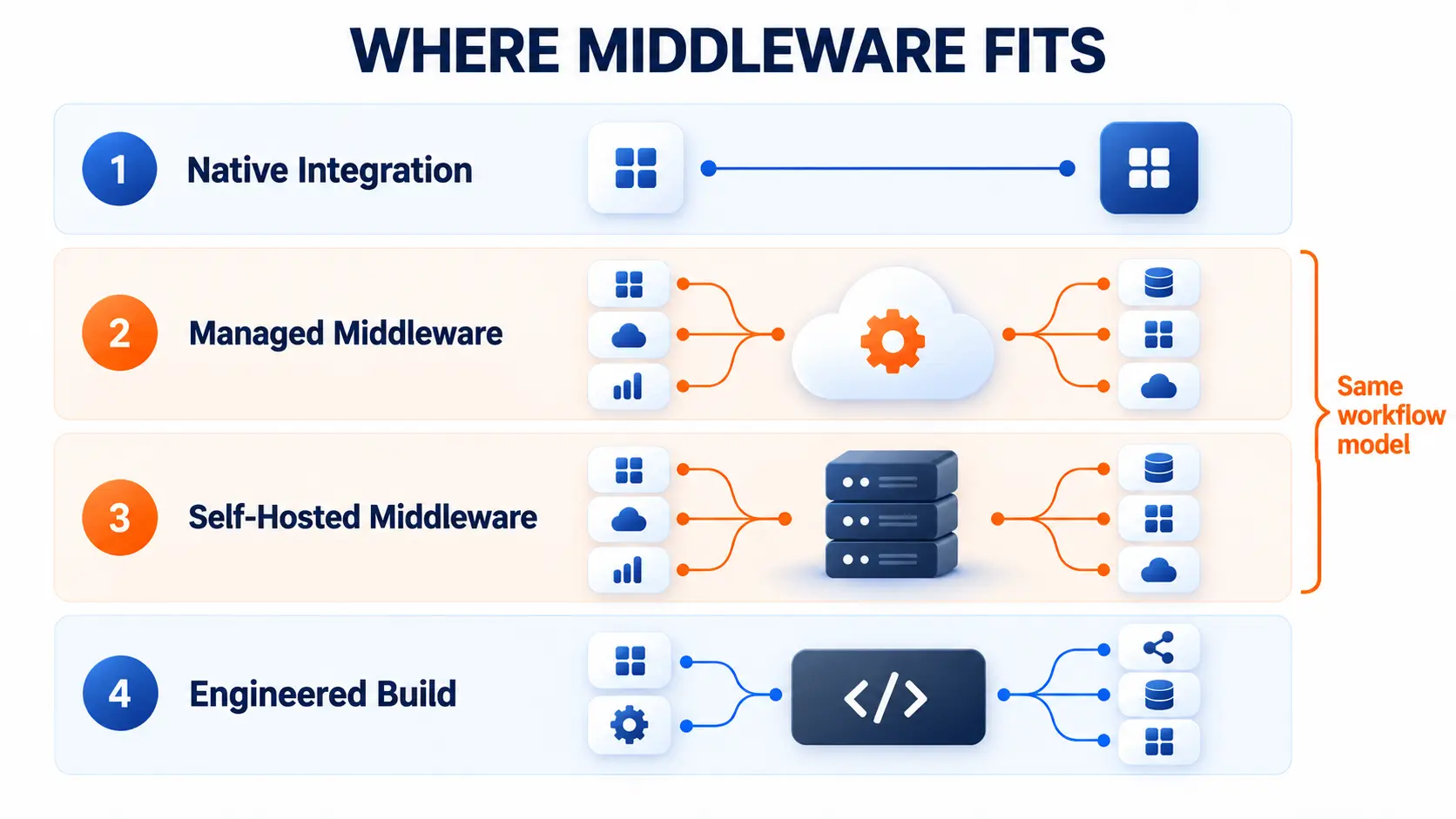
Middleware is one layer of four, and most advice about leaving it moves you to a different tier of the same category.
Native integration: Two applications talk directly, maintained by somebody else, at no cost to you
Managed middleware: Connector-rich, hosted for you, priced per operation
Self-hosted middleware: The same workflow model on your own infrastructure, without the per-operation bill, and still middleware
An engineered build: Code you own, running against the interfaces directly
Most teams asking about custom builds are actually asking about tiers two and three. Choosing between managed platforms is a separate question, covered in our comparison of the main middleware platforms.
Middleware and a Custom Build, Side by Side
The two layers differ on nine things, and only one of them is cost.
Time to first working version: Hours to days on managed middleware, weeks with a custom build
Who can change it: Anyone on the operations team with middleware, an engineer with a custom build
Cost shape: Middleware scales with operations performed. A custom build is a fixed cost, then flat infrastructure
Connector coverage: Middleware covers thousands of applications, maintained for you. A custom build covers whatever you write, maintained by you
Conditional logic: Middleware handles real branching, brittle once conditions compound. A custom build has no practical limit
Failure handling: Middleware retries on a schedule and alerts on error. A custom build responds to the type of failure
Run visibility: Middleware gives you a run history a non-engineer can read. A custom build gives you logs you design and access you grant
When a vendor changes its API: Fixed for you on middleware, often before you notice. Your problem, on your timeline, with a custom build
Best fit: Middleware fits broad estates that change often. A custom build fits deep workflows that must not fail
Read the last row first. Most decisions get made on the cost row, and the cost row is the least reliable one in the table.
Your Bill Is a Step Count, Not a Volume Count
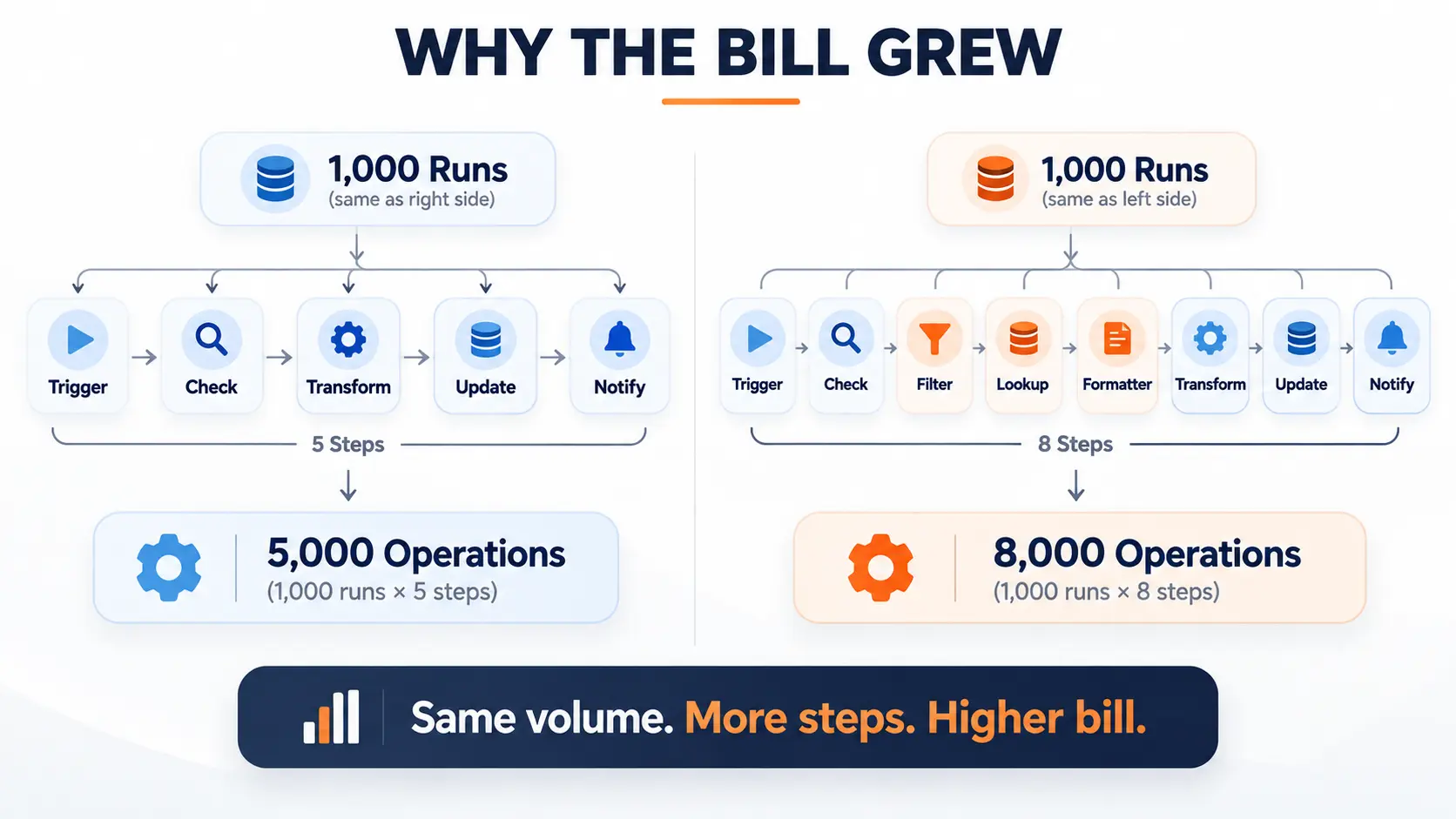
An operation is a step multiplied by a run, so a bill that doubled usually means the logic got harder rather than the business getting busier.
Take a workflow with five steps that fires a thousand times a month. That is five thousand operations. Add three steps to handle an edge case somebody found in March, and the same thousand runs now cost eight thousand.
The trigger count never moved. The bill went up sixty percent.
Why Steps Accumulate
Steps accumulate because workarounds are made of steps. A condition the workflow model cannot express cleanly becomes a filter, then a lookup, then a formatter, then a second workflow holding state the first one needed.
None of that made the logic more expensive to run. It made the logic more expensive to say.
That distinction matters because the two problems have different fixes. Volume growth is solved by changing where the workflow runs. Complexity growth is not, and moving the same tangled logic to a cheaper platform moves the bill with it.
Worth being clear about what is happening here. The platform is not being inefficient or overcharging you. It is billing accurately for the number of operations you asked it to perform, and you asked it to perform more of them because the logic needed more of them.
The Number to Pull Before You Price Anything
Pull two figures from twelve months ago and compare both to today: how many times your busiest workflows ran, and how many steps they contained.
If the run count grew, you have a volume problem and the layer decision is a real one. If the step count grew and the run count did not, you have a logic problem wearing a pricing problem.
Four Signals the Platform Is the Wrong Layer
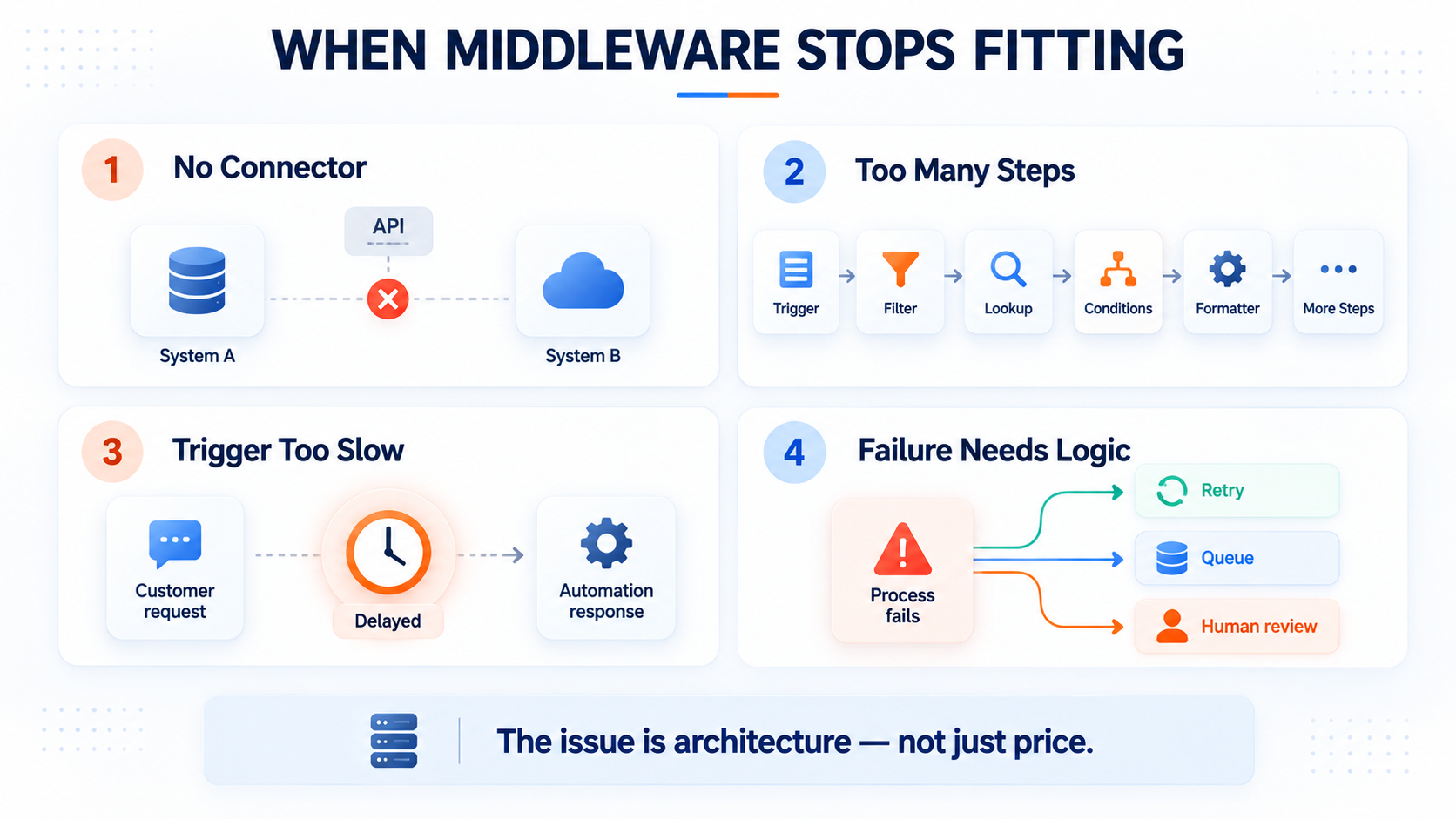
Four signals genuinely indicate a workflow has outgrown middleware, and cost on its own is not one of them.
No Connector Exists on One End
This is the clearest signal and the least arguable. When a system has no connector, you end up handling authentication, pagination, and error parsing inside a builder designed to hide all three.
That combines the rigidity of a no-code tool with the complexity of custom API work. On an $8M distributor build, supplier portals exposed no usable connector at all, so the work became direct API clients and scheduled scrapers normalising 5,500 SKUs hourly.
The Step Count Climbs to Express One Decision
When a single business rule needs six steps and a helper workflow to express, the model has become the constraint rather than the tool.
Platforms handle conditional branching properly, with real paths and nesting. What they handle badly is compound logic where a later decision depends on the outcome of several earlier ones, because expressing it takes more structure than reading it should.
The Workflow Needs an Answer Faster Than a Trigger Delivers One
Trigger-based automation is asynchronous by design. Something happens, and shortly afterwards something else happens.
That is a fit statement rather than a fault. A workflow sitting inside a request a customer is actively waiting on is a different architecture, not a badly configured automation.
Failure Needs Business Logic, Not a Retry
Platforms do retry, on a schedule, and they retry sensibly for transient failures.
What a retry cannot do is know what failed. A payment authorisation that declines should reach a person, while an inventory lookup that times out should go to a queue and try again later.
The correct response depends on the nature of the failure, and encoding that judgement is the thing middleware was never built to hold.
When the right answer to a failure depends on which failure it was, that logic belongs in code.
What You Stop Being Able to Do
The real cost of leaving middleware is not the build. It is that your operations team stops being able to change their own workflows.
Nobody prices this, and it is the change people feel first.
The person who adjusts the routing rule today is usually not an engineer
After a custom build, that adjustment becomes a ticket, a sprint, and a deployment
You are trading speed of change for control over behaviour. That is a good trade for a workflow that must not fail, and a poor one for a workflow that changes every month.
What you get in exchange is worth naming precisely. Failure handling that matches the failure, logging you choose the shape of, and a cost that stops tracking your operation count. None of that shows up on an invoice, which is why the trade gets made on the wrong evidence.
The workflows worth building custom are the ones nobody should be editing on a Tuesday afternoon anyway.
Which Layer Fits the Workflow
The right layer depends on what actually grew and on what a failure costs when it happens.
If your run count grew and your step count stayed flat, that is genuine volume growth. Look at a flat-cost layer, or a build if failure is expensive
If your step count grew and your run count stayed flat, the logic outgrew the model. Fix the logic before changing the platform
If both grew, the workflow became load-bearing. Split it: keep the simple path, build the hard part
If neither grew but the bill did, the estate grew, not the workflow. Audit for redundant workflows first
Breadth and depth pull in different directions. A $25M fencing contractor we run a retainer for has over one hundred workflows under active management and belongs on middleware, because the estate is wide rather than deep and the people who own those processes need to keep changing them.
Working Out Which One You Actually Have
Most operators have never pulled their step count and their run count side by side, which means the build conversation usually starts from a bill rather than a diagnosis.
A paid discovery audit tells you which workflows justify a build, which should stay exactly where they are, and what a fixed-fee scope looks like for the ones that move.
Prototype on Middleware, Then Build
Building a workflow on middleware first is the cheapest way to find out whether it deserves an engineered build.
You find the edge cases in production instead of guessing at them in a specification
You learn the real volume rather than estimating it
You discover whether anybody uses it before paying to make it permanent
A workflow that has run on middleware for six months is the best brief you will ever hand a developer. It documents itself by existing.
Move One Workflow, Not All of Them
Leaving is rarely all or nothing, and the smallest useful move is usually a single workflow.
Run the new build alongside the existing workflow before switching the trigger over
Sometimes the fix is one custom step inside a workflow that otherwise stays where it is
Most healthy estates end up running both layers permanently, and that is the normal outcome rather than a compromise
Frequently Asked Questions
Is My Automation Bill a Volume Problem or a Complexity Problem?
Compare your run count and your step count against the same figures a year ago. If runs grew, it is volume and a different layer may genuinely be cheaper. If steps grew while runs stayed flat, the logic outgrew the model and rebuilding it elsewhere will reproduce the same bill.
Do I Have to Move Everything at Once?
No, and you should not. Move the single workflow with the highest cost of failure first, run it in parallel with the existing version until the outputs match, then leave everything else where it is.
What Happens to Our Team's Ability to Change Workflows After a Custom Build?
They lose it for anything you move. Adjustments that took a coordinator five minutes become engineering work, which is why the workflows worth building custom are the stable ones rather than the ones still changing shape.
Should We Self-Host Instead of Building Custom?
Self-hosting removes the per-operation bill and keeps the same workflow model, so it solves a cost problem and leaves a complexity problem exactly where it was. It is the right move when your run count grew and the wrong move when your step count did.