

We build operations infrastructure with engineering discipline for $10M-$50M operators, and middleware sits under nearly every system we ship. Disclosure first: we are a Zapier Certified Solutions Partner, listed in the partner directory. And we build production systems on all three of these tools. Our badge says Zapier. Our builds say all three.
That is exactly why this comparison can be honest. We have no reason to pretend one tool wins everywhere, because our work depends on picking right per client, not per commission.
Zapier vs Make vs n8n: The Short Answer
Forced to a verdict, the verdict is conditional, and conditional is the truth.
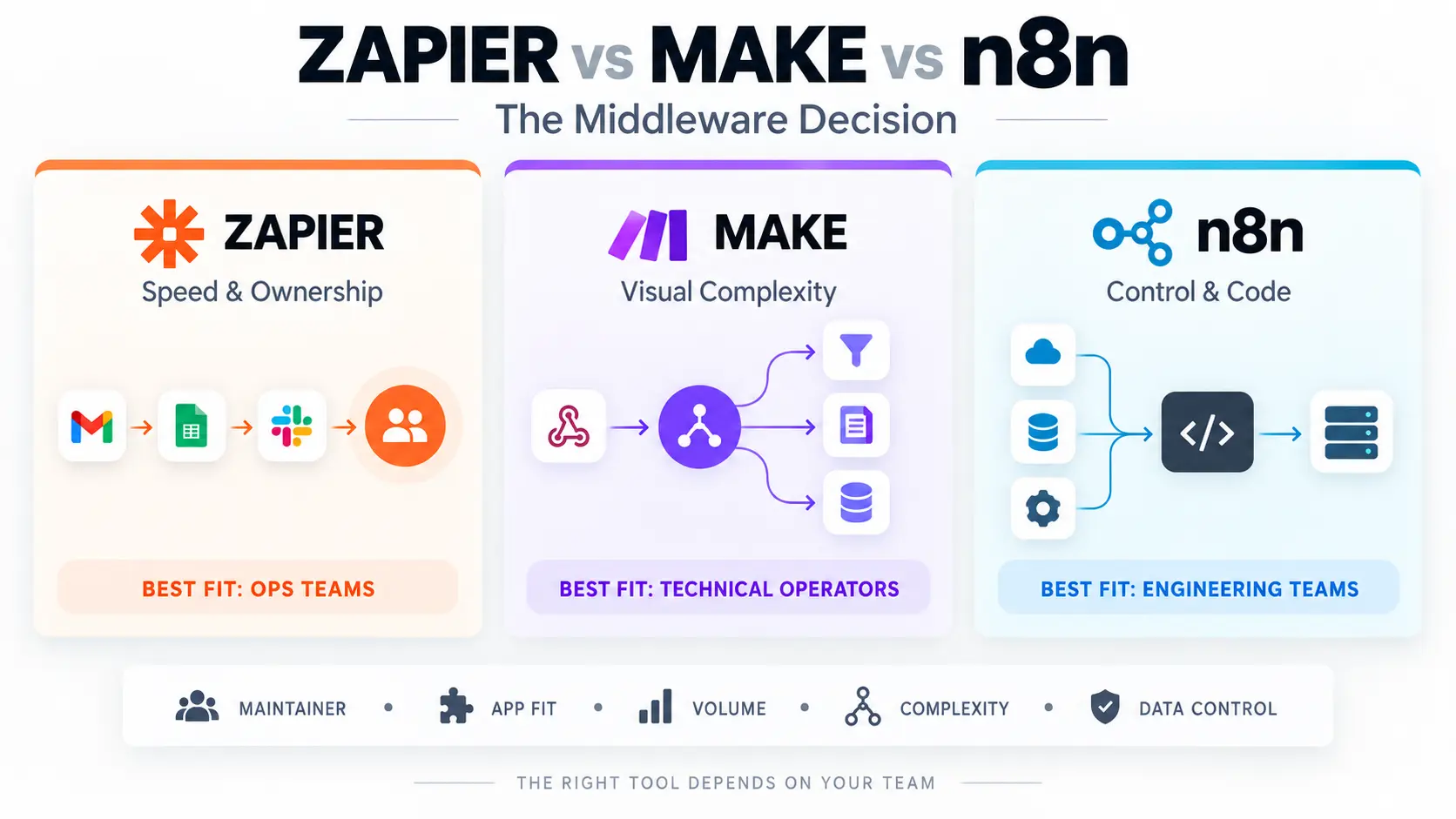
For a non-technical team that needs working automations this week: Zapier first, Make second, n8n last. For a technical operator building complex, branching flows on a budget: Make first, n8n second, Zapier third. For an engineering-minded team wanting control, code, and flat costs at scale: n8n first, Make second, Zapier third.
Anyone who ranks these three without asking about your team is selling something. The rest of this guide earns those three sentences, and the five-question test below turns them into your answer.
What the Middleware Decision Actually Decides
Middleware is the build layer from our sales stack model: the connective tissue moving data between the systems that run your business. Pick a middleware tool and you are picking your company's nervous system. Every integration build we ship runs on this layer, which is why the choice gets engineering attention instead of a coin flip.
Three things ride on the choice. Who can build and fix workflows, because the maintainer decides more than the feature list. What your integration ceiling looks like, because tools differ most at the hard edges. And what growth costs, because every pricing model taxes volume differently.
The decision also locks in harder than most software choices, for reasons the switching-costs section covers. Choose for the next three years, not the next demo.
Zapier: Strengths, Limits, and Who Should Choose It
The category creator, and still the default for a reason.
Where Zapier Wins
Coverage and speed. Zapier connects the widest range of business apps of the three. The long tail matters most: the niche industry tool your team adopted last year probably has a Zapier integration and nothing else. Building is fast, the interface stays friendly, and a capable ops person owns workflows without engineering help.
That ownership point is the quiet superpower. Automations maintained by the team that uses them get fixed the same day they break. Our Zapier experts guide covers when outside help still earns its fee.
Where Zapier Hits Its Ceiling
Complex logic and chatty volume. Deep branching, iteration over large datasets, and heavy data transformation push against the tool's linear grain. And the task-based cost model taxes busy workflows. Polling triggers and multi-step chains consume tasks fast.
The bill grows with activity rather than with value. Workflows that outgrow Zapier usually outgrow it here. The workaround tax is the tell. When zaps start calling zaps and formatter steps stack five deep, the tool is telling you something.
Make: Strengths, Limits, and Who Should Choose It
The visual power tool in the middle.
Where Make Wins
Flow complexity per dollar. Make's scenario canvas handles branching, routing, iteration, and aggregation visually, and technical operators build genuinely sophisticated logic without writing code.
Data transformation is a particular strength: reshaping, mapping, and merging records mid-flow without a code step. The operations-based cost model tends to carry mid-volume complexity further before the bill objects. Teams that think in flowcharts feel at home quickly.
Where Make Gets Hard
The learning curve and the debugging sessions. The same canvas that enables complexity invites it, and scenarios grow into diagrams only their author understands.
Coverage trails Zapier on the long tail of niche apps. And handoff discipline matters more here: an undocumented Make scenario is a puzzle wearing a flowchart. Module naming and a one-line note per route cost minutes and save the next maintainer's afternoon.
n8n: Strengths, Limits, and Who Should Choose It
The engineer's choice, and the loudest recommendation in every technical forum.
Where n8n Wins
Control and cost shape at scale. n8n is source-available and self-hostable, which means your workflows and data run on your infrastructure when you want them to. Code steps sit naturally beside visual nodes, so the ceiling is effectively your developer's ceiling.
And self-hosting trades subscription fees for server costs, which flattens the bill exactly where volume-priced tools get expensive. Data-control and compliance requirements often decide the whole comparison in n8n's favor by themselves. The template library and community momentum keep growing too, which shortens the build time the tool once demanded.
What n8n Demands
An owner who is comfortable with servers, updates, and occasional breakage, or the hosted plan that softens those demands. Updates land frequently, which is momentum and maintenance in the same sentence.
The forum enthusiasm is real and earned, and it comes from people who enjoy maintaining infrastructure. If nobody on your team does, the free-looking option carries a salary-shaped cost. n8n rewards an engineer and punishes their absence.
The Five-Question Middleware Decision Test
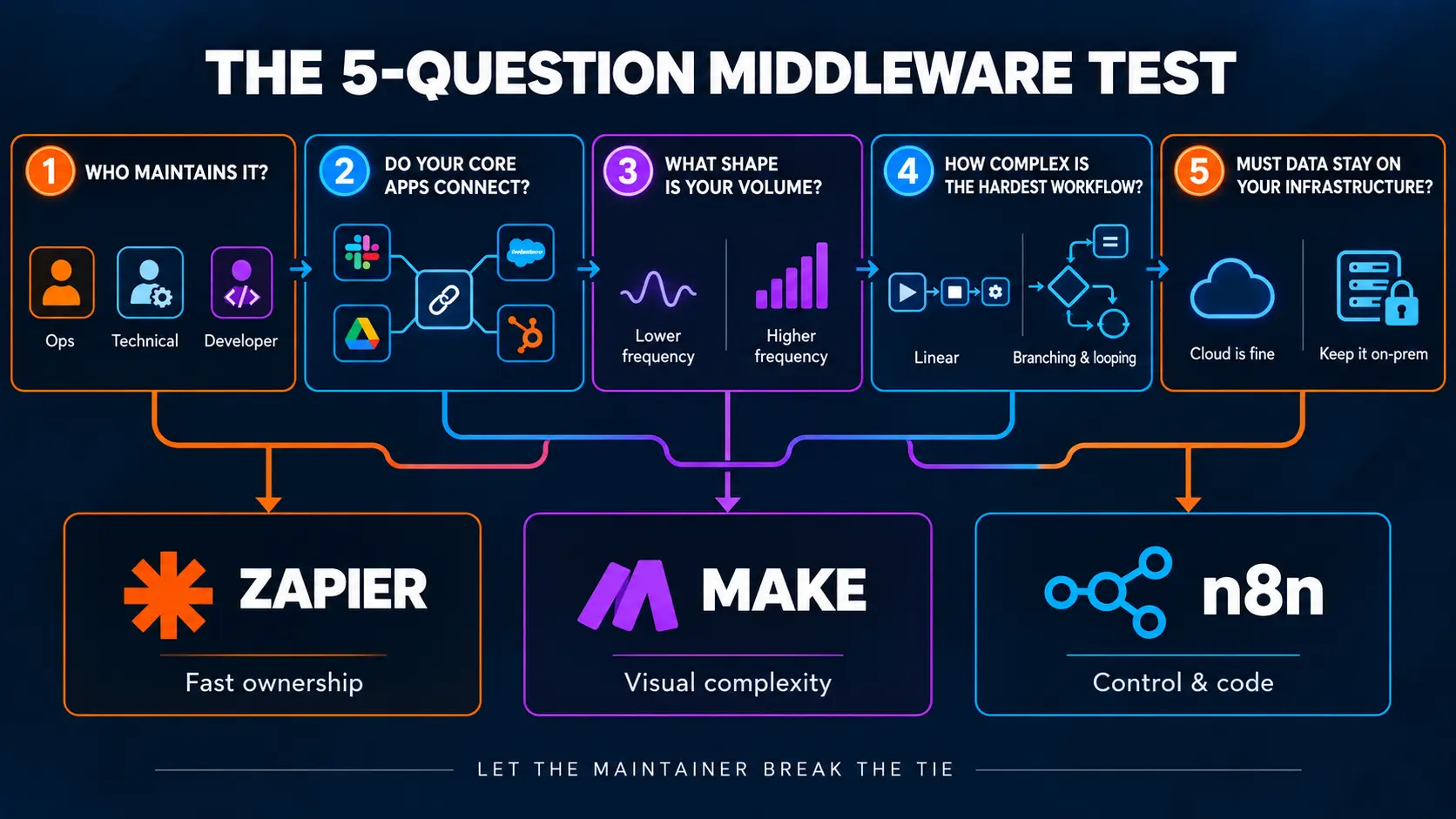
Five questions sort almost every team, in order.
Who maintains workflows in month eighteen? An ops person points to Zapier. A technical operator points to Make. A developer points to n8n. Answer with a name, not a hope.
Do your apps connect natively on each platform? List your ten core tools and check each directory. Missing connectors decide fast, and webhooks cover gaps only when someone can build them.
What shape is your volume? Few workflows with high value tolerate any pricing model. Chatty, high-frequency automation demands the flat-cost shapes.
How complex is the hardest workflow you need? Linear notifications live anywhere. Iteration, aggregation, and multi-branch logic point toward Make or n8n.
Does data need to stay on your infrastructure? A yes shortens the list to one.
Score honestly, and the tool usually picks itself. Ties break toward the maintainer's comfort, every time.
Zapier vs Make vs n8n Pricing Models Compared
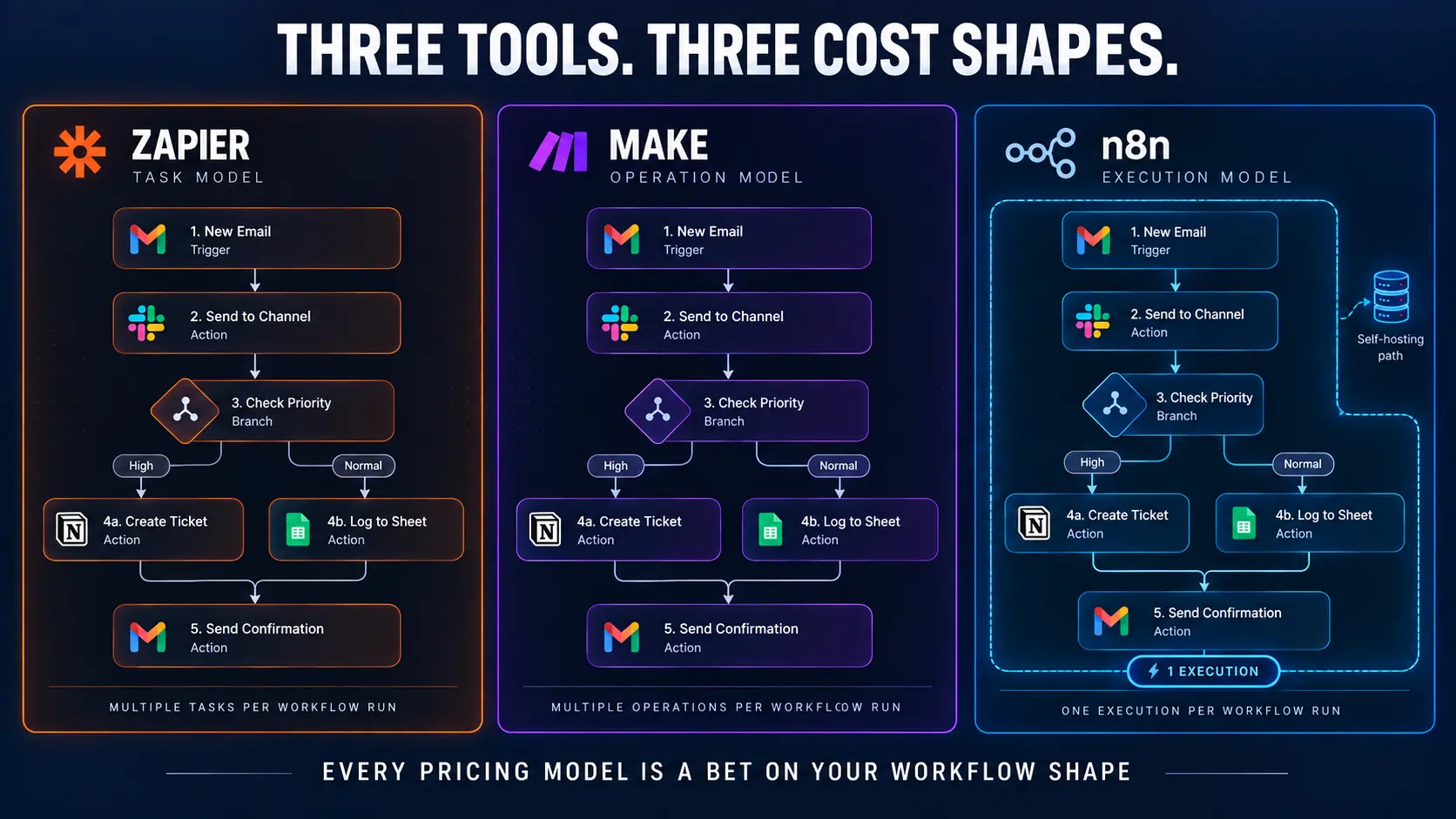
No figures here, because published rates change and your volume decides everything anyway. The models themselves are the durable comparison. One workflow makes the shapes vivid.
A polling sync that checks every five minutes and updates ten records per run: the task meter bills every check and every update. The operation meter bills each module touch. The execution meter bills one run. Same workflow, three very different bills.
The Task Model
Zapier meters tasks: roughly, actions performed. Simple to predict for simple workflows. Expensive for chatty ones, because every step of every run spends. The model rewards lean workflows and taxes polling and loops.
The Operation Model
Make meters operations, a finer-grained unit across scenario modules. Complex scenarios often carry further per dollar, and the same granularity means big iterations spend fast. The model rewards efficient scenario design and punishes brute force.
The Execution and Self-Host Model
n8n cloud meters executions: a workflow run counts once, however many steps inside. Heavy multi-step workflows love this shape. Self-hosting removes the meter entirely and replaces it with infrastructure and maintenance time. The model rewards scale and engineering ownership.
Every pricing model is a bet on your workflow shape. Model your three heaviest workflows against each meter before believing any calculator, including the vendors' own.
Can You Use Zapier and n8n Together? The Multi-Tool Stack
Yes, and mature stacks often do. The pick-one framing is a listicle convention, not an engineering rule.
A common production pattern: n8n or Make carries the heavy, high-volume pipelines where the cost shape and complexity ceiling matter. Zapier carries the long tail: the dozens of light automations touching niche apps only it connects. Each tool does what it is best at, and the stack costs less than forcing either tool to do everything.
The discipline that makes multi-tool work: one inventory of every workflow, wherever it lives, with an owner and an alert on each. Sprawl is a documentation failure, not a tool count. The standards from our hiring guide apply per workflow, per platform.
One routing rule keeps the stack sane. A new workflow lands where its maintainer lives, not where the last workflow went. The ops team's automations stay on the ops team's tool. The pipeline work stays with the engineers. The stack stays maintained because every piece has a natural home.
Switching Costs: Why the Middleware Decision Locks In
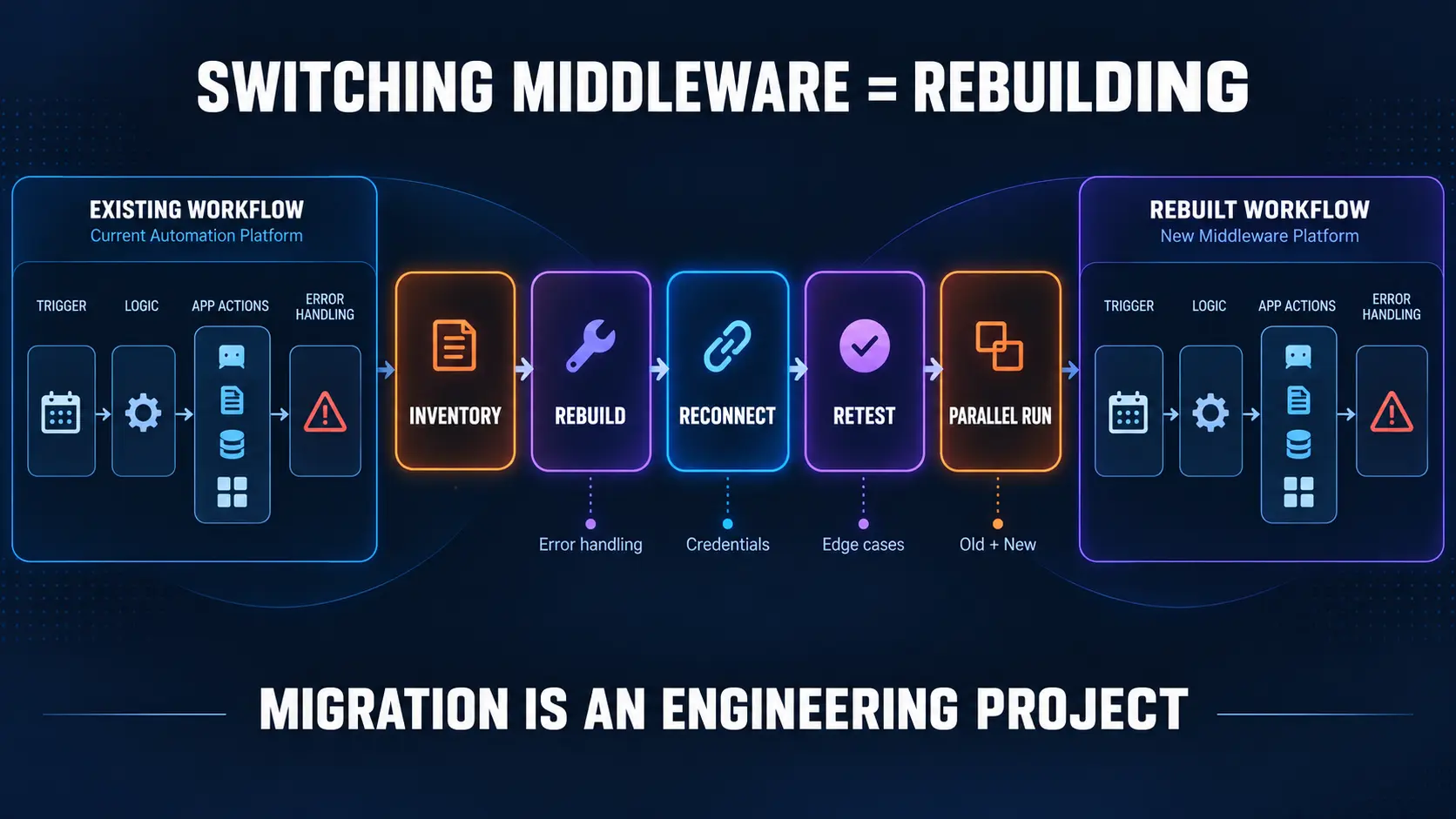
Here is the paragraph the comparison articles skip. Workflows do not export between these tools. A migration is a rebuild: every workflow redesigned, rebuilt, retested on the new platform. Credentials reconnect, edge cases resurface, and the error handling gets rewritten.
That is why the month-eighteen question leads the test. The tool you can afford to leave is the one you never need to. Choose against your team's real skills and your three-year volume trajectory.
Document every workflow from day one, because documentation is what makes any future migration survivable. The dependency thinking from our lock-in guide applies to platforms too, not just consultants. When a migration does happen, parallel running is the safety: old and new side by side per workflow, cutover on proof, never on faith.
When None of the Three Is the Answer
Two honest exits from the comparison.
Native integrations first, always. Your CRM probably syncs to your email platform without any middleware. Configure what you own to its real limits before metering a single task. The rule costs us nothing and saves you plenty.
Custom code at the far end. When one integration carries extreme volume, strict latency, or logic no visual tool expresses cleanly, a small custom service beats middleware gymnastics. That graduation is rare, deliberate, and part of our integration builds practice when it arrives.
Middleware owns the wide middle between those exits, which is most of operator reality.
How ACS Builds on All Three
Tool-agnostic by policy, certified where certification helps. The Zapier badge means audited competence on the platform most clients already run. The Make and n8n builds in our case studies mean the recommendation follows your test answers, not our directory listing.
Fixed fee, after a paid and refundable discovery. Discovery runs the five-question test on your actual stack. It models your three heaviest workflows against all three pricing shapes. It writes the recommendation with reasons, and you keep the analysis either way. Builds ship with the constants: error alerts, a named owner, documentation your team keeps, accounts in your name.
The month-eighteen test applies to us too, because a build your team cannot maintain is a build we did wrong. The workflows land inside sales automation and operations systems alike. Engagement structure sits on pricing: 500+ workflows shipped, more than 10,000 hours reclaimed, over $2 million in client savings.
Frequently Asked Questions About Zapier, Make, and n8n
What is middleware in business automation?
The connective layer moving data between the systems that run your business: CRM to accounting, forms to databases, stores to fulfillment. Zapier, Make, and n8n are the three leading general-purpose options, and the decision between them is the subject of this guide.
Which is best: Zapier, Make, or n8n?
Best for whom. Non-technical teams needing speed: Zapier. Technical operators building complex flows: Make. Engineering teams wanting control and flat costs: n8n. The five-question test in this guide sorts your case in minutes, and any unconditional answer is marketing.
Is n8n better than Zapier?
For engineers at volume, usually. For ops teams without one, usually not. n8n wins on control, code, and cost shape at scale. Zapier wins on coverage, speed, and non-technical ownership. The maintainer decides, not the feature grid.
Is Make cheaper than Zapier?
Often for complex, mid-volume scenarios, because the operation model carries branching and iteration further. Not always, and current published rates change. Model your own three heaviest workflows against both meters. Your shapes answer better than any pricing page.
Is n8n really free?
The self-hosted version has no subscription, and it is not free. Servers, updates, monitoring, and someone's hours are the price. The hosted plan trades that work for a meter. Count the maintenance salary before calling anything free. Free software with an unpaid maintainer is the most expensive tool in the stack.
Can non-developers use n8n?
For simple workflows, yes, and the comfort ceiling arrives sooner than on Zapier. The tool assumes technical instincts around data, APIs, and self-hosting. Non-technical teams choosing n8n should budget for the person who makes it viable.
Can you migrate from Zapier to n8n or Make?
You can rebuild, and rebuilding is what migration means here. Workflows do not export between platforms. Inventory everything, rebuild by priority, run parallel, then cut over. Budget it like the engineering project it is, because that is what it is.
Do these tools handle AI steps?
All three ship AI capabilities and keep adding them, so specifics date fast. The durable rule from our practice: AI drafts and classifies inside workflows, rules route and decide, humans keep judgment. The middleware choice changes none of that division.
Should a small business start with Zapier?
Usually, because speed and ownership beat optimization at small scale. Start where your team can build today. Document from workflow one. Revisit the test when volume or complexity makes the bill or the ceiling visible. Growth funds the graduation.
Ready to Pick Your Nervous System?
Three ways forward.
Run the test yourself. Five questions, your ten core apps, your three heaviest workflows. The answer usually surfaces before the coffee cools.
Read the platform-specific guide. The Zapier experts guide covers getting the most from the coverage leader.
Book a paid discovery. The full test on your stack, all three cost shapes modeled, a written recommendation with reasons, one fixed price. Refundable if the fit is wrong. Details on pricing.
Pick for month eighteen. Document from day one. Let the maintainer win every tie, because the maintainer is who the tool really belongs to.