

We build operations infrastructure with engineering discipline for $10M-$50M operators, and CRM migrations are recurring work inside that. We implement HubSpot and Pipedrive both. We are partnered with neither. Our verified credentials sit with Zapier and Attio, so no license commission shapes what follows.
That neutrality is why this guide covers both directions in one place. Vendor-written migration guides only ever point one way. Real operators move both ways, for reasons worth taking seriously.
The honest verdict
Both migrations are routine engineering work with good tooling on each side. Neither should scare you. The data moves in days. The rebuild and the traps take the weeks.
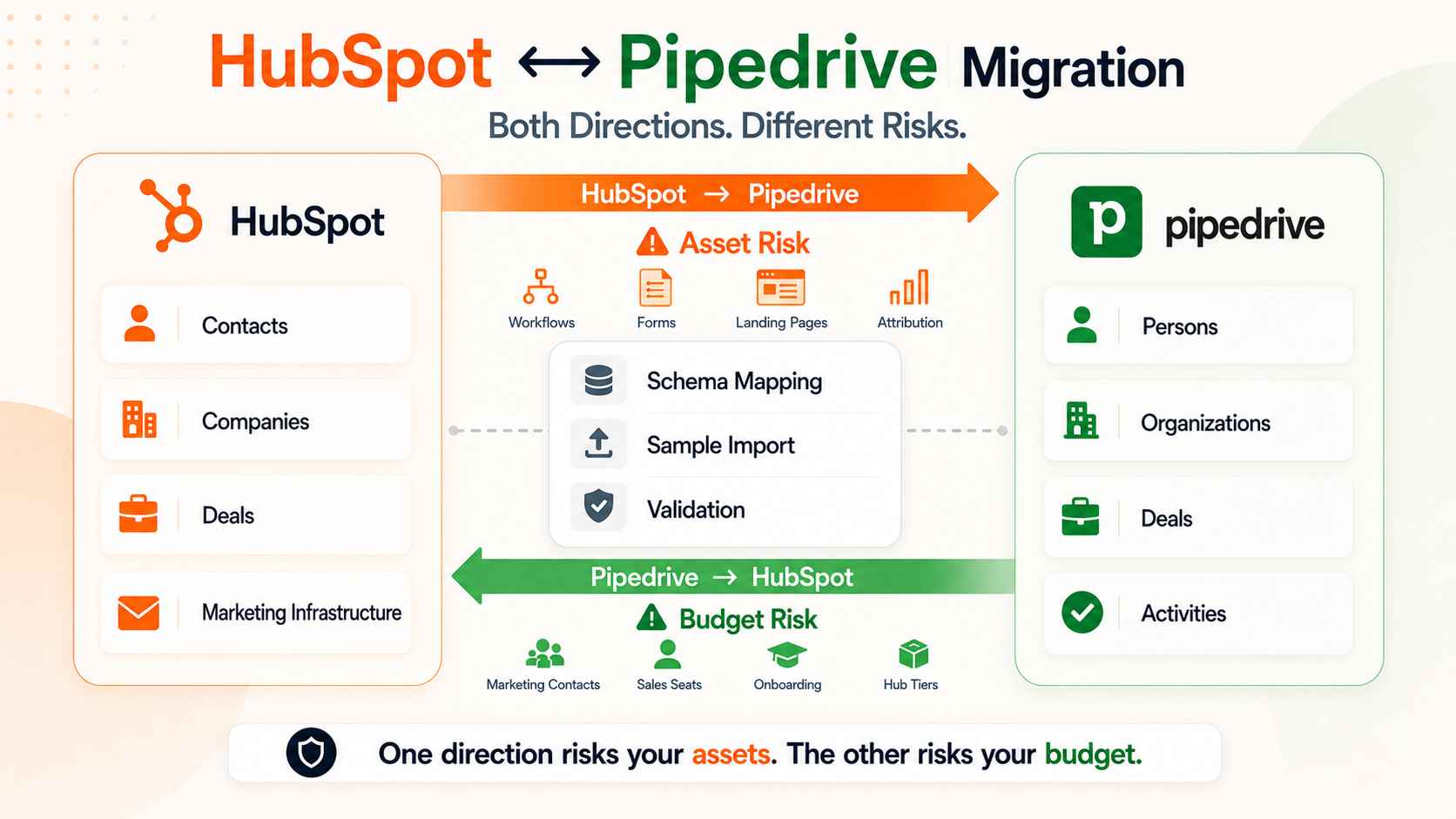
The direction decides the difficulty. Moving from HubSpot to Pipedrive is heavier than it looks, because you are usually leaving marketing infrastructure behind, not just a CRM. Moving from Pipedrive to HubSpot is lighter on data and heavier on contract decisions, because HubSpot's pricing model punishes a careless entry.
Put simply: one direction risks your assets. The other risks your budget. Both risks are manageable. Both are covered below.
Diagnose before you move. Migration direction is a symptom, and the disease is usually cost, adoption, or a capability gap. Name the disease first. Then pick the treatment. If the diagnosis is still open, start with our Pipedrive vs HubSpot comparison and the side-by-side page, then come back.
Which direction are you moving, and why
Signals you should leave HubSpot for Pipedrive
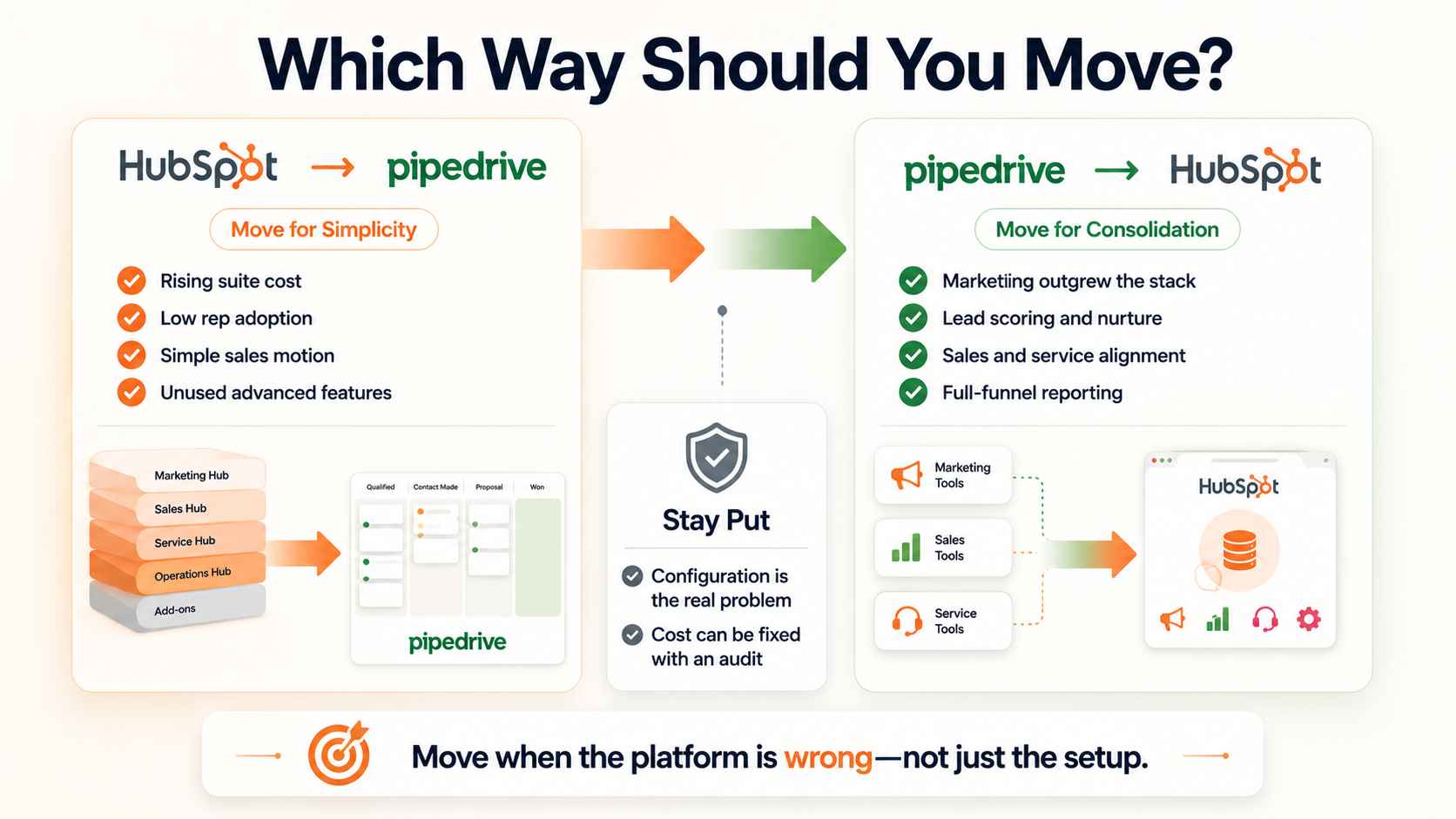
The bill grew faster than the team. Seats, marketing contact tiers, and hub attach compound, and the renewal keys off your peak contact count. Teams paying for a marketing suite their sales motion never touches are the classic case.
Adoption tells the same story from the other side. Reps live in spreadsheets while HubSpot holds stale deals. A simpler pipeline tool your team actually uses beats a suite they avoid. Sales-led operators with straightforward pipelines fit Pipedrive's shape.
The usage audit settles it. List the Professional-tier features actually configured: scoring, sequences, custom reporting, workflows. Teams commonly run a fraction of what the tier includes. Paying suite prices for pipeline-tool usage is the most fixable line item in the stack.
Signals you should leave Pipedrive for HubSpot
Marketing outgrew the stack. You are duct-taping an email tool, a form builder, and a landing page product around Pipedrive, and attribution lives nowhere. HubSpot's suite consolidates that on one database.
Lifecycle complexity is the second signal. When leads need scoring, nurture tracks, and a governed handoff to sales, Pipedrive plus add-ons strains. The suite earns its cost when marketing genuinely drives pipeline.
Service consolidation is the third. Tickets, knowledge base, and support reporting on the same customer record close the loop Pipedrive leaves open. Operators who want funnel reporting from first touch through renewal in one place are describing the suite.
The signal that says stay put
Frustration with configuration is not a migration signal. A badly built HubSpot portal moves its problems to a badly built Pipedrive account. If the schema is the issue, fix the schema. A migration is a chance to fix the schema, not photocopy it, but only when the platform itself is wrong.
Cost alone deserves the same test. A marketing contact prune, a tier review, and a seat audit inside HubSpot can cut the bill without a migration. Run the cheap fix first. Move when the platform, not the configuration, is the mismatch.
The schema translation, both directions
The object map
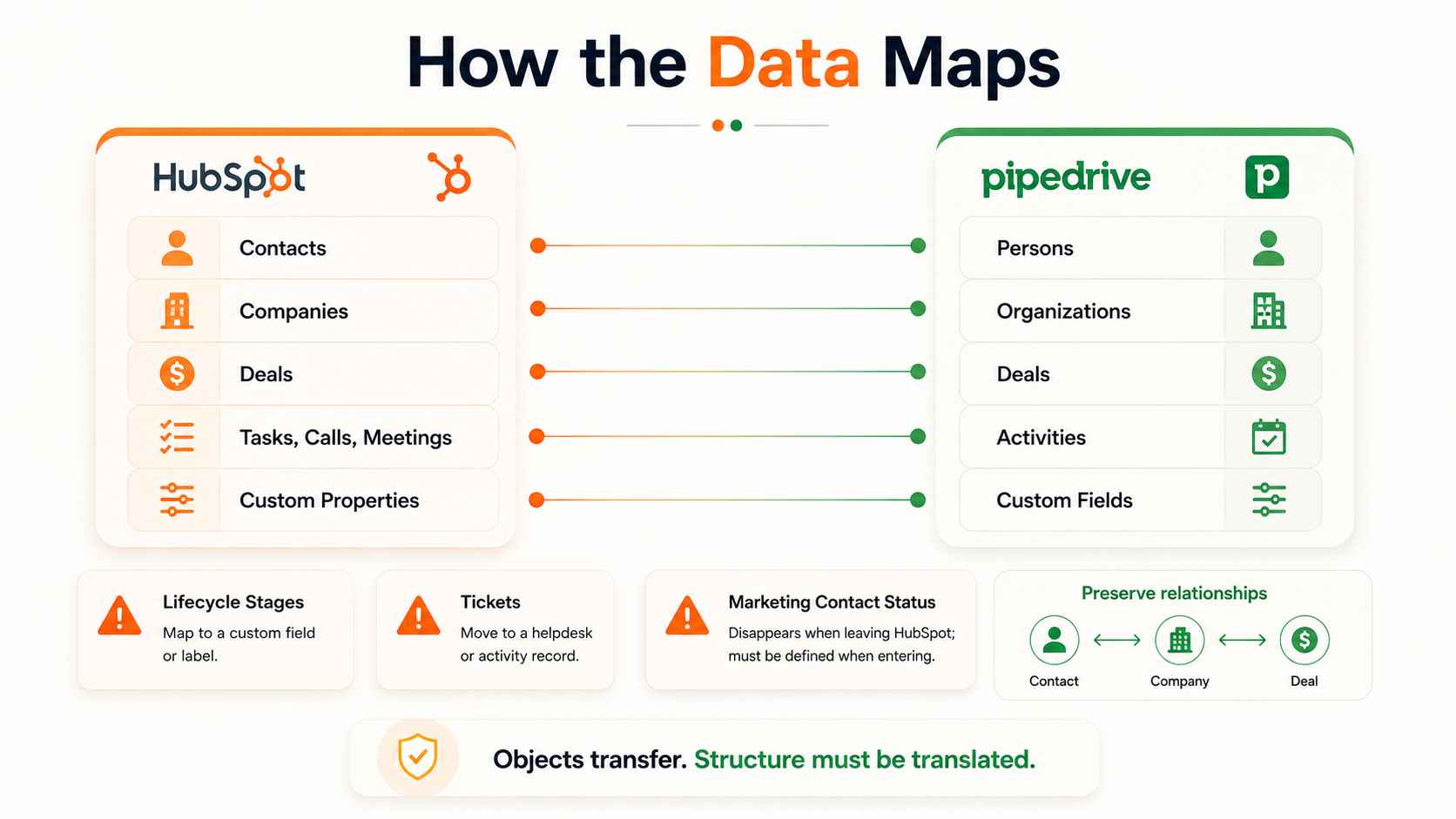
The core objects translate cleanly. HubSpot Contacts become Pipedrive Persons. Companies become Organizations. Deals stay Deals on both sides. Tasks, calls, and meetings on the HubSpot side map to Pipedrive Activities. Notes carry across in both directions, and both platforms hold products with line items, though the price book structures differ enough to check field by field.
Three structures need decisions, not mapping. HubSpot lifecycle stages have no Pipedrive equivalent, so they flatten into a custom field or label. HubSpot Tickets have no native Pipedrive home, so service work routes to a helpdesk tool or activity records. And the marketing contact flag simply disappears on the way out, or gets created on the way in.
What HubSpot to Pipedrive loses
Marketing automation does not travel. Workflows, nurture sequences, and lead scoring get rebuilt or retired, and most should be retired on the evidence of their open rates. Email engagement history stays behind in any meaningful form. Attribution reporting ends at cutover.
Reporting rebuilds too. HubSpot dashboards become Pipedrive Insights reports by hand, and active lists become saved filters. The concepts map. The configurations do not.
Forms, landing pages, and CTAs hosted by HubSpot die with the subscription. Export the assets and stand up replacements before cancellation, not after. Sales data moves in days. Marketing infrastructure moves in weeks, and the weeks belong to this list.
What Pipedrive to HubSpot loses
Less. Persons, Organizations, Deals, notes, and activities import cleanly. Custom fields become properties. Multiple pipelines carry over.
The rebuild list is automations and integrations. Pipedrive automations become HubSpot workflows by hand. Marketplace integrations get re-evaluated, because the HubSpot ecosystem covers different ground. Products and quotes need remapping if you used them. Sequences get rebuilt, not moved, in this direction too.
Watch the small translations. Pipedrive activity types split across HubSpot calls, meetings, and tasks, so map each type deliberately. Labels land as properties or tags depending on the object. Small mismatches here surface later as broken reports.
Replacing HubSpot is a two-tool decision
Searchers typing "replace HubSpot" usually miss this. HubSpot bundles a CRM with a marketing platform. Pipedrive replaces the CRM half only. The marketing half needs its own plan, and there are three honest options.
Move marketing to a dedicated email and automation tool alongside Pipedrive. Lighter cost, two systems to own. Pipedrive's own campaign add-on covers simple sends, and dedicated email platforms cover nurture depth.
Keep Marketing Hub standalone and sync it to Pipedrive. HubSpot ships a native Pipedrive data sync, strongest on contacts, and the marketing-in-HubSpot, sales-in-Pipedrive split is a proven pattern. Our integration guide covers the architecture rules for running two systems on one customer base.
Or conclude the bundle was the point, and stay. Some teams price the two-tool future and renew. That is a legitimate outcome of an honest audit.
One more scope check: if your website or blog runs on HubSpot CMS, replacing HubSpot includes a website migration. That is a third project, not a footnote.
The migration playbook
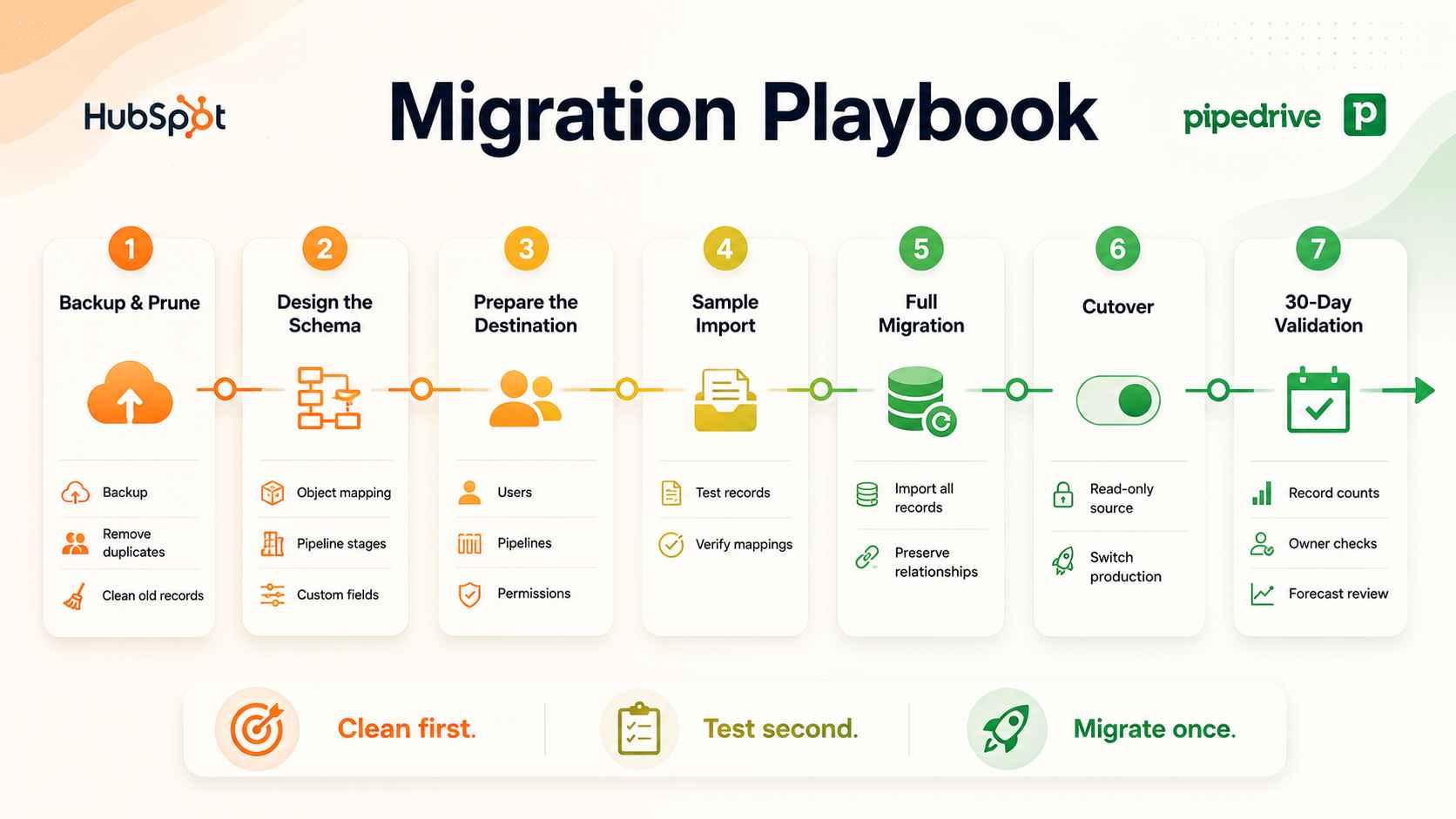
The method matches any CRM move, and the full version lives in our Salesforce to Pipedrive playbook. Here is the shape, compressed.
Prune first with a full backup taken. Dead contacts, duplicate companies, and fields nobody filled stay behind. Design the target schema before touching import tools, with stage exit criteria written down. Map stage probabilities deliberately too, because the two platforms attach different numbers to similar-sounding stages, and unmapped probabilities quietly rewrite the forecast.
Create users, pipelines, and custom fields in the destination before any records land. The rule exists for a reason: records import owned by whoever ran the import unless their real owner already has an account, and reassigning thousands of records after the fact is a week nobody budgeted.
Run a sample. Both directions have real tooling: dedicated migration services like Import2 handle HubSpot and Pipedrive in both directions with sample runs and undo, HubSpot ships native import paths on the way in, and CSV plus API cover the rest. Validate the sample by record counts and spot checks, then run the full load.
Check ten records by hand. Open them. Click the associations. Counts lie less than dashboards, and eyes catch what counts miss. Cut over on a hard date with the old system read-only. Then validate for thirty days: counts, associations, owner assignments, and the first forecast out of the new system.
The association problem deserves its own sentence. CSV exports flatten the links between contacts, companies, and deals, so relationship rebuilding needs matching keys planned in advance. Migration tools that preserve associations earn their fee right there.
Name the validation owner before the load runs. One person signs off on the counts. One person approves the cutover. Shared ownership of a migration means nobody owns the miss. The thirty-day window has a checklist, and the checklist has a name at the top.
Direction-specific traps
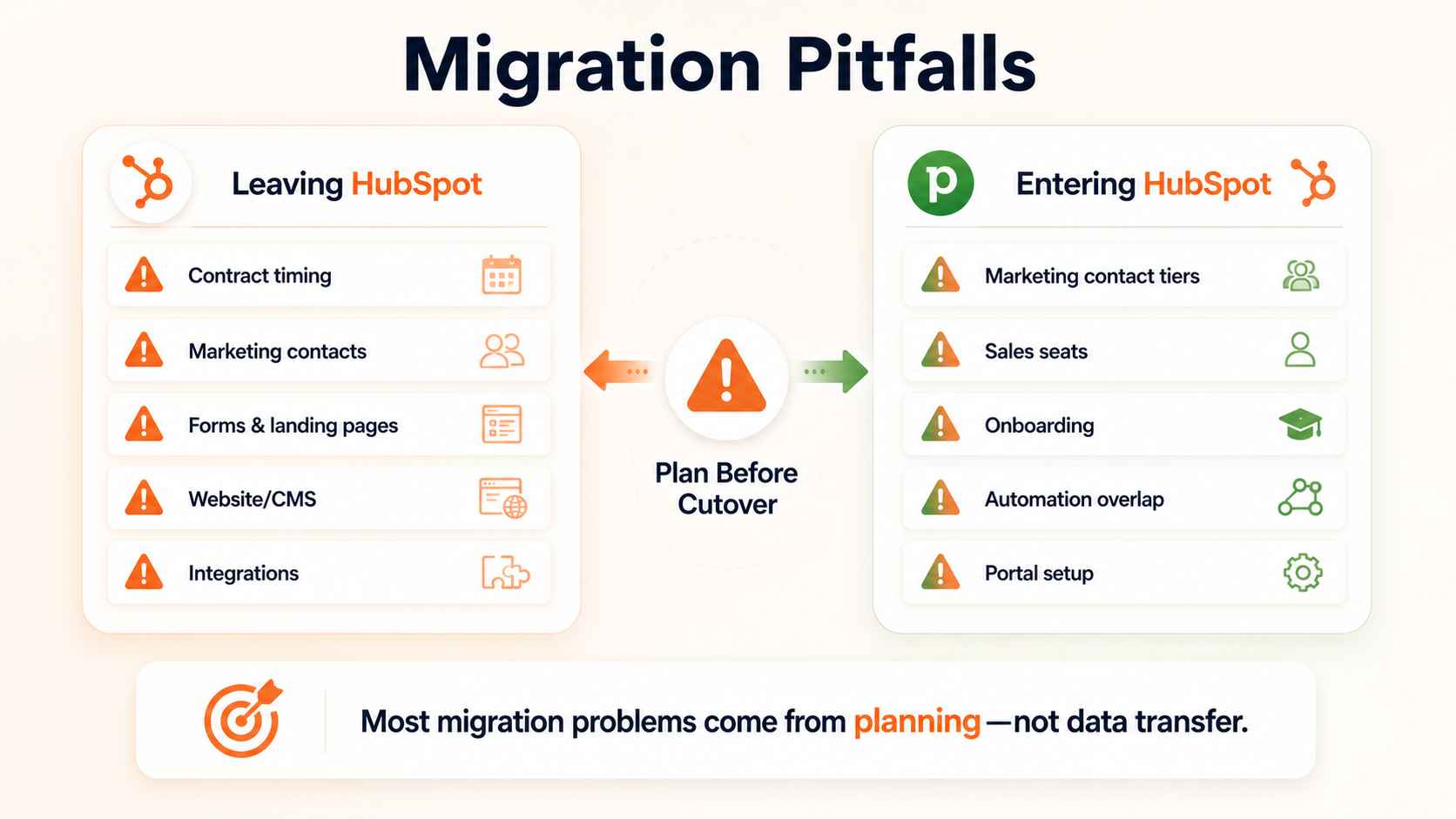
Leaving HubSpot: the checklist
Time the cutover against the contract. HubSpot terms run annual, and a migration finishing two weeks after renewal is a year of paying for an empty portal. Audit the marketing contact count before the final bill, since renewal pricing keys off the peak.
Repoint the integrations too. Zapier connections, form tools, and enrichment feeds all reference the old portal. List them at discovery. Switch them at cutover. An orphaned integration writes to a dead system for months.
Export everything hosted: pages, forms, CTAs, email templates, files. Download the full contact and engagement export even if you will not import it all, because the archive closes with the account. Redirect any HubSpot-hosted pages that carry SEO value before they go dark.
The CMS trap catches teams late. A blog or site on HubSpot CMS needs a new home, a content migration, and a redirect map, and that work starts months before cutover, not weeks. Rankings lost to a rushed site move cost more than the CRM migration itself.
Entering HubSpot: the checklist
Import everyone as non-marketing contacts, then flag the genuinely active segment. Importing your whole database as marketing contacts inflates the tier before you send a single email, and tiers upgrade automatically but never downgrade automatically.
Right-size the seats. Pipedrive seats are cheap enough that everyone gets one. HubSpot Sales Hub seats are not, so buy for the people who work deals, and give view access to the rest. Budget the mandatory onboarding fee on Professional and above, and treat it as guided setup, not process design. Design still belongs to you or your implementation partner.
Silence the old automations at cutover. A Pipedrive automation still firing during the overlap window sends duplicate emails and creates ghost activities. Kill switches go in the runbook.
How ACS runs CRM migrations
Fixed fee, refundable discovery first. We audit the source system, produce the schema map with the loss list in writing, and scope the rebuild. No surprises at cutover because the losses were named at discovery. We run this move in both directions. The direction changes the traps, not the discipline.
Then the build: destination schema first, sample import, validation by counts, full load, hard cutover, thirty-day validation window. Automations get rebuilt deliberately against a kill list, because carrying dead workflows into a clean system defeats the move. Where a hard cutover is too risky, we run a phased transition with a temporary sync between the platforms, expiry date in writing. Everything ships with a runbook your team owns.
The proof: 500+ workflows shipped, more than 10,000 hours reclaimed, over $2 million in client savings across seven industries. Platform detail sits on our Pipedrive and HubSpot pages, credentials on the partners page, engagement structure on pricing, and shipped work in the case studies.
Frequently asked questions
How long does a HubSpot to Pipedrive migration take?
The data lands in days with proper tooling. The full project runs two to four weeks: schema design, sample validation, marketing asset replacement, and the cutover window. Marketing infrastructure, not the CRM data, sets the timeline.
How long does a Pipedrive to HubSpot migration take?
Two to three weeks for most mid-market teams. Data import is the fast part. Workflow rebuilds, portal configuration, and the onboarding process carry the schedule. Add time for marketing contact segmentation before the first send.
Can I migrate from HubSpot to Pipedrive for free?
The import tooling can be free at typical volumes, including CSV and migration services with free tiers. The real cost is labor: schema design, asset replacement, and rebuild time. Free tooling with an unplanned schema is the expensive option.
What happens to my HubSpot workflows in Pipedrive?
They do not transfer. Pipedrive automations get built fresh, and the move is the right moment to audit which workflows earned their existence. Most teams rebuild a fraction of what they had and lose nothing measurable.
Does Pipedrive have lifecycle stages like HubSpot?
Not natively. The common pattern is a custom field or label carrying the equivalent stages, with filters standing in for lifecycle reporting. Teams that live on lifecycle-based marketing reporting should weigh that gap before leaving.
Will I lose my email history moving between them?
Sales email threads reconnect through inbox sync on both platforms. Marketing email engagement history, opens, clicks, and sends, stays behind when leaving HubSpot. Export the reports you need for reference before the account closes.
Should I keep HubSpot Marketing Hub and move sales to Pipedrive?
It is a proven pattern when marketing genuinely uses the suite. The native data sync carries contacts between them, and deal sync needs middleware. Price the two-system future against consolidation before committing. Split stacks need a named owner for the seam.
What does a HubSpot to Pipedrive migration cost?
Cost follows the rebuild, not the record count. Data transfer is cheap. Schema design, marketing asset replacement, and automation rebuilds carry the budget, which is why a usage audit comes first. We price migrations as fixed-fee projects after a refundable discovery.
Who should run the migration, us or a partner?
Small clean databases with simple pipelines are a competent DIY project. Bring a partner when associations, custom objects, marketing assets, or compliance enter the picture. Judge any partner on schema design and a written loss list, not tool access.
Moving between HubSpot and Pipedrive?
Three ways to start.
Book a paid discovery. We audit the source system, map the schema, and put the loss list in writing. Refundable if the move is wrong. See pricing.
Read the sibling playbook. The Salesforce to Pipedrive guide carries the full step-by-step method.
Review the proof. The case studies show shipped migrations for operators like you.
Diagnose first. Prune second. Move once.