

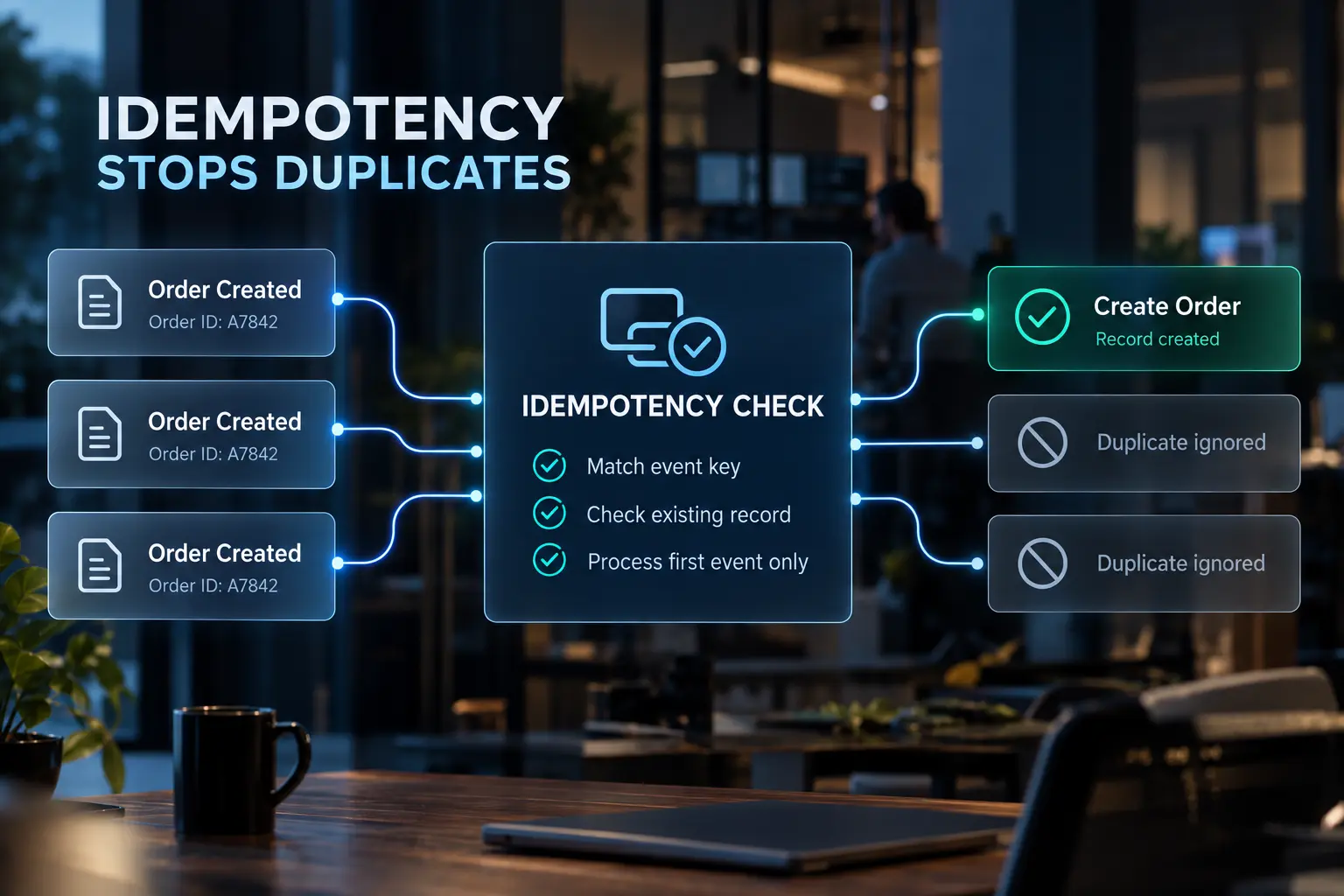
Idempotency is the property that prevents this. An idempotent workflow produces the same result whether it runs once or twenty times. At Automation Consulting Services, every integration build ships with repeat safety written into the specification, because retrofitting it onto a live system costs more than designing it in.
What idempotency means for a business workflow
An idempotent operation produces the same end state after twenty runs as it does after one.
Reading a record is naturally repeat-safe. Fetch the same customer ten times and nothing changes. Creating one is not. A create action runs, a record appears, and running it again produces a second record with no memory of the first.
Webhook senders operate on at-least-once delivery. That guarantees an event arrives. It does not guarantee it arrives once. Repeated events are normal traffic, not a malfunction.
Duplicates are silent. Every step returns success, the run history shows green, and the data degrades underneath.
Five reasons your automation creates duplicates

Duplicate records come from five mechanical causes, and none of them are platform bugs.
The retry that already succeeded: The write landed at the destination. The confirmation did not travel back before the timeout expired. The platform reads that silence as failure and runs the step again.
The event delivered twice: Webhook senders retry when they do not receive a fast acknowledgement. Polling triggers re-read an item when its timestamp shifts or the source reorders results.
The write that never checked: A plain create action carries no awareness of what already exists at the destination. It creates a record every single time it runs.
The match that failed: A search step ran correctly but queried a field that is not unique or not consistently formatted. It found nothing, so the workflow created a second record.
The two workflows that both fired: Separate automations listening to the same trigger, or a manual replay of a run that partially completed before it errored.
Three of these produce duplicates while every step in the workflow reports success. That is why duplicate volume is usually discovered by a sales rep, not by an alert.
The matching key decides everything
A workflow can only prevent duplicates if it knows what makes two records the same record.
Four key types exist. An identifier the source system already supplies, such as an order or submission ID. A field the destination enforces as unique. A composite built from two or more fields. A hash of normalised values.
The problem is that business records rarely arrive with a clean identifier. A company name is formatted three ways across three systems. An email belongs to a person, not to the account. A phone number carries a country code in one system and not the other. Normalisation comes before matching, and skipping it is why correctly built search-then-create steps still duplicate.
Two-tier matching

Match on the strongest available signal first, exactly. Match on the weaker signal second, probabilistically, with a confidence threshold attached. Anything scoring below that threshold routes to a review queue instead of writing automatically.
On a competitor intelligence pipeline enriching 12 to 25 look-alike accounts per closed deal, that structure held the duplicate rate under 2%. Exact matching on email and domain ran first. Fuzzy matching on company name ran second, against records the first tier could not resolve. The build is documented in the enrichment pipeline behind that match rule.
Five patterns that make a workflow repeat-safe
Five design patterns cover nearly every repeat-safety problem in an operations workflow.
Search before you create
Query the destination for the record, update it if it exists, create it only when the search returns nothing. Most platforms expose this as a create-or-update action in a single step. Its limit is the matching key. A search-first pattern built on a weak key still duplicates.
A key that travels with the request
An idempotency key is a token derived from stable data and sent with the request. The receiving system recognises the repeat and returns the original result rather than processing again. One rule breaks it: generating a fresh identifier on each retry defeats the entire mechanism. The key must be deterministic.
A uniqueness rule at the destination
A unique constraint on email, external reference, or order number rejects the second write at the database. This is the only guard that holds when two runs race each other, because it does not depend on timing.
Write the difference, not the whole set
For recurring syncs, compare current state against last known state and write only what changed. An hourly sync across 5,500 SKUs pulling live availability from multiple supplier portals runs on this pattern, described in the multi-supplier lead time build.
A ledger of what you already processed
A small table recording every event key handled, checked before any write. Useful when the destination offers no search action and no unique constraint.
Layer them. A single guard fails at the edges.
Which pattern fits your destination
When the destination supports create-or-update on a unique field, search before you create. That holds regardless of what a duplicate would cost.
When the destination accepts a key on the request and a duplicate would cost money or a customer-visible action, use a key that travels with the request.
When the destination enforces a uniqueness rule, rely on that rule plus one guard above it, whatever a duplicate would cost.
When the destination supports none of the above and a duplicate only costs reporting accuracy, a processed-event ledger is enough on its own.
When the destination supports none of the above and a duplicate would cost money or reputation, add a review queue on top of the ledger.
When the workflow receives a full set on a schedule, write the difference rather than the whole set, regardless of cost.
The duplicates your customers can see
A duplicate record reaches a report. A duplicate email reaches a customer.
Ranked by cost, the expensive surfaces are outbound: a second outreach sequence to a live prospect, a quote issued twice at different numbers, an invoice issued twice, a work order dispatching two crews to one site, an approval request routed twice to the same executive.
Order the workflow accordingly. Irreversible actions go last, because every step before them can be retried safely and they cannot. Most coverage of this subject stops at CRM contacts, and CRM contacts are the cheapest duplicates you will ever create.
How to test a workflow for repeat safety
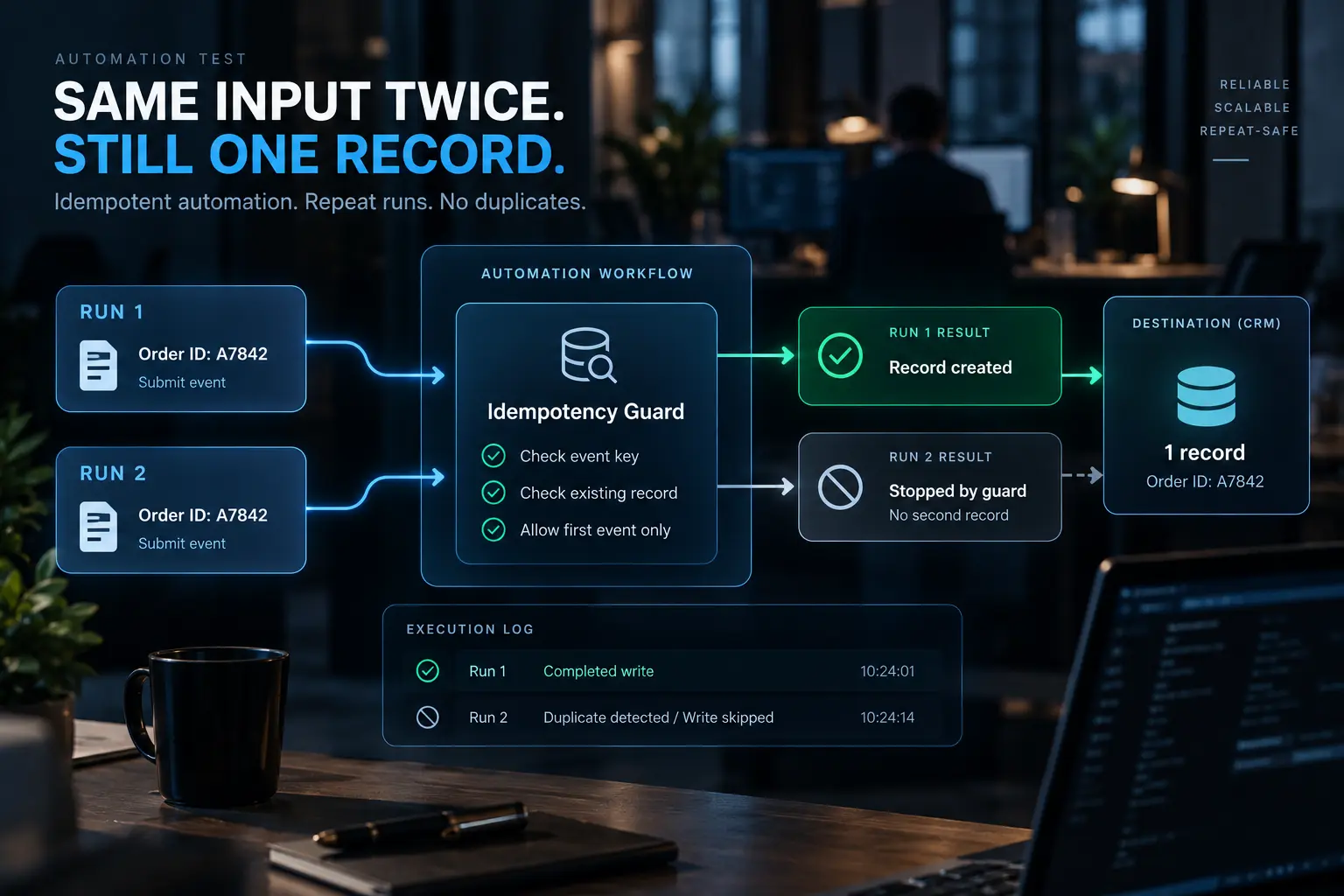
Run the workflow twice against the same input and count the records.
Take one real input and push it through the workflow twice.
Count records at the destination. One record passes. Two records fail.
Replay a completed historical run and count again.
Open the execution log and confirm the second run stopped at the guard rather than completing the write.
Step four matters most. A workflow can produce one record by accident and still have no guard in it. A workflow you have never run twice on purpose is a workflow you have not tested.
When deduplication destroys a real record
An over-aggressive matching rule merges two genuine customers into one.
Two companies with similar names in the same industry get collapsed into a single account. Two divisions of one parent, each with its own budget and buyer, get merged. A contact who changed employers gets absorbed back into their previous account, and their new company disappears from the pipeline.
The asymmetry is what matters. A duplicate is visible, annoying, and reversible. A bad merge is often unrecoverable, because the merge destroyed the field values that proved the two records were different in the first place.
Two guards prevent it. Set a confidence threshold on probabilistic matching and tune it deliberately rather than accepting a default. Route everything below that threshold to a human review queue.
Matching too loosely is not the cautious direction. It is the expensive one.
What to check once the fix is live
Preventing new duplicates does not remove the ones already created.
Sort the destination by the same key the workflow now matches on and count exact and near matches. Clean up after prevention is in place, never before, because cleaning a table that is still receiving duplicates is unbounded work.
Then track three numbers. How often the guard blocks a repeat. How many duplicates still reach the destination. How many records land in the review queue. A blocked-repeat count of zero usually means the guard is not running, not that duplicates stopped.
Getting repeat safety into your workflows
Repeat safety is a design decision made before the first workflow ships. Every workflow we build carries a written specification naming its trigger, its failure modes, and its rollback path, plus a runbook the operator keeps.
If your CRM is filling with copies and nobody can point to which step created them, a paid discovery audit maps the workflow estate, identifies where duplicates enter, and returns a ranked bottleneck list with a fixed-fee scope to fix it.
Frequently asked questions
What is the best way to prevent duplicate records in an automation?
Use a create-or-update action keyed on a genuinely unique field rather than a plain create action. Where the destination supports a uniqueness constraint, add that as well. The two together handle both ordinary repeats and simultaneous runs.
Is deduplication the same as idempotency?
They are related but distinct. Deduplication discards repeated events. Idempotency makes a repeated operation harmless, so running it again produces the same end state. Most production workflows use both.
What is the purpose of an idempotency key?
The key lets a receiving system recognise that a request it already processed has arrived again, so it returns the original result instead of performing the action twice. It must be derived from stable data, not generated fresh on each attempt.
Where do duplicates come from in a multi-step workflow when one step fails?
When a platform retries the workflow from the beginning rather than from the failed step, every earlier step runs a second time. If step one created a record and step three failed, the retry creates a second record. Each step with a side effect needs its own guard.