

We build operations infrastructure with engineering discipline for $10M-$50M operators. Sales automation is one of our four service surfaces, so this definitional question crosses our desk weekly, usually wearing a stack decision underneath it.
We are a Zapier Certified Solutions Partner and an Attio Expert Partner, with no partnership on any CRM vendor named below. The definitions here come from building the systems, not selling the licenses.
What is the difference between sales force automation and CRM?
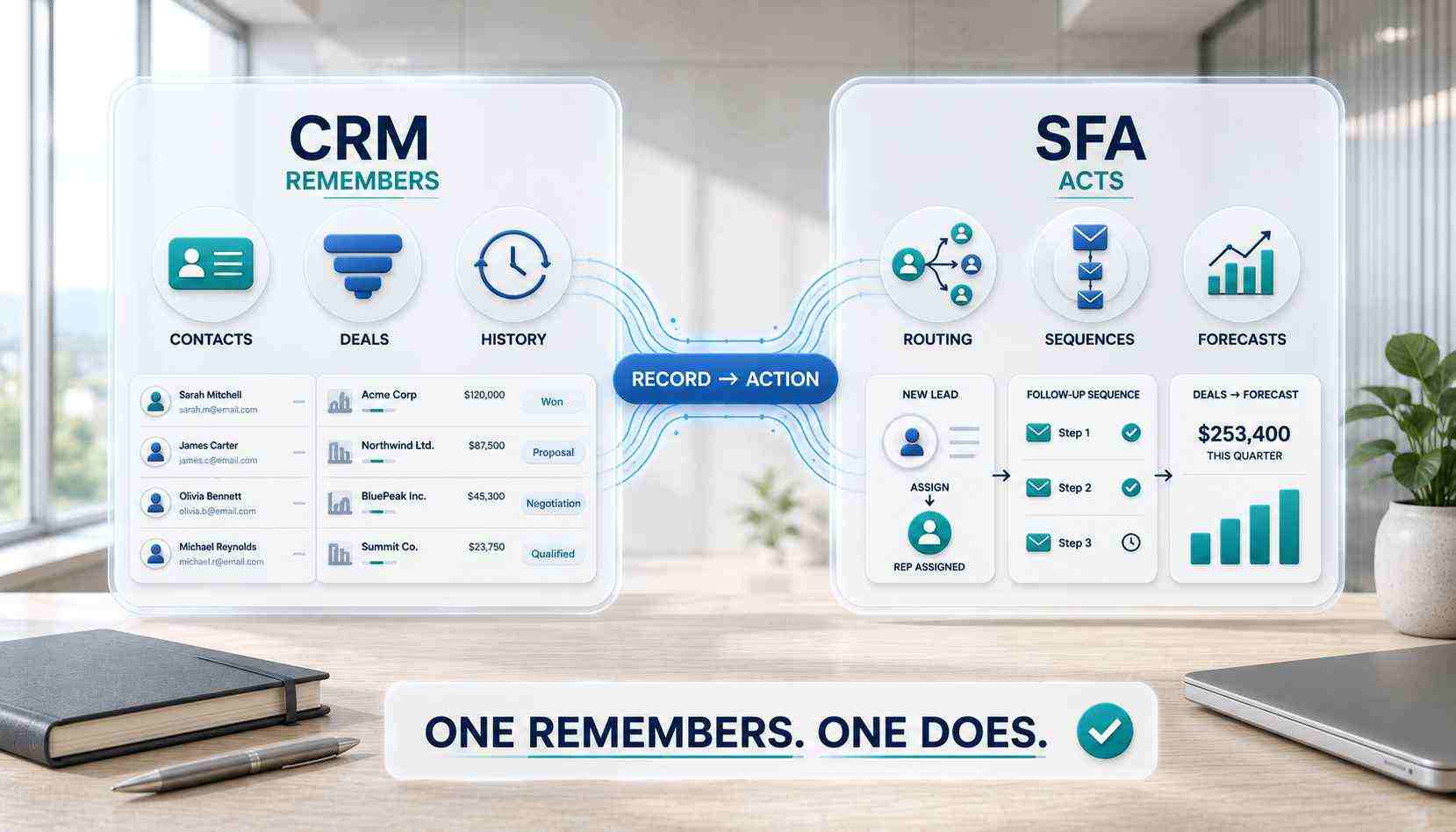
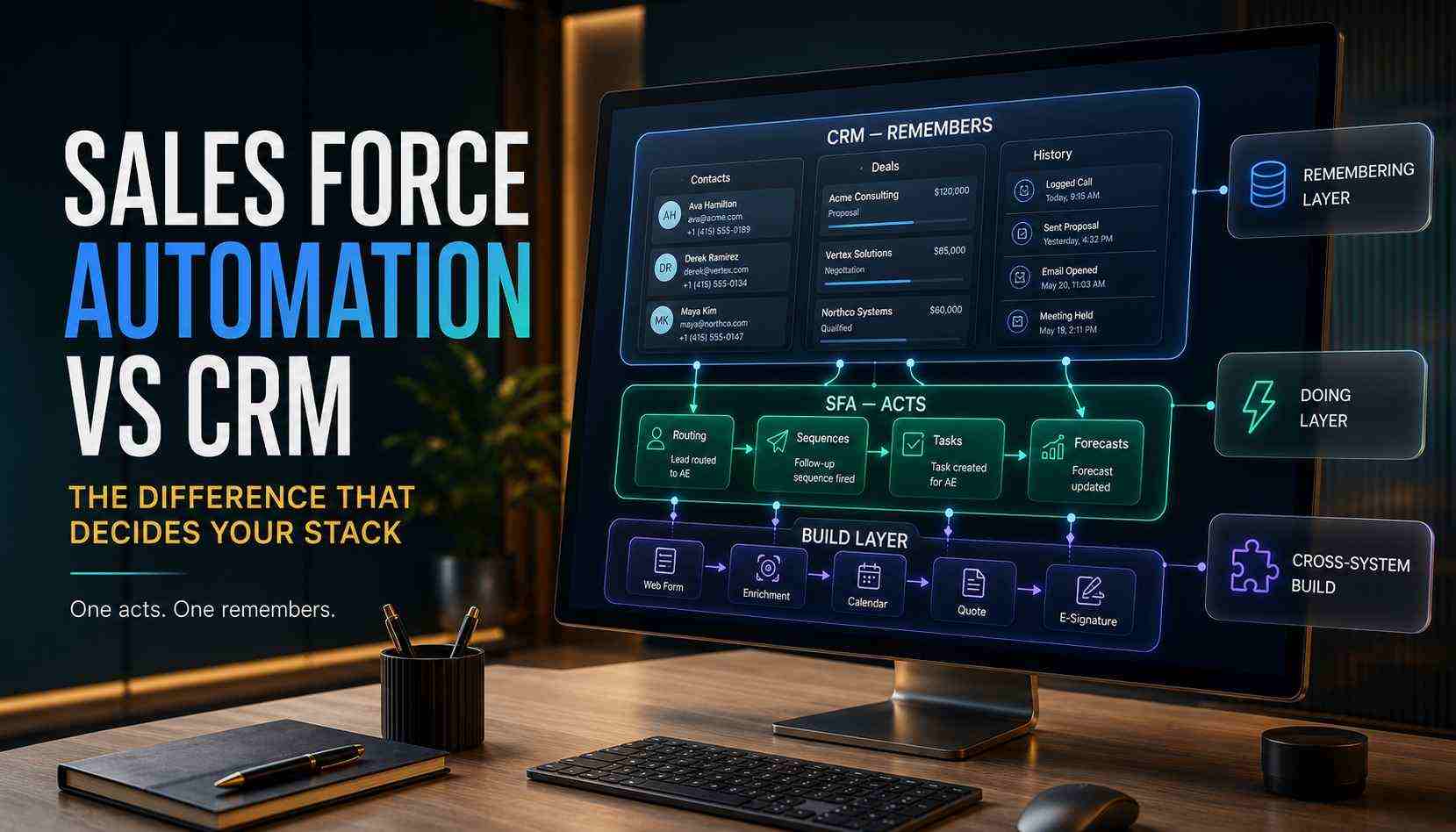
Sales force automation automates the actions of selling. CRM stores the relationships behind the selling. SFA handles routing, task creation, follow-up sequences, activity logging, and forecasting rollups. CRM handles the contact records, company records, deal history, and everything the team must remember about a customer.
One does. One remembers. That is the difference in six words.
The stakes hide in the purchase decision. Teams buy a new remembering layer when the doing layer is what leaks. The new CRM arrives, the same leads sit unrouted, and the invoice bought nothing. Naming the layer first prevents the most expensive mistake in sales software.
The trick is that the boundary stopped being a product boundary years ago. Modern CRMs ship with SFA built in, so you cannot buy one shelf against the other anymore. What you can do is understand the layers, find where your sales motion actually leaks, and fix that layer specifically. This guide gives you the map.
What is sales force automation?
Sales force automation is software that performs the repetitive mechanics of a sales process automatically: assigning leads, scheduling follow-ups, logging activity, moving deals through stages, and rolling numbers into forecasts. The goal is a rep who spends the day selling instead of administering the selling.
The category is old, and the age explains the confusion.
Where the term came from
SFA predates CRM. Early sales software in the late 1980s and 1990s automated the rep's task list: contacts, calendars, call logging, pipeline tracking. The industry called it sales force automation. CRM arrived later as the bigger idea, absorbing SFA and adding service, marketing, and the full customer view around it.
So SFA became a feature family inside CRM rather than a rival category. The comparison articles kept getting written anyway. That is why the question feels confusing: you are comparing a layer against the platform that contains it.
The pattern keeps repeating too. Mobile absorbed into CRM. Then analytics. Now AI agents. Each wave starts as a separate category and ends as a layer. The layer model outlives every product cycle.
Sales force automation vs Salesforce: the name collision
One more tangle needs cutting. Salesforce is a company that sells a CRM platform. Sales force automation is a generic software category that predates that company. The name overlap is historical, not accidental, and it wrecks half the search results on this topic.
So when someone asks "CRM or Salesforce, which is better," the question mixes a category with a brand. The honest answer: Salesforce is one CRM among several, every one of them containing SFA features. Our platform comparisons cover those choices, including Pipedrive vs Salesforce and HubSpot vs Salesforce. This guide covers the layers underneath all of them.
The collision has a practical cost. Half the research on this topic silently switches subjects mid-article, from the category to the company. Watch for the switch. It explains most of the contradictory advice you have read.
The three layers of a modern sales stack
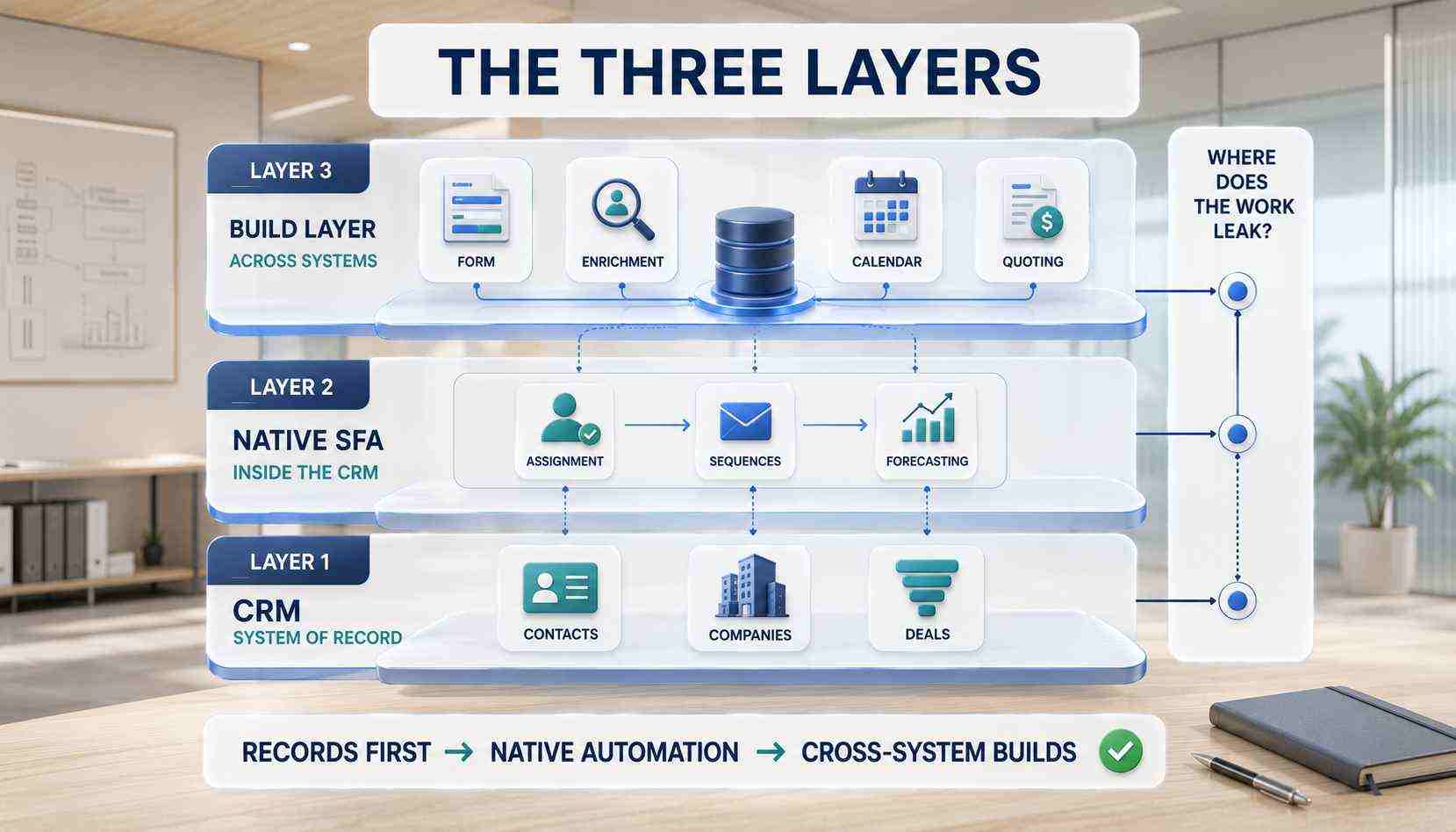
Here is the model that replaces the outdated SFA-versus-CRM debate. Every working sales stack has three layers, and each layer fails differently.
Layer one: the CRM as system of record
The foundation. Contacts, companies, deals, and the history connecting them. One place where the truth about every customer lives.
This layer fails through neglect, not absence. Duplicate records. Stale deals. Fields nobody fills. Most CRMs become glorified spreadsheets within twelve months when the schema gets improvised, and no automation above can fix a record layer nobody trusts. Our CRM guides cover choosing and building this layer properly.
What good looks like is specific. One pipeline per motion, with stages defined in writing. Dedup rules enforced on email and domain. Every field earning its place with a report that reads it. Platforms like Pipedrive make this layer fast to build well. No platform makes it survive neglect.
Layer two: native SFA inside the CRM
Every modern CRM ships automation for its own data. This is where classic SFA lives today.
Assignment and routing rules
New lead arrives, rules assign it: by territory, by round robin, by deal size. Native routing handles the simple cases well. It stops at the CRM's walls. Route on data from an outside enrichment source, and you just left layer two.
Sequences and follow-up automation
Email sequences, task reminders, and activity prompts that keep every deal touched on schedule. The features that turn "follow up with everyone" from a memory exercise into a system. Audit what your license already includes before buying anything. Unconfigured features are the cheapest capacity in your stack.
Pipeline and forecasting automation
Stage-based triggers, rotting-deal flags, probability rollups, and forecast reports that build themselves. Useful exactly as far as the stage data is honest. Pipeline stages without exit criteria become forecasting fiction, in every CRM, at every price. Write one sentence per stage defining what earns entry. That sentence is the whole fix.
Layer three: the build layer across systems
The layer no CRM ships, because it lives between systems. Lead routing that starts at the website form, checks enrichment data, and lands in the CRM already assigned. Quote generation pulling from pricing rules and product data. Competitor intelligence feeding rep briefings. Outreach systems coordinating across email, CRM, and calendar.
Where native automation ends
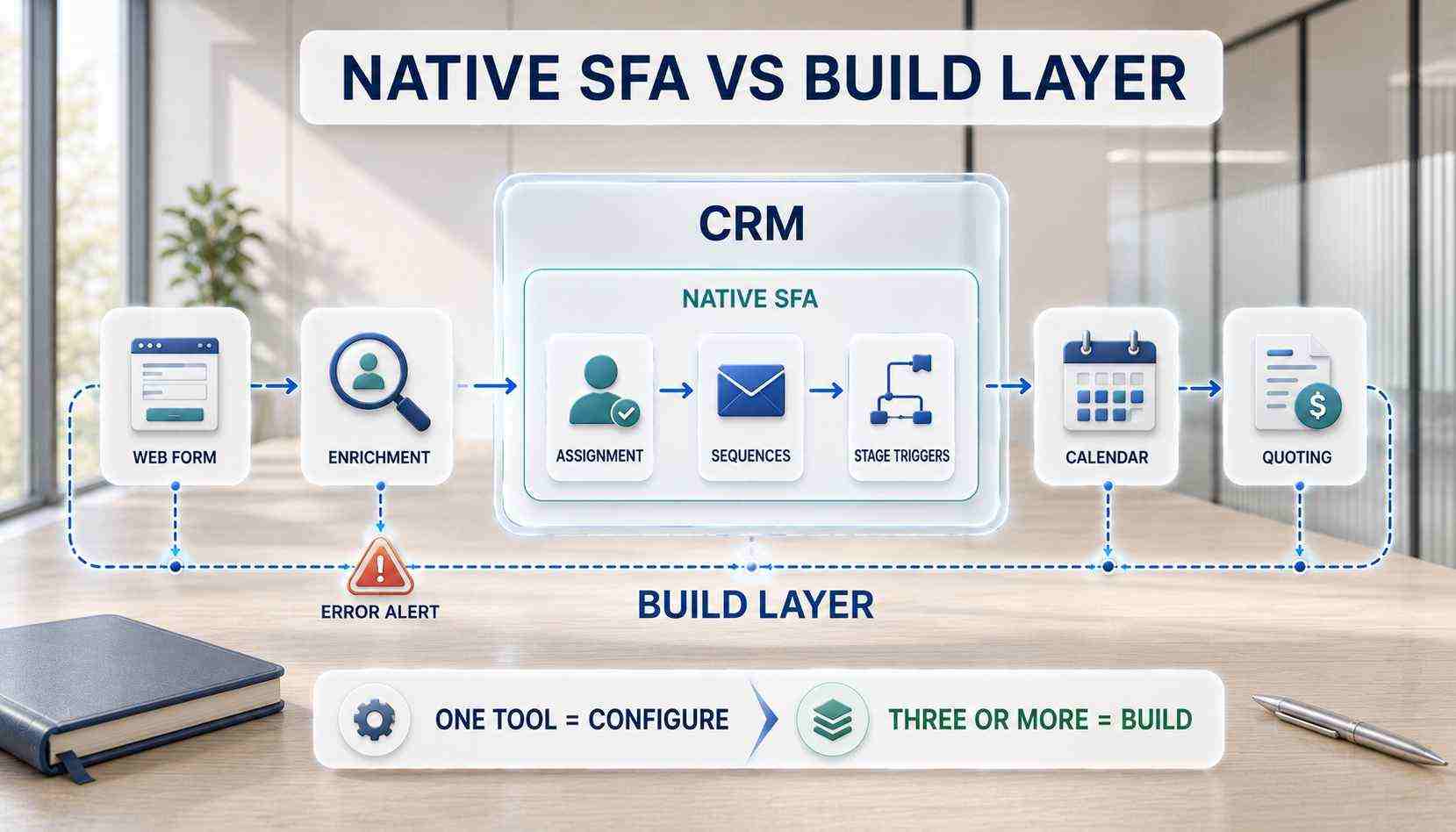
Native SFA automates inside one tool. The build layer automates across your stack: forms, enrichment sources, CRM, quoting, e-signature, billing, dashboards. Different discipline, different engineering, different failure modes. Count the tools in one workflow. Three or more, and you are in layer three by definition.
What the build layer requires
Error handling, because cross-system workflows fail silently. Documentation, because they outlive their builder. A named owner, because every automation gets an owner and an alert. And a metric, because a routing build gets judged in minutes to first touch, not in demo applause. This layer is precisely our sales automation practice, and the engineering standards behind it are the same ones in our consultant hiring guide.
Benefits of sales force automation
The benefits are measurable or they are marketing. Four numbers move when SFA is built well, across whichever layer carries it. Each one converts to money with arithmetic your CFO already accepts.
Speed to first touch drops to minutes. In referral and inbound motions, the first responder wins a measurable share of deals, and routing automation is the whole difference.
Picture the before and after. Before: a form fill waits in a shared inbox until Monday. After: routed, enriched, and assigned in ninety seconds, with the rep notified. Same lead. Different outcome. That gap repeats on every inquiry, every week.
Data completeness rises without nagging. Automatic logging and enrichment fill the records reps skip. Field completeness and stage currency are the honest adoption metrics, and automation moves both.
Forecast trust improves. When stages carry exit criteria and rollups build themselves, the Monday forecast stops being a debate. Trusted numbers change how a company plans.
Selling hours return. Administrative time per rep drops, and the hours go back into conversations. Across our client base, that arithmetic contributed to more than 10,000 hours reclaimed and over $2 million in savings, documented in the case studies.
Measure before building, or the benefits stay theoretical. Baseline the four numbers for two weeks. Minutes to first touch. Field completeness. Forecast variance. Admin hours per rep. Then automate, and let the deltas make the case in your own data.
SFA vs CRM vs marketing automation: the boundary map
One more boundary completes the picture, because the confusion has a third participant.
Marketing automation works the audience before the handoff: campaigns, nurture, scoring, landing pages. SFA works the pipeline after the handoff: routing, sequences, stages, forecasts. CRM holds the record underneath both.
The seams between them matter more than the labels. The marketing-to-sales handoff needs one written definition of a qualified lead. The data needs one system of record per object. Companies that define the seams stop caring which label a feature wears, because the workflow runs regardless.
Revenue operations is the modern name for owning all three at once. RevOps teams manage the record layer, the automation layers, and the seams as one system. Same layers, newer title, identical engineering underneath.
Which layer is your bottleneck?
The stack decision gets easy once you name the leaking layer. Three symptoms, three diagnoses.
Reps cannot find or trust customer information: layer one problem. Fix the record system before automating anything. A CRM rebuild or migration beats any workflow built on bad records.
Deals slip because follow-up depends on memory: layer two problem. Configure the native SFA you already own. Sequences, reminders, and rotting flags are usually sitting unconfigured in your current license.
Work stalls between systems, with re-keying, slow quotes, and leads arriving unassigned: layer three problem. That needs a build, not a feature toggle. Cross-system automation is engineering work with error handling and documentation attached.
Most operators guess wrong here, usually buying a new CRM for a layer-three problem. The diagnosis is cheaper than the mistake. Our automation consultant overview explains the mapping work that produces it.
When symptoms span layers, fix bottom up. Records first, native features second, builds third. Automation stacked on a broken layer inherits the break and hides it deeper.
One diagnostic session settles it in practice. Walk one lead from arrival to close, on a whiteboard, with timestamps. Every delay point belongs to exactly one layer. The longest delay names your project.
How ACS builds the automation layer
We work all three layers, in order. Record layer first when the schema needs fixing, native SFA configured to its actual limits, and the build layer engineered across the stack with error alerting and a runbook.
Sometimes discovery finds that configuration is the whole answer. We say so, invoice the discovery, and send you back to features you already own. A build sold where a toggle sufficed is the industry's oldest overcharge, and refusing it is cheaper for everyone.
Fixed fee, after a paid and refundable discovery that maps your sales motion and names the leaking layer in writing. The sales automation page carries the service detail, pricing carries the engagement structure, and the case studies carry the proof: 500+ workflows shipped across seven industries.
Frequently asked questions
What is the difference between CRM and sales force automation?
CRM stores customer relationships: contacts, companies, deals, history. Sales force automation performs sales actions: routing, sequences, reminders, forecasting. Modern CRMs include SFA as a built-in layer, so the practical question is which layer of your stack leaks, not which product to buy.
Which is better, CRM or Salesforce?
The question mixes a category with a brand. Salesforce is one CRM platform among several, all containing sales force automation features. Pick the CRM by fit: data model, motion, and cost structure. Our platform comparisons walk each matchup honestly.
What is sales force automation in CRM?
The feature family that automates selling mechanics inside the platform: lead assignment rules, follow-up sequences, task automation, stage triggers, and forecast rollups. Most teams own more of it than they have configured. Configuration is the cheapest upgrade in sales software, and a license audit takes an afternoon.
What is the difference between CRM and automation generally?
CRM is a system of record. Automation is behavior across systems: triggers, rules, actions, alerts. Some automation lives inside the CRM natively. The rest gets built across tools, which is a different discipline with engineering standards attached. The record remembers. The automation acts. Healthy stacks need both layers trustworthy.
Is sales force automation still a product you can buy?
Not as a standalone category. SFA merged into CRM platforms decades ago. What you buy today is a CRM with native SFA, plus custom automation built across your stack where the native layer ends. The layers replaced the product.
Do I need sales force automation if I already have a CRM?
You already own layer two. The real questions: is it configured, and does your bottleneck live inside the CRM or between systems? Configure native features first. Build across systems when the leak is cross-tool. Diagnose before buying anything.
What are examples of sales force automation?
Round-robin lead assignment. A five-touch follow-up sequence firing on schedule. Deals flagged after ten idle days. A form fill routed, enriched, and assigned in under a minute. Forecast rollups built nightly. Small mechanics, compounding daily.
What is the difference between sales force automation and revenue operations?
SFA is a feature layer. Revenue operations is the function that owns the whole stack: records, native automation, cross-system builds, and the seams between marketing, sales, and service. RevOps runs the layers. SFA is one of them.
Does a small sales team need SFA?
At small scale, native CRM features usually cover it: reminders, simple routing, one clean pipeline. The build layer earns its cost when volume grows, systems multiply, or speed to lead starts deciding deals. Let the bottleneck justify the build, and let the baseline numbers date the decision.
Ready to name your leaking layer?
Three ways to move.
Book a paid discovery. We map the sales motion, name the layer, and scope the fix at one fixed price. Refundable if we are the wrong fit. See pricing.
Read the service detail. The sales automation page covers the build layer end to end.
Review the proof. The case studies show shipped sales systems with the reclaimed hours counted.
One layer always leaks. Find it. Fix that one.