
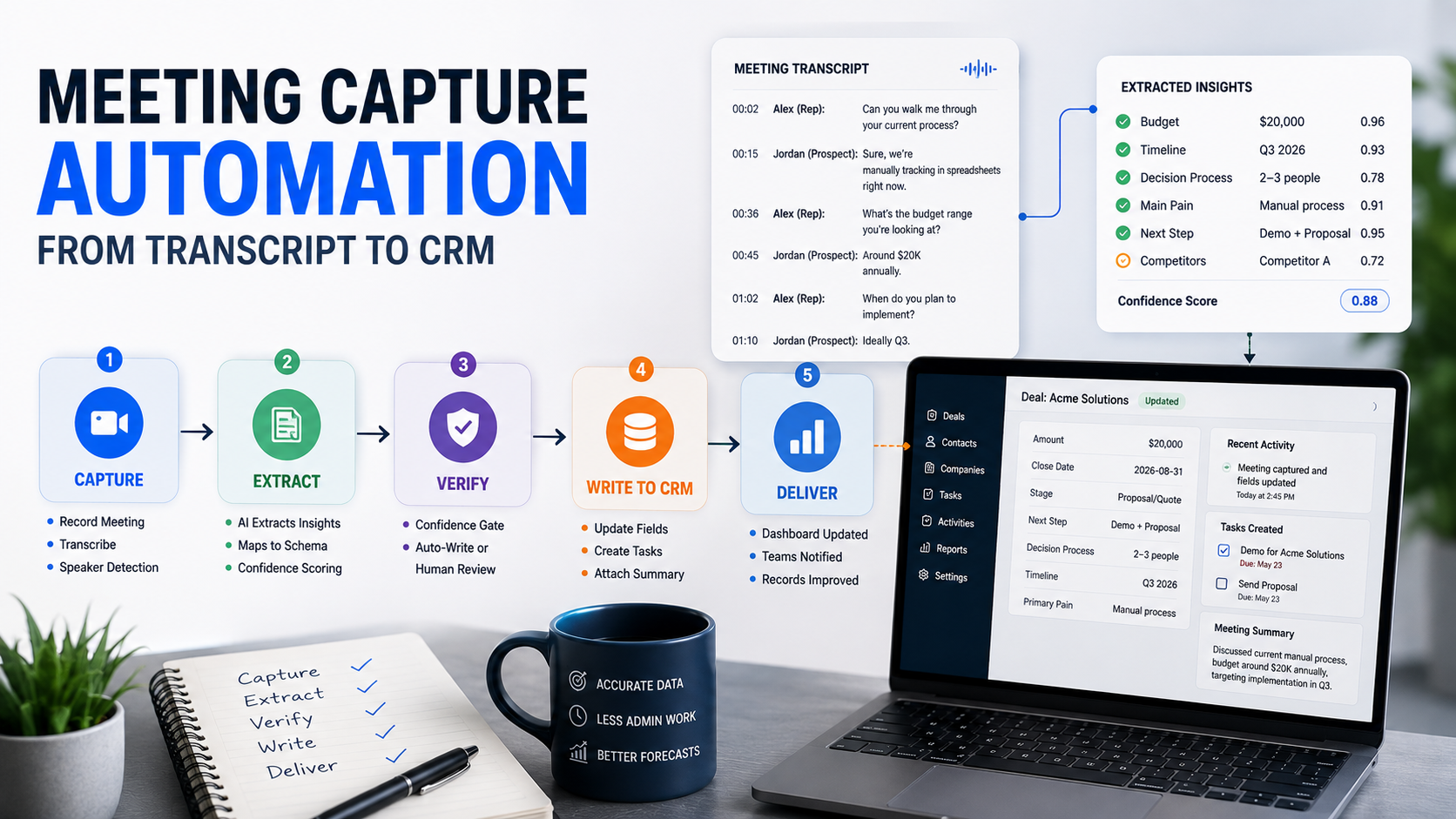
Here is the paradox of 2026: every meeting gets recorded, transcribed, and summarized, and the CRM is still empty. Reps drown in AI notes. Pipeline fields stay blank. The forecast still runs on memory. More capture produced more files, and the files changed nothing.
We build operations infrastructure with engineering discipline for $10M-$50M operators, and we build the part of this pipeline the notetaker market skips. Our healthcare meeting automation runs the full path in production, in a vertical where documentation is not optional.
The paradox has a simple cause. The market solved the first mile and called it done. Transcription got cheap, accurate, and universal. The write into structured fields stayed unbuilt, because the write needs your schema, and vendors cannot ship what only you can define.
What is meeting capture automation?
Meeting capture automation is a pipeline that turns conversations into structured records. The meeting gets captured. A model extracts defined fields from the transcript. Verified values write to the right CRM objects. Action items become tasks with owners and dates.
Notice what the definition demands beyond a transcript. Defined fields. Verified values. The right objects. Owners and dates. Every phrase after "captured" is work the recording bot never does, and that work is where the value lives.
The fields matter because of who reads them. Forecasts read stage and close date. Routing reads territory and size. Reports read all of it. A note reaches one human once. A field feeds every system forever.
The first mile is solved
Capture is commoditized, and the honest tour takes one paragraph. Meeting bots join video calls and record. Native recorders inside conferencing platforms do the same without a visible guest.
Botless capture reads the audio locally for teams that find bots awkward. On-device transcription handles in-person conversations. Accuracy is high across the category, and prices keep falling.
Treat this layer as plumbing. Pick the capture route that fits each meeting situation, and spend your design effort downstream, where the differences are real.
One tuning note earns its place. Product names, jargon, and people get misheard. A custom vocabulary list fixes most of it in an afternoon. Feed the transcriber your nouns.
The transcript that comes out of mile one is raw material. Words in order, speakers labeled, timestamps attached. Useful. And still zero fields updated.
The last mile: from words to fields
Here is the mile that decides everything, in four steps.
Extraction needs a schema
The model cannot extract "what matters." It extracts what you defined. A discovery-call schema might name six targets: budget signal, timeline, decision process, objections, next step, and competitors mentioned. A renewal-call schema names different ones.
No schema, no extraction. The model needs a target, and the schema is the target. Writing one per meeting type takes an hour and outperforms every generic summary ever generated. This is the same design discipline our enrichment architecture guide applies to data providers: define the fields before touching the source.
A second schema shows the contrast. The renewal call targets risk signals, usage feedback, expansion interest, and renewal date. Different meeting, different fields, same machinery. Three or four schemas cover most operator calendars.
Attach versus update
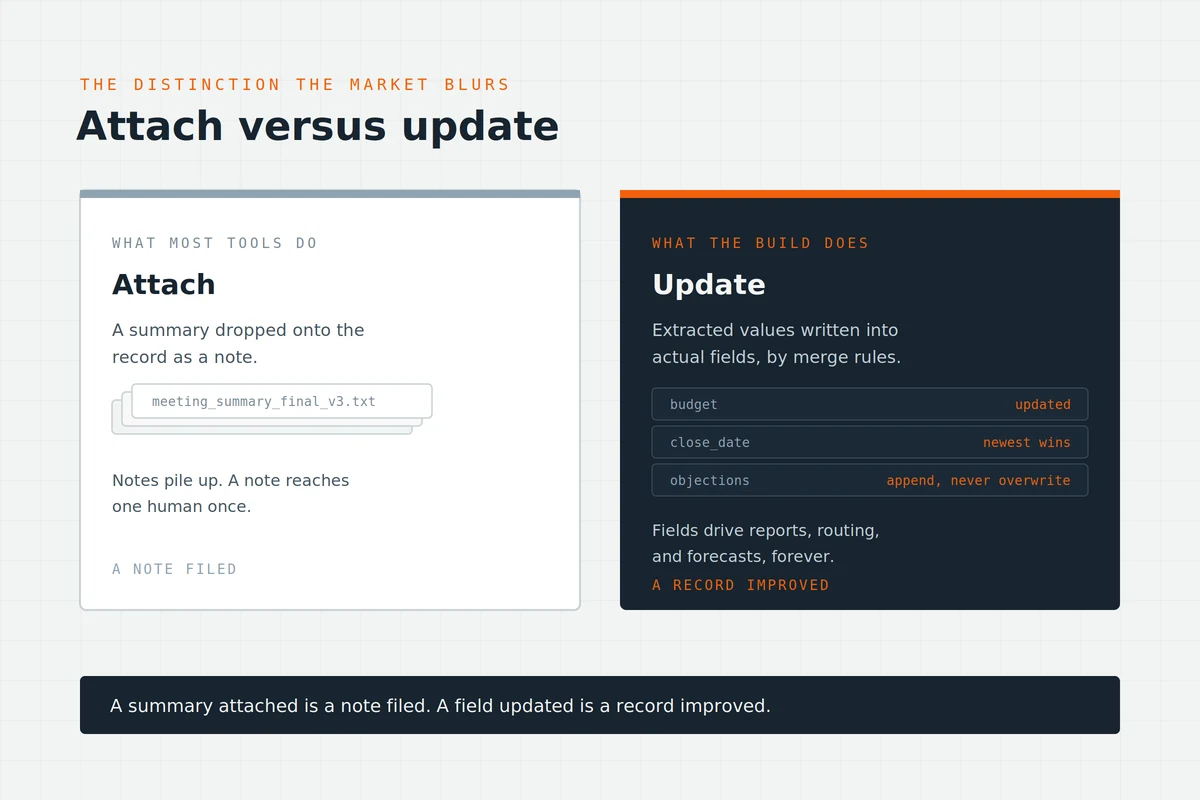
The distinction the whole market blurs. Attaching drops a summary onto the record as a note. Updating writes extracted values into actual fields: the budget field, the close date, the stage. Notes pile up. Fields drive reports, routing, and forecasts.
A summary attached is a note filed. A field updated is a record improved. Most tools attach and advertise it as CRM integration. The build updates, with rules deciding which extraction wins when the field already holds a value, the same field-level merge thinking that governs enrichment.
The merge rules read naturally once written. Close date: newest wins. Objections: append, never overwrite. Budget: update only above the confidence bar. Stage: propose, never auto-move. Four rules cover most schemas.
The confidence gate
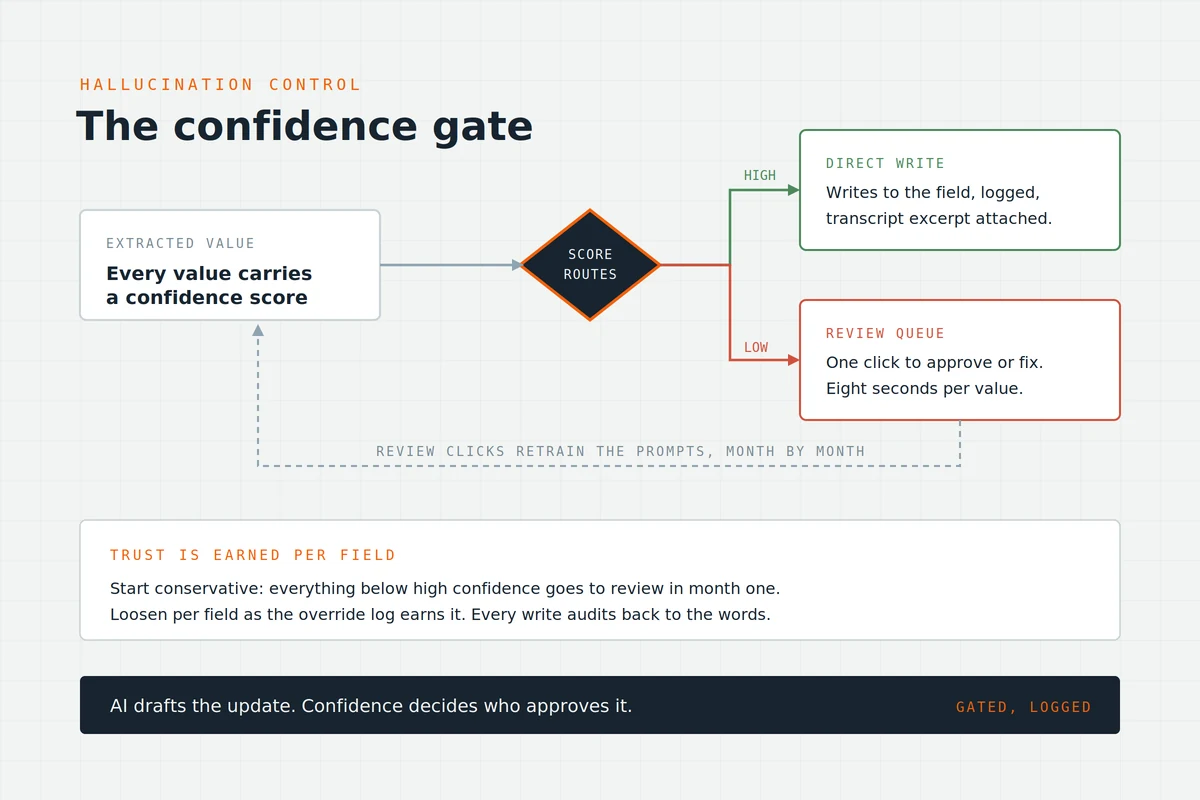
Models misread. The pipeline plans for it. Every extracted value carries a confidence score, and the score routes the write. High confidence writes directly, logged. Low confidence lands in a review queue, one click to approve or fix.
AI drafts the update. Confidence decides who approves it. The gate keeps hallucinated budgets out of the forecast, and the review clicks retrain the prompts month by month. Trust is earned per field, measured by override rate, exactly like the promotion gates in our other systems.
Start conservative. Route everything below high confidence to review in month one. Loosen per field as the override log earns it. Every write keeps its transcript excerpt attached, so any number audits back to the words in one click.
Tasks with owners and dates
Action items are the last extraction and the easiest to fumble. "We should send the proposal" becomes a task assigned to the rep, dated Friday, linked to the deal. No owner, no date, no task. Commitments made in meetings finally reach the systems that chase completion.
The chase is the point. Task systems remind, escalate, and report completion rates. Meeting promises join that machinery, and the follow-through number becomes visible for the first time.
One meeting through the pipeline
A 40-minute discovery call, followed end to end.
The call ends at 2:40. By 2:44, the transcript lands in the pipeline. The discovery schema runs: budget signal extracted at high confidence, timeline extracted at high confidence, decision process extracted at medium, two objections logged, one competitor mention captured, next step identified.
By 2:45, the CRM shows the work. Five fields updated on the deal. One value, the decision process, waits in the review queue with its transcript excerpt attached. Two tasks exist: proposal to the rep, dated Friday, and a security-questions follow-up to the engineer, dated Monday. One summary sits on the record for humans who want the story.
The rep reviewed one value for eight seconds. That was the entire human cost. Multiply the alternative, fifteen minutes of typing per meeting times every meeting on the calendar, and the pipeline's value prices itself.
The payoff compounds a week later. The forecast meeting reads real fields. The manager coaches from logged objections. Nobody asks the rep what happened on the call, because the record already answered.
The four capture situations
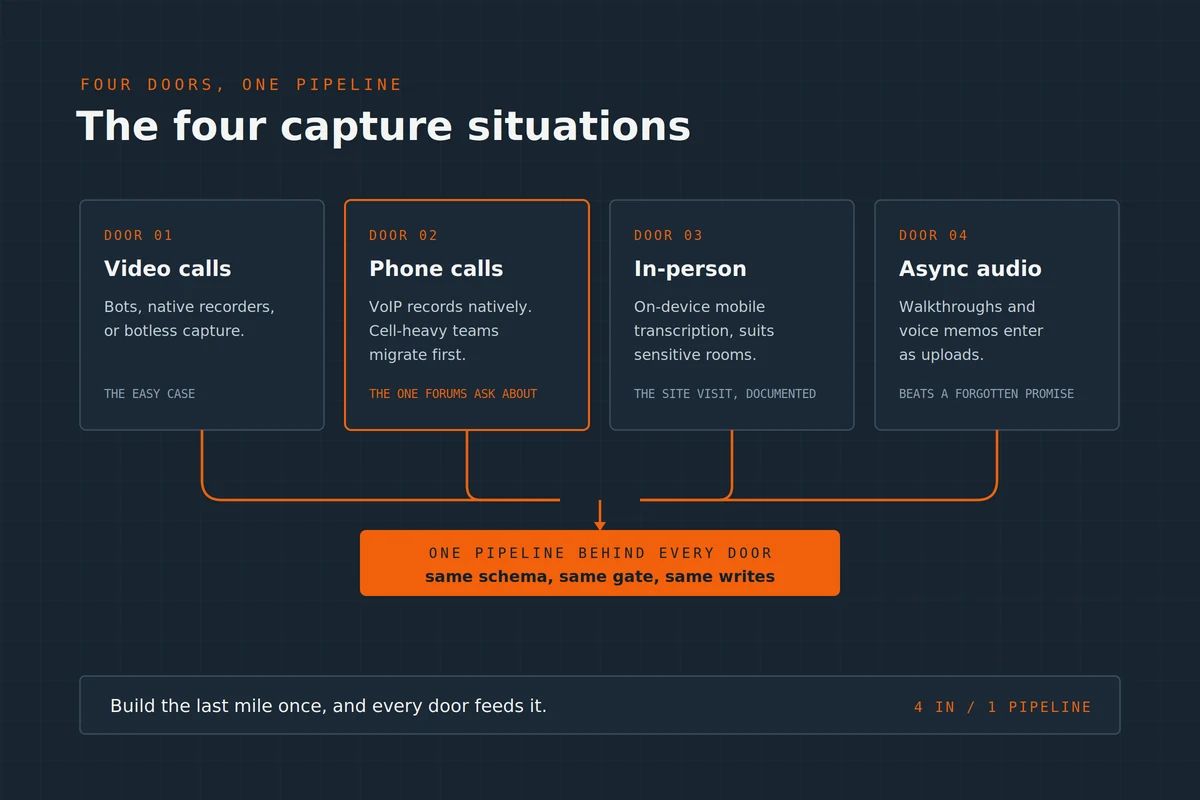
Meetings happen four ways, and each has a capture route. One pipeline, four doors, and the schema stays identical behind all of them.
The four doors
Video calls
The easy case: bots, native recorders, or botless capture, feeding the pipeline directly. Coverage approaches total once the team stops declining the recorder.
Phone calls
The door operator forums ask about most. VoIP systems record and transcribe calls natively, then hand transcripts to the same pipeline. If the business runs on regular cell calls, the honest answer is a VoIP migration first, capture second. No pipeline fixes uncaptured audio.
In-person meetings
Mobile transcription with on-device processing, which matters for sensitive conversations. The rep taps record, the pipeline receives, the same schema applies. The site visit finally documents itself.
Async recordings
Walkthrough videos and voice memos enter as uploads. Same extraction, same gate, same writes. A five-minute voice memo after a hallway conversation beats a forgotten commitment every time.
Build the last mile once, and every door feeds it. That reuse is the argument for the pipeline over four separate tools.
Consent, retention, and the recording rules
Recording laws are real and vary by jurisdiction. Some regions require one party's consent. Others require everyone's. The safe pattern is also the polite one: record the meeting, announce the recorder. Disclosure at the start, visible bot or stated notice, and an opt-out honored without argument.
Retention deserves a policy before the first recording. Transcripts hold sensitive conversation, so the pipeline stores what the schema needs, dates everything, and deletes on schedule. Extracted fields outlive the raw words.
Regulated industries raise the bar further, and our healthcare build lives there: tighter access controls, stricter retention, and capture routes chosen for compliance posture. We are engineers, not lawyers, so your counsel sets the rules and the pipeline enforces them. That division of labor is the design.
Internal meetings run lighter rules than client calls, and the policy should say so explicitly. One page covers it: what gets captured, who can access, how long it lives. Write the page before the first recording.
Tools versus the build
Three honest roads, sorted by what you need written.
Native CRM notetakers ship inside the big platforms and attach summaries to records well. If attach is enough, configure what you own first, as always.
Dedicated AI meeting platforms go further: topic organization, coaching features, and field writes into HubSpot and Salesforce for standard sales fields. Teams living entirely inside one CRM with standard schemas do well here.
The engineered pipeline earns its place when the schema is yours: custom fields, multiple meeting types, multi-system writes, review gates, and retention rules.
Middleware plus a language model plus your CRM's API, built once, owned by you, per the standards in our consultant overview. The integration engineering underneath carries the usual constants: every step alerted, every failure owned.
The record layer matters more than the capture brand. A meeting pipeline writing into a neglected CRM produces well-documented chaos, so the record-layer discipline comes first.
One more argument for owning the schema: it travels. Change capture tools, change conferencing platforms, even change CRMs, and the schemas plus merge rules move with you. The pipeline outlives every subscription underneath it.
How ACS builds meeting capture
The proof runs in production. Our healthcare meeting automation moves compliance-sensitive conversations into structured documentation, with the gates and retention rules the vertical demands.
The pattern transfers to sales, client services, and operations meetings directly. A pipeline built for the strictest room works in every easier one, and healthcare is the strictest room there is.
Fixed fee, after a paid and refundable discovery. Discovery writes your meeting-type schemas with your team in the room, counts the weekly meeting hours currently lost to typing or to nothing, and maps the capture routes across your four situations.
The math usually surprises. Twenty customer meetings a week at fifteen minutes of admin each is over two hundred hours a year, before counting the fields that never got filled at all.
The build ships inside our admin workflows practice with training to a named owner. Engagement structure sits on pricing, the wider record in the case studies: 500+ workflows shipped, more than 10,000 hours reclaimed, over $2 million in client savings.
Frequently asked questions
How do I automatically get meeting notes into my CRM?
Build or buy the four-step path: capture the meeting, extract against a per-meeting-type schema, write verified values to fields with a confidence gate, and create tasks with owners. Attach-only tools stop at step one. The value starts at step two.
What is the best AI notetaker for CRM updates?
Judge by the write, not the transcript. Categories: native CRM notetakers attach summaries, dedicated platforms write standard sales fields, engineered pipelines write custom schemas with review gates. Match the category to how custom your fields and rules are. Every category transcribes well now. Only one writes exactly what you defined.
Can meeting capture work for phone calls?
Yes, through the telephony layer. VoIP systems record and transcribe natively and feed the same pipeline as video calls. Standard cell calls stay uncaptured, so phone-heavy teams migrate to VoIP first. The pipeline handles everything after the audio exists.
Does AI actually update Salesforce or HubSpot fields?
It can, and the distinction matters. Attaching a summary is common. Updating actual fields requires field mapping, merge rules, and ideally a confidence gate. Ask any tool one question: which fields does it write, and what happens when the field already has a value.
Is recording meetings legal?
Consent rules vary by jurisdiction, from one-party to all-party requirements. The safe pattern: announce the recording, make the recorder visible, honor opt-outs. Regulated industries add retention and access rules. Your counsel sets policy. The pipeline enforces it consistently, which is more than any manual process ever managed.
What about AI hallucinations in the extracted data?
The confidence gate exists for exactly this. High-confidence extractions write with a log trail. Low-confidence ones queue for a human click. Every write links its transcript excerpt, so any value can be audited back to the words. Trust builds per field, measured monthly. A pipeline without the gate is trusting a model with your forecast, and no accuracy percentage justifies that.
Can it handle in-person meetings?
Yes, through on-device mobile transcription, which processes audio locally and suits sensitive conversations. The rep records, the pipeline extracts against the same schema, the same gates apply. In-person capture is a door into the pipeline, not a separate system.
Should we capture internal meetings too?
Selectively. Standups and syncs rarely justify the pipeline. Project reviews, client-prep sessions, and decision meetings do, because their action items and decisions feed real systems. Capture where the output has a destination. Skip where the transcript would just be filed.
What does meeting capture automation cost?
Structurally: capture tools bill per seat monthly, and the pipeline builds once at fixed fee plus small model costs per meeting. Price it against typing time. Fifteen minutes per meeting across a team's calendar funds the build quickly, and the fields it fills feed every report downstream. The uncaptured version costs more. It just bills in blank fields and forgotten commitments instead of invoices.
Meetings recorded, CRM still empty?
Three ways forward.
Book a paid discovery. Schemas drafted, capture routes mapped, typing hours priced, one fixed fee. Refundable if the fit is wrong. Details on pricing.
See the compliance-grade proof. The healthcare meeting build shows the full pipeline where documentation rules are strictest.
Read the practice. The admin workflows page covers the surface this pipeline belongs to.
Capture is solved. The transcripts already exist. Build the mile that fills the fields, and the CRM finally hears what the meetings said.