

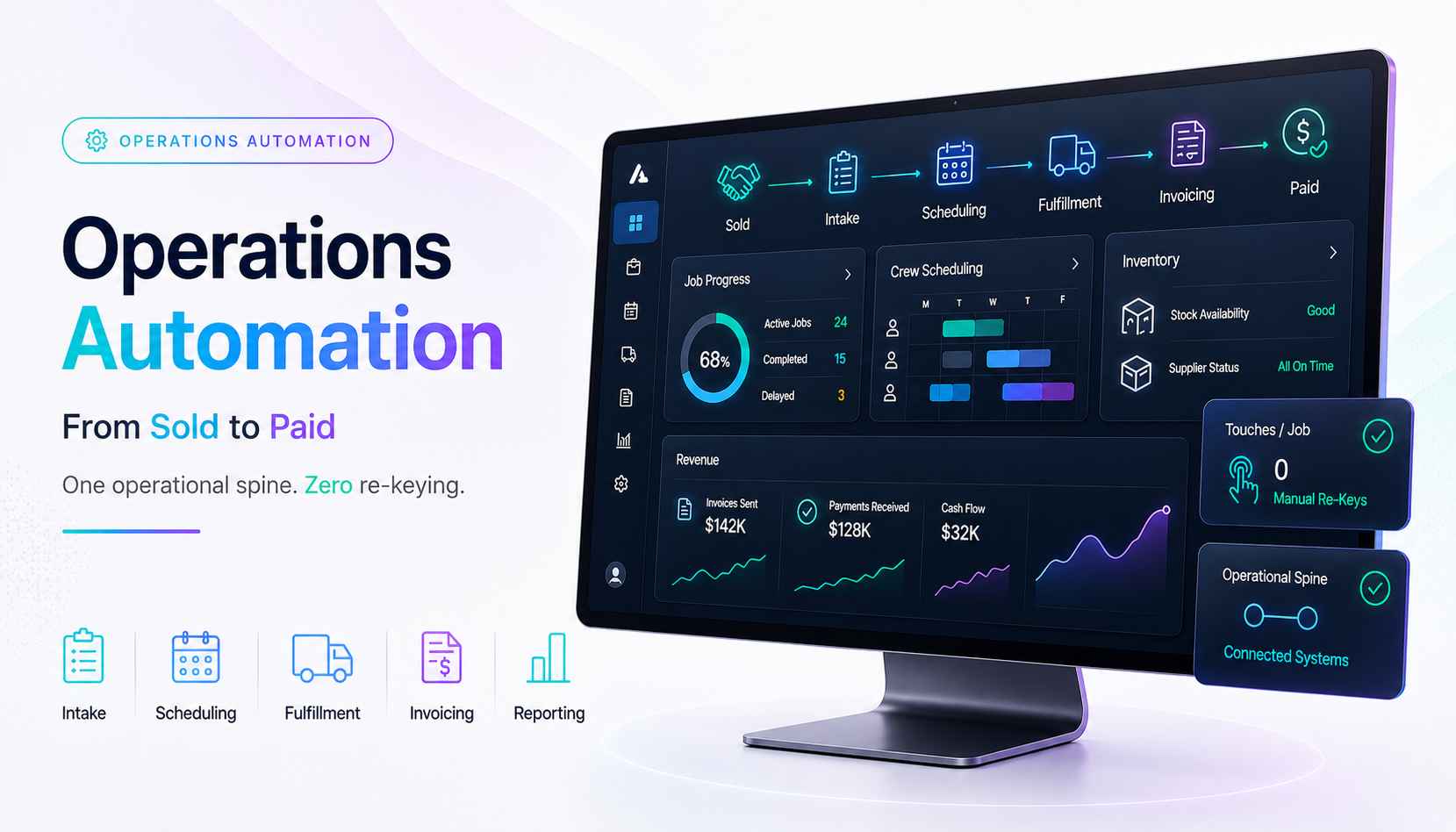
We build operations infrastructure with engineering discipline for $10M-$50M operators, and operations automation is the surface where that phrase gets literal. The systems described below run in production across field services, distribution, and manufacturing clients, documented in our case studies.
Software vendors define this term by their features. This guide defines it the way an operator does: by what stops being manual, and by what the Monday numbers say afterward.
What is operations automation?
Operations automation is the use of connected systems to run the operational work of a business automatically: opening jobs, scheduling work, tracking materials, invoicing, and reporting, with data flowing between tools instead of being re-typed into them.
The operator's version is shorter. A job gets sold. The same job gets delivered, billed, and counted. Operations automation is everything that makes that journey happen without a human copying data from one screen to another.
The definition matters because the manual version hides in plain sight. Nobody budgets for re-keying. Nobody invoices for the Friday afternoon spent assembling the weekly report. The hours leak between systems, and the leak compounds with every job. Automation closes the seams the tools left open.
Run the arithmetic once. Ten minutes of transport per job, across forty jobs a week, is over three hundred hours a year. One seam. Most operators run six. The leak is payroll spent moving data nobody reads twice.
One term, four meanings
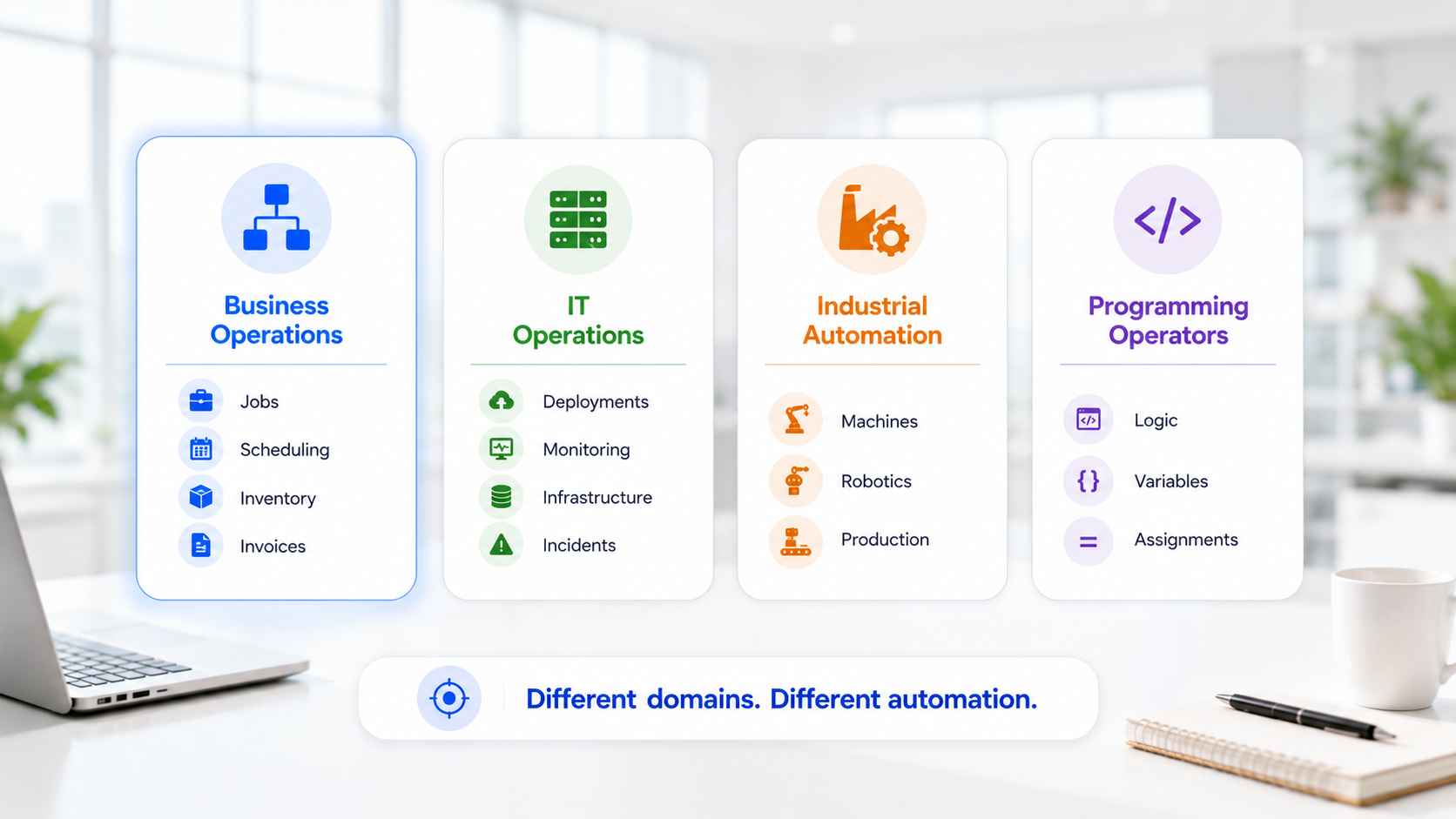
The phrase collides with three other worlds, and the collision wrecks half the search results. Sort them once.
Business operations automation is this guide: the operational spine of a company, from sold to paid. Our subject.
IT operations automation lives in a different department. Server provisioning, incident response, monitoring pipelines. The ITOps and AIOps world automates infrastructure, not invoices.
Industrial automation runs factory floors: machinery, control systems, and the automation operator job title that staffs them. A trade of its own, covered in our broader consultant overview.
Programming operators are homework. Symbols in code that compare and assign values. Students land here by accident, and the FAQ below points them home politely.
Four meanings. One phrase. This guide owns the first, and every section below stays inside it.
The mixing shows up everywhere. Search results blend server runbooks with invoice workflows in one list. A quick reader test: if the examples mention deployments and incidents, you are reading ITOps. If they mention jobs, crews, and invoices, you found the right room.
The operational spine: six links in three phases
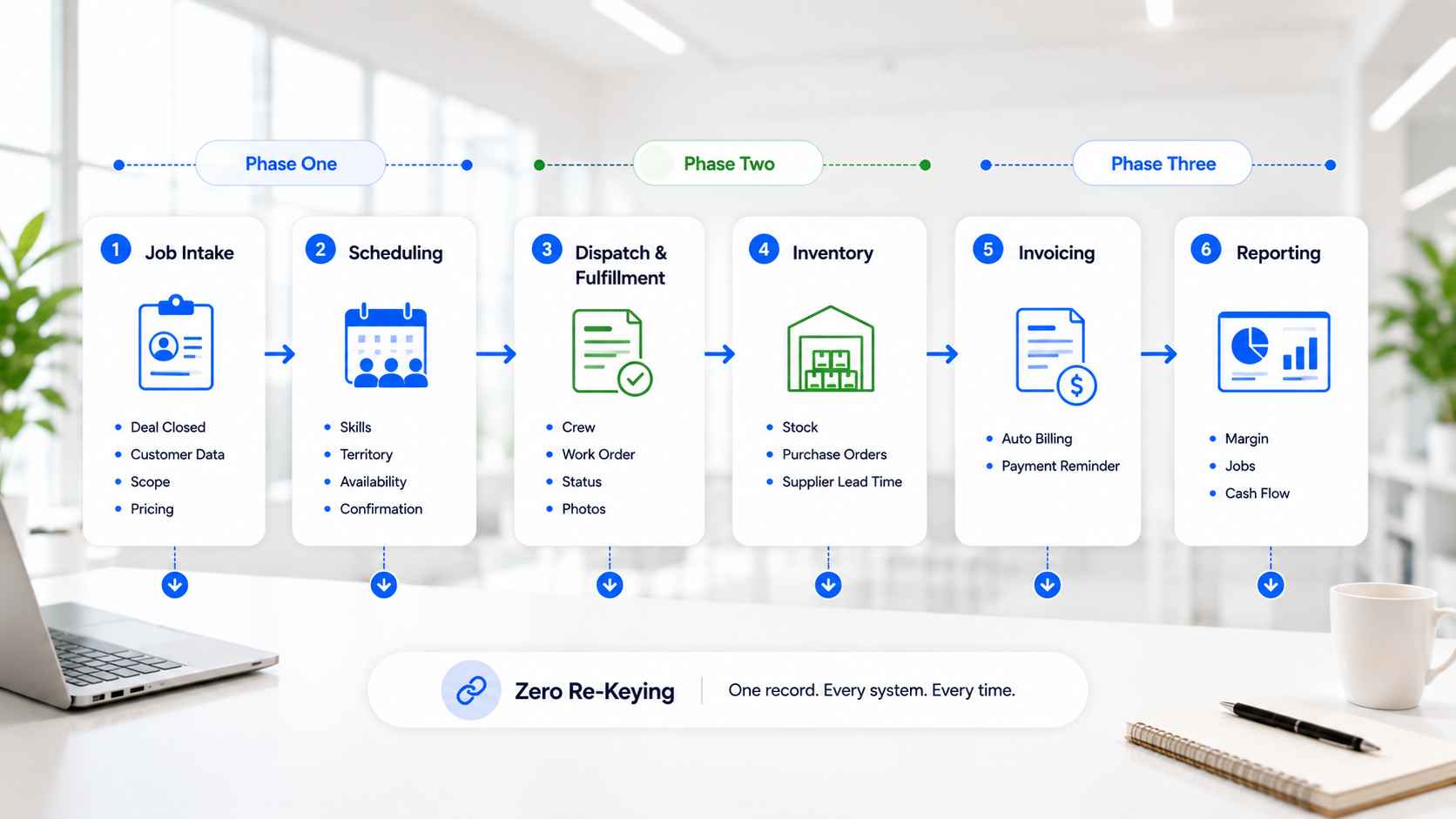
Every operating business runs the same spine, whatever the industry wears over it. Six links, three phases. Each link is a place where hours leak or flow.
Phase one: from sold to scheduled
The phase where the sale becomes work. Two links carry it, and both leak at the handoff.
Job intake
The closed deal becomes an open job automatically. Customer details, scope, and pricing carry over from the sale. Nobody re-types the order. The handoff from sales runs on rails, and our quote automation guide covers the upstream half of it.
Three things travel or the handoff fails. The scope as sold. The price as agreed. The customer contact as confirmed. Intake validates all three before the job opens, and rejects incompletes back to sales with a reason.
Intake sets the record straight from minute one. A job born from clean data stays clean. A job born from a re-typed email starts wrong and stays wrong.
Scheduling
The job gets its slot and its people. Rules match skills, territories, and availability. The calendar fills itself, confirmations go out, and changes ripple to everyone affected without a phone tree.
The rules read like routing rules, because they are. Certification required maps to certified crew. Location maps to territory. Urgency maps to the next open slot. Exceptions surface to the dispatcher instead of hiding in the pile.
Scheduling is where operations feel automation first. The dispatcher stops playing calendar Tetris and starts handling exceptions only.
Phase two: from scheduled to delivered
The phase where the work happens. The office and the field stay synchronized, or they drift apart by phone call.
Dispatch and fulfillment
Work orders reach the crew with everything attached: scope, site details, materials list, history. Status updates flow back as the work happens. The office sees progress without calling anyone.
The updates run both directions. Crew marks arrival, the customer gets the notification. Crew flags a snag, the office sees it live. Photos and signatures file themselves against the job. Nobody transcribes a voicemail.
Field and fulfillment teams live or die on this link. Complete information at dispatch prevents the second trip, and the second trip is the most expensive event in field service.
Inventory and procurement
Materials commit when the job schedules. Stock levels adjust as work completes. Reorder points trigger purchase orders before the shelf goes empty. Supplier lead times feed the schedule, so promises match reality.
Committed against on-hand is the number that matters. Ten units on the shelf means nothing when eight belong to next week's jobs. The system counts both, and the schedule reads the honest number.
Our HVAC lead-time build lives on this link: parts availability and supplier timelines pulled live, so quoting and scheduling tell the truth.
Phase three: from delivered to paid
The phase where the work becomes money. Delay lives here by habit, and cash flow pays for the habit.
Invoicing
Completed work becomes an invoice without a second data entry. Line items pull from the job record. The invoice fires on completion, not on somebody's Friday backlog. Payment reminders follow on schedule.
Exceptions keep their gate. Change orders and disputed scopes route for a human look before billing. Everything standard ships itself. Progress billing rides the same rails for longer jobs, milestone by milestone.
Speed here is cash flow. Days between delivered and invoiced are days added to collection, and automation removes them wholesale.
Reporting
The last link is the exhaust of the other five. Jobs, hours, margins, and pipeline roll up from live data into dashboards that build themselves. Reporting stops being a project because the spine emits it as a side effect.
Monday answers three questions before anyone asks. Jobs completed against plan. Margin by job type. Cash invoiced against cash collected. The numbers agree with each other, because they share one source.
When a report requires assembly, the spine has a gap. The report is the diagnostic, and the gap is the project.
A job's journey: sold to paid without re-keying
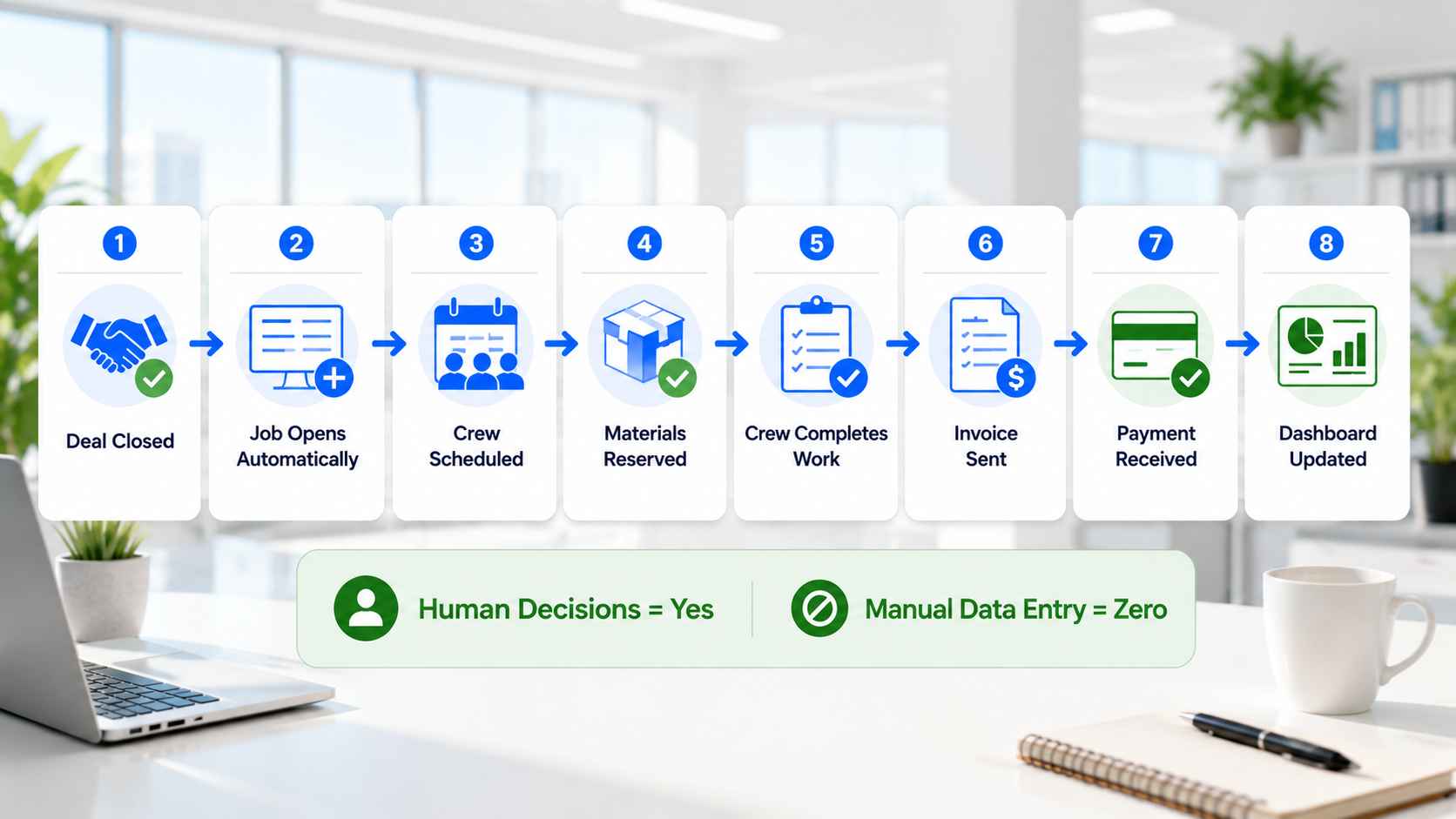
Watch one job travel the whole spine. A deal closes in the CRM. The job opens itself with the scope attached. Scheduling assigns the crew by skills and territory, and the customer gets a confirmation.
Materials commit, and a purchase order fires for the one part below reorder. The crew gets the work order with the full picture. They complete it from a phone. The invoice sends within the hour. Payment lands, the books update, and Monday's dashboard already knows.
Now watch something go wrong, because it will. The supplier slips the part by four days. The system catches the delay, shifts the schedule, notifies the customer with the new date, and flags the dispatcher once. One exception, one human decision, zero phone trees. Failure handling is the half of the spine nobody demos.
Count the human touches in that journey: decisions, exceptions, and customer conversations. Count the re-keys: zero. That ratio is the whole point. People handle judgment. The spine handles transport.
What operations automation is not
Boundaries keep the term honest.
Not sales automation. That surface runs before the deal closes: routing, sequences, quoting. The two meet at the sold-to-job handoff, and the layer thinking from our sales stack guide applies to both.
Not admin workflow automation. Documents, approvals, and meeting capture ride their own surface, covered by our admin workflows practice. The surfaces share engineering standards, not scope.
Not a transformation program. Operations automation is a series of shippable builds with measurable deltas, not a two-year initiative with a steering committee. The spine gets automated one link at a time, each link paying for the next.
And not a headcount cut, in practice. The hours come back as capacity: more jobs per dispatcher, faster invoicing per admin, exceptions handled instead of transport performed. Operators grow into the reclaimed hours. The payroll stops leaking, and the team stops doing robot work.
Operations automation tools: categories, not brands
Five categories cover the tooling, and the design picks among them.
A system of record for jobs: field service platforms, ERPs, or a well-built CRM extended with job objects. Middleware moving data between systems. Scheduling engines, native or built. Document and invoice generation. Dashboards reading live data.
The category list matters less than one rule carried from our layer model: configure native features to their real limits first, then engineer across tools where the spine crosses them. Cross-tool spine work is integration builds engineering, with error handling and ownership standards attached.
Industry platforms deserve one note. Field service, distribution, and manufacturing each have vertical systems with spine links built in. Good ones cover three or four links natively. The build then covers the seams the platform left, which is always fewer seams and never zero.
Where to start: automate the spine before the edges
Edges always tempt first. A clever notification here, a fancy dashboard there. Resist. Spine links compound; edges decorate.
Rank the six links by leak size. Count weekly hours spent on manual transport in each: re-keying, chasing, assembling. The biggest leak gets the first build. For most operators, intake or invoicing wins, because both bleed daily and both automate cleanly.
One gate before any build. The link's rules must be stable on paper. A scheduling policy still argued about weekly is not ready for rails. Automation freezes whatever it touches, so settle the argument, then freeze the settlement.
Then measure three numbers before and after. Touch count per job. Days from delivered to invoiced. Hours per week on report assembly. The deltas make the case for link two, and the spine funds its own completion.
How ACS builds operations automation
Fixed fee, after a paid and refundable discovery. Discovery walks one real job through your current spine, timestamps every touch, and ranks the leaks in writing. You keep the map either way.
The spine transfers across industries because the shape does. Field services, distribution, and manufacturing wear different vocabularies over the same six links. A dispatch board and a pick list are the same object wearing different uniforms, and the engineering underneath does not care which.
Builds ship link by link with the standards we publish everywhere: error alerts to a named owner, documentation your team keeps, accounts in your name, training before final payment. The service detail sits on the operations automation page, the engagement structure on pricing, and the shipped proof in the case studies: 500+ workflows, more than 10,000 hours reclaimed, over $2 million in client savings.
Frequently asked questions
What is automation, in plain terms?
Systems doing repeatable work on triggers and rules, without a person driving each step. Operations automation applies that idea to the business spine: jobs, schedules, materials, invoices, and reports moving on their own rails, with humans steering the exceptions.
What does automated operations mean day to day?
Deals become jobs without re-typing. Schedules fill by rules. Crews get complete work orders. Invoices fire on completion. Dashboards build themselves overnight. People handle exceptions and judgment. The spine handles the transport between systems, quietly, on every job, including the ones that go sideways.
How do automation and operations management relate?
Operations management decides how work should flow: the policies, priorities, and standards. Automation enforces the decisions consistently and reports the results honestly. Management stays human. Execution gets rails. Good automation makes management visible in the numbers, and bad management visible even faster.
What is the difference from IT operations automation?
IT operations automation manages infrastructure: servers, deployments, incidents. Business operations automation manages the revenue spine: jobs, scheduling, inventory, invoicing. Different departments, different tools, same word. This guide covers the business side.
Is an automation operator a job?
In manufacturing, yes: the person who runs and monitors automated machinery on a production floor. Different world from this guide. Business operations automation has owners rather than operators, and the owner's job is exceptions, not consoles.
I searched for programming operators. Am I in the right place?
Different topic, honest answer. Programming operators are symbols in code for arithmetic, comparison, and assignment, covered well in language documentation and tutorials. This guide covers business operations automation. Good luck with the assignment.
What tools does operations automation need?
Five categories: a job system of record, middleware, scheduling, document and invoice generation, and live dashboards. Most operators own three already. The build connects and extends before it buys, and the design decides the rest. Vertical platforms cover several links natively, and the seams they leave become the build list.
What is an example of operations automation?
A closed deal opens a job, the schedule assigns a certified crew, materials commit with one purchase order fired, the crew completes from a phone, and the invoice sends within the hour. One job, zero re-keys, one dashboard updated overnight. The spine, working.
Does a small business need operations automation?
When one spine link leaks more weekly hours than its automation costs once, yes. Start with intake or invoicing on a fixed fee. One link, measured for thirty days. The delta decides link two.
Running the spine by hand?
Three ways to move.
Book a paid discovery. One job walked through your spine, every touch timestamped, leaks ranked, one fixed price. Refundable if we are the wrong fit. See pricing.
Read the service detail. The operations automation page covers the practice end to end.
See a spine link live. The HVAC lead-time case study shows inventory and scheduling truth in production.
Sold to paid. Zero re-keys. That is the operator's definition, working.