

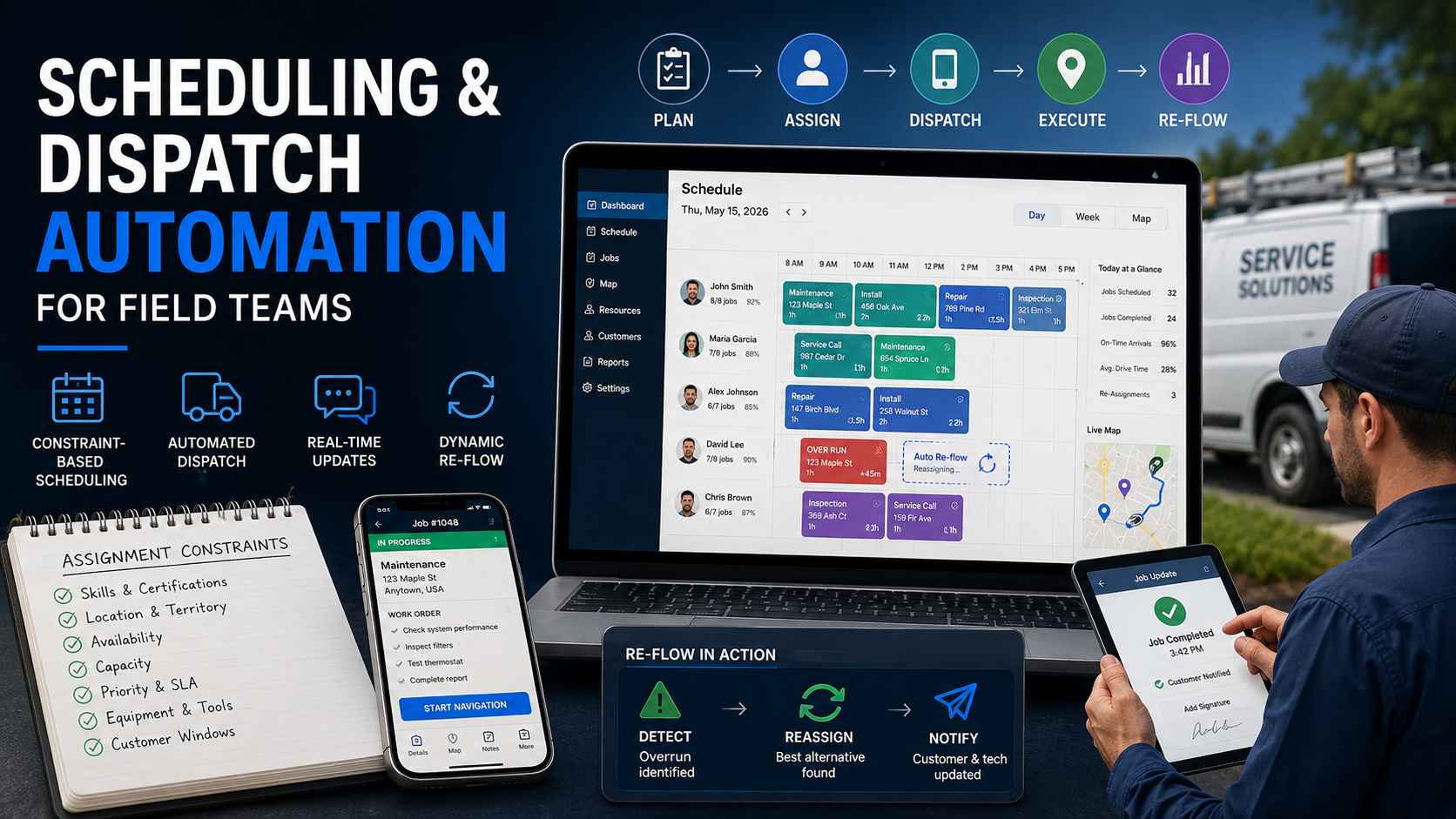
We build operations infrastructure with engineering discipline for $10M-$50M operators, and scheduling sits at the center of the operational spine we engineer. Field teams across trades, testing firms, inspections, and installations run on the patterns below, with the HVAC version detailed in our vertical guide.
The search results for this topic sell scheduling boards. This guide engineers scheduling systems. A board shows the day. A system runs it, and reruns it when reality disagrees.
What is scheduling and dispatch automation?
Scheduling and dispatch automation is a system that plans field work by rules and executes the plan without manual coordination. Scheduling decides who does what, when. Dispatch delivers the decision: work orders to crews, updates to customers, status back to the office.
The two words name two different jobs. Scheduling is the planning layer: constraints in, assignments out. Dispatch is the execution layer: notify, confirm, track, adjust. Teams that blur them automate the calendar and keep the phone tree. Both layers need rails, and the rails need to talk to each other all day.
The payoff shows up in three places. Techs complete more jobs per day because drive time and idle time shrink. The office handles exceptions instead of coordination. Customers get real windows and live updates instead of "sometime Thursday."
Coordination is the tax nobody itemizes. Every manual assignment costs a decision, a message, and a confirmation chase. Multiply by jobs per day, and the tax funds a whole role. Automation refunds it.
The seven constraints every assignment reads
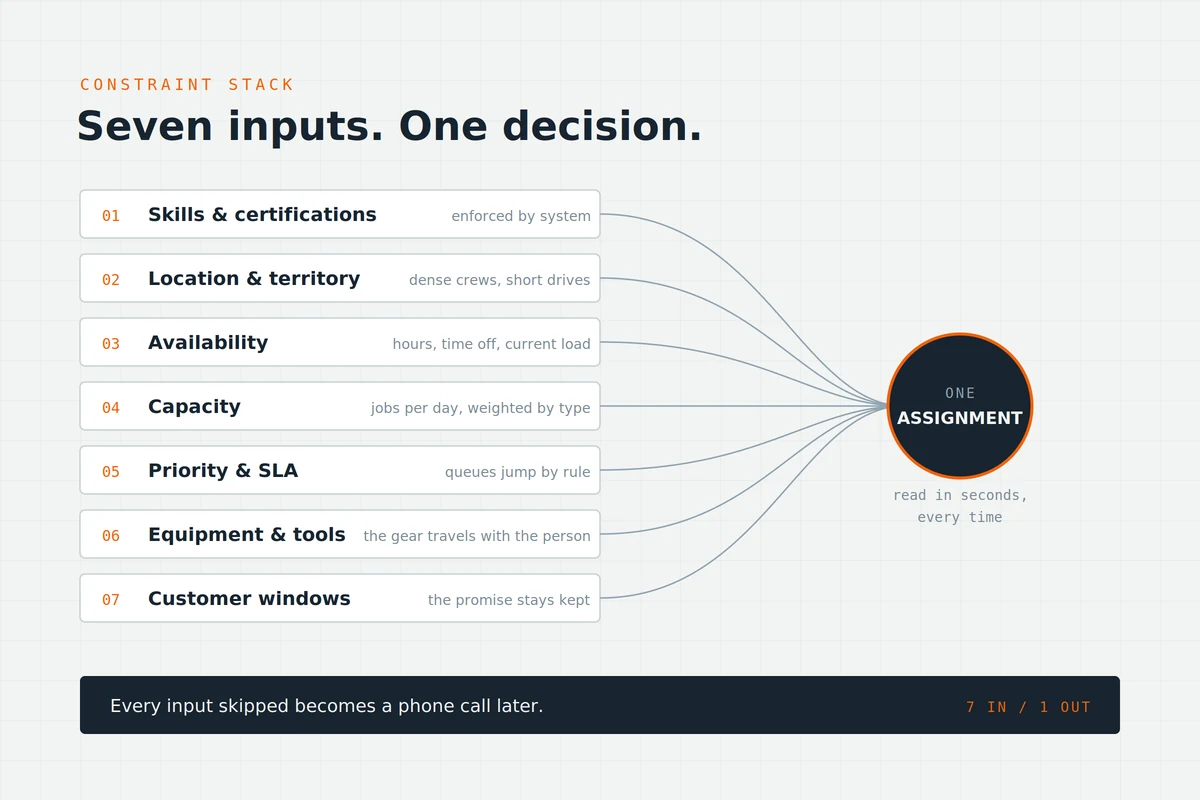
An assignment is a decision with seven inputs. Rules read them in order, and every input skipped becomes a phone call later.
Skills and certifications. The job's requirements match the tech's qualifications. Licensed work goes to licensed people, enforced by the system instead of memory.
Location and territory. Distance costs money and hours. Territory rules keep crews dense and drive time short.
Availability. Working hours, time off, and existing load. An assignment to an absent tech is an unassignment with paperwork.
Capacity. Jobs per day per tech, weighted by job type. Overloading the fastest tech burns out the fastest tech.
Priority and SLA. Contract customers, emergencies, and deadline work jump queues by rule, not by whoever calls loudest.
Equipment and tools. The job needs a lift, a meter, a specific rig. The assignment checks the gear travels with the person.
Customer windows. The promised timeframe binds the schedule. Rules book inside the promise, and the promise stays kept.
Seven inputs. One decision. The system reads all seven in seconds, every time, which no morning meeting ever did.
Constraints compose rather than compete. Most jobs satisfy all seven quietly. When two conflict, the conflict surfaces ranked, with the rule that lost named. Visible trade-offs beat silent ones, and the dispatcher decides the genuine dilemmas only.
Three modes: full-auto, assisted, and manual with guardrails
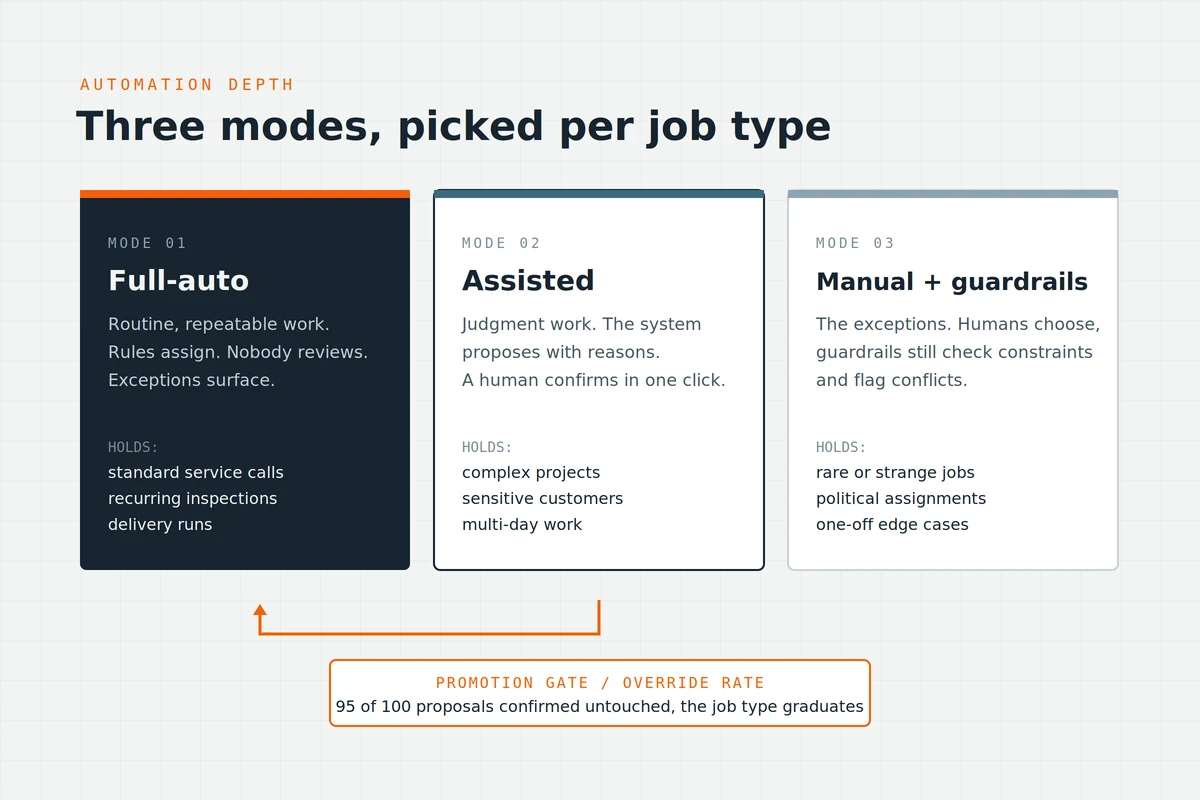
Honesty about automation depth, because the sales pages skip it.
Full-auto fits routine, repeatable work. Standard service calls, recurring inspections, delivery runs. Rules assign, nobody reviews, exceptions surface. Most field volume lives here, and full-auto earns its keep on it.
Assisted fits judgment work. The system proposes assignments with reasons attached. A human confirms or overrides in one click. Complex projects, sensitive customers, and multi-day work deserve the human glance, and the glance takes seconds when the proposal is good.
Manual with guardrails fits the exceptions. Rare, strange, or political assignments stay human. The guardrails still check constraints and flag conflicts, so even manual choices stay inside the rules.
Pick the mode per job type, not per company. The mix shifts toward full-auto as duration models improve, and the system tells you when.
The promotion gate has a number: override rate. When humans confirm the assisted proposal untouched ninety-five times in a hundred, that job type graduates to full-auto. The override log is the trust ledger, and it makes the migration a measurement instead of an argument.
The scheduling engine
Under the modes sits the engine: the logic that turns constraints into a workable day.
Duration models from actuals
Every job type carries an expected duration, and most teams guess it once and never revisit. The engine does better. Completed jobs feed actual durations back into the model, by job type and by tech. Estimates converge on truth, and the schedule stops promising physics-defying days.
This feedback loop is the least configured feature in field operations, and the highest-return one. A schedule built on real durations needs half the rescue calls.
Two refinements sharpen it. Durations vary by tech as well as by job type, and the model can respect both without anyone taking it personally. New job types start on a conservative guess and converge within their first dozen completions. The loop forgives bad starts fast.
Buffers and travel time
Travel gets budgeted per hop, from real distances, with traffic-aware windows where the stakes justify it. Job buffers absorb the normal overrun without cascading. Thin buffers break daily. Fat buffers waste capacity. The actuals data sets them honestly.
Customer windows deserve honest sizing too. A two-hour window kept beats an exact time missed. Promise the window your buffer math supports, then let the on-my-way text tighten it live on the day.
Load balance and fairness
Distribution rules keep workloads even and visible. Overtime spreads by rule. The rotation is auditable, and the crew can see it. Fairness you can show beats fairness you can claim, and field teams trust systems they can check.
The rotation can grow people too. A junior tech earns shadow slots on complex job types by rule, and the skills matrix updates as certifications land. The schedule becomes a training plan wearing a calendar.
Dispatch: the execution loop
Dispatch runs the same loop as our lead routing playbook, wearing work boots: assign, notify, claim, escalate.
The work-order payload
The notification carries everything: scope, site details, access notes, contact, history, forms, and the materials list. Complete payloads prevent second trips, and the second trip is the most expensive event in field work.
The payload arrives where the crew lives: mobile, with offline capture for the basements and back lots where signal dies. Photos, signatures, and status flow back as the work happens. Job-specific forms and checklists ride the payload too, so data collection happens on site, once, instead of at a desk from memory.
Notify, claim, escalate
Assignment without confirmation is a hope. The tech claims the job, and the claim timestamps. Silence past the timer escalates: next qualified tech, then the dispatcher. No work order sits orphaned, because the system never assumes the first ping landed.
Customer updates on rails
Booking confirmation, day-before reminder, on-my-way with a live window, completion summary. Each fires from status changes. Inbound where-is-my-tech calls fall because the answer arrives first.
When the day breaks: the re-flow system
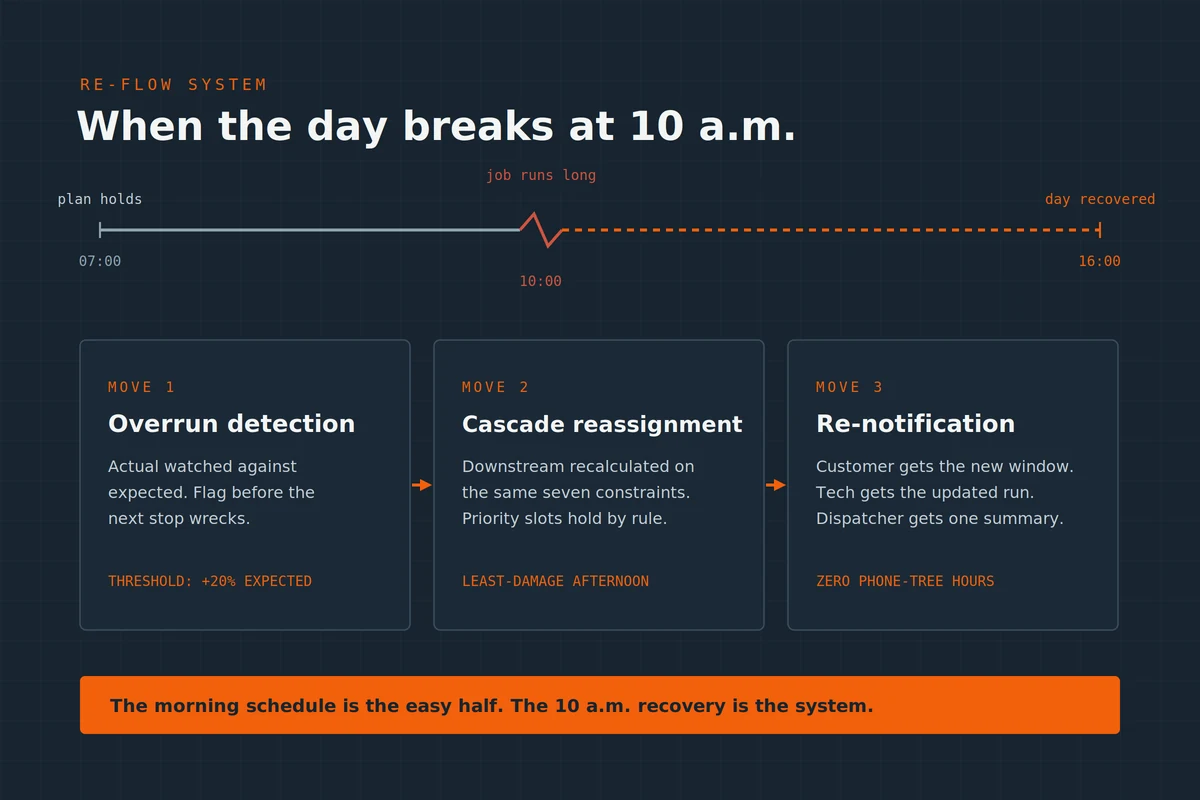
Here is the section the software pages skip, and the one that separates a board from a system.
Every schedule survives until mid-morning. A job runs long. A truck breaks. An emergency lands. A customer cancels at the door. The static schedule is now fiction, and teams without a re-flow system spend the afternoon improvising by phone.
The three moves of a re-flow
The recovery runs the same three moves every time, in order, in seconds.
Overrun detection
The system watches actual against expected. A job crossing its duration threshold flags before it wrecks the next stop. A sane starting threshold: twenty percent past expected duration, tuned by job type from there. Early detection buys options. Late detection buys apologies.
Cascade reassignment
The flagged delay recalculates downstream. The next job shifts, moves to another qualified tech, or rebooks by rule. The cascade runs the same seven constraints as the morning schedule, in seconds, and proposes the least-damage version of the afternoon. Priority customers hold their slots by rule, so the cascade spends its disruption on the jobs that can absorb it.
Re-notification
Every affected party hears automatically. The customer gets the new window. The tech gets the updated run. The dispatcher gets one summary instead of five fires. The day bends without breaking, and nobody spent an hour on the phone bending it.
Design the re-flow before launch. The morning schedule is the easy half. The 10 a.m. recovery is the system.
Where FSM boards end and the build begins
The honest tool sort, same as everywhere in our practice.
Field service management platforms ship the board: calendars, drag-and-drop, work orders, mobile apps. Vertical FSM tools serve niches with purpose-built forms and views. Configure yours to its real limits first. Plenty of teams own re-flow features they never switched on.
One prerequisite gates everything: clean skills and job-type data. Rules read fields, and empty fields read as anyone-can-do-anything. An afternoon spent tagging certifications and job types pays back on the first automated morning.
The build begins at the seams. The scheduler reading job data from systems the platform never met. Duration models fed from completed-work history. Dispatch talking to inventory, so assignments check parts before promising arrival, the pattern our HVAC work proves. Customer updates wired to your channels. Cross-system work is integration builds engineering, with error alerts and a named owner on every sync, per the ownership standards in our hiring guide.
The numbers that prove the system
Six metrics, baselined for two weeks before any build.
Jobs completed per tech per day. Drive-time share of the working day. On-time arrival rate against promised windows. Same-day reassignment count, which measures re-flow health. First-visit completion rate. Schedule adherence, planned against actual.
Watch same-day reassignments with respect. Zero means the day never breaks, which means nobody is measuring. A steady, handled count means the re-flow works. A rising count names the next duration model to fix. Drive-time share tells the territory story: rising share means the map outgrew the rules, and the rules need redrawing before anyone buys optimization software.
How ACS builds scheduling and dispatch automation
Fixed fee, after a paid and refundable discovery. Discovery maps one real day: every assignment decision, every phone call, every mid-day scramble, timestamped. The constraint stack and the re-flow design come out of that map, in writing, yours either way.
The patterns transfer across field industries because the day's shape does. Trades, testing and inspection firms, installations, deliveries: different uniforms, same seven constraints, same 10 a.m. break. The engineering underneath does not care what the trucks carry.
Builds run mode by mode: full-auto for the routine volume first, assisted where judgment stays, re-flow wired before launch because the day will break in week one. Handoff follows the published standard: accounts in your name, runbook your team owns, training to a named owner.
The wider practice sits on the operations automation page, engagement structure on pricing, and the shipped record in the case studies: 500+ workflows, more than 10,000 hours reclaimed, over $2 million in client savings.
Frequently asked questions
What is field service management software?
The record and board layer for field operations: jobs, schedules, work orders, mobile apps, invoicing. It holds the data and shows the day. The automation layer above it, native plus built, is what assigns, adjusts, and re-flows the day.
What is the difference between scheduling and dispatch?
Scheduling plans: constraints in, assignments out, before the day starts. Dispatch executes: work orders delivered, claims confirmed, status tracked, changes pushed. One decides, one delivers. Automating only one leaves the phone tree running the other.
What is the best dispatch software for field teams?
Judge by category fit: your industry's record layer, mobile quality for your crews, and openness to integration. Then judge the seams it leaves, because the seams become your build list. No single tool ships the full system.
Does AI scheduling actually work?
For recalculation and duration prediction, yes. Models predict job length from history and propose re-flows faster than any human. Judgment calls stay assisted: the system proposes with reasons, a person confirms. AI runs the math. Rules run the policy. The override log decides how much trust each job type has earned.
Does a small field team need dispatch automation?
At three or four techs, the constraint rules and customer updates already pay. The re-flow matters at every size, because small teams break harder when one truck dies. Scale the depth, keep the design.
How do automated schedules handle emergency jobs?
Two lanes by design. Scheduled work fills the calendar by rules. Emergencies enter a triage tier, claim reserved capacity, and preempt by priority rules when the tier demands it. The cascade rebooks what the emergency displaced. Reserved slots per day per tech make the lane real instead of theoretical.
Do we need route optimization?
Budget travel per hop first, from real distances. Dedicated route optimization earns its seat at high stop density: deliveries, inspections, dense service routes. Most field teams win more from duration truth and re-flow than from shaving miles.
What does a dispatcher do after automation?
Runs a bigger board calmly. Exceptions, escalations, customer saves, and the judgment calls the assisted mode surfaces. The coordination theater ends. The decisions remain, and they get better data than the phone tree ever provided. Most teams find the role grows in value as it shrinks in chaos.
How long does a scheduling automation build take?
Constraint rules and dispatch loops ship in two to four weeks. Duration models and re-flow logic add two more, because they need your history wired in. Discovery sets the honest number after mapping one real day.
Still rescuing the schedule by phone every afternoon?
Three ways to move.
Book a paid discovery. One real day mapped, constraint stack written, re-flow designed, one fixed price. Refundable if we are the wrong fit. See pricing.
Read the practice. The operations automation page covers the full spine this link belongs to.
See the vertical proof. The HVAC guide shows dispatch fused with parts truth in a live build.
Plan by rules. Deliver by rails. Re-flow by design, before the day demands it.