

Open any proposal folder in any services firm, including a very good one. Fifty files sit inside it. Each one a copy of a copy. The rate on page four disagrees with the current rate card. The clause on page nine was retired last year, quietly. Someone senior is formatting page one right now. At night. Unpaid by any client for the hour.
We build operations infrastructure with engineering discipline for $10M-$50M operators, and document generation runs underneath our quoting, reporting, and operations builds daily. This guide gives documents the engineering treatment.
Three layers, separated cleanly. A lifecycle after the render, four steps long. Guardrails legal will actually like. And the honest list of what not to automate at all.
What Is Document Generation?
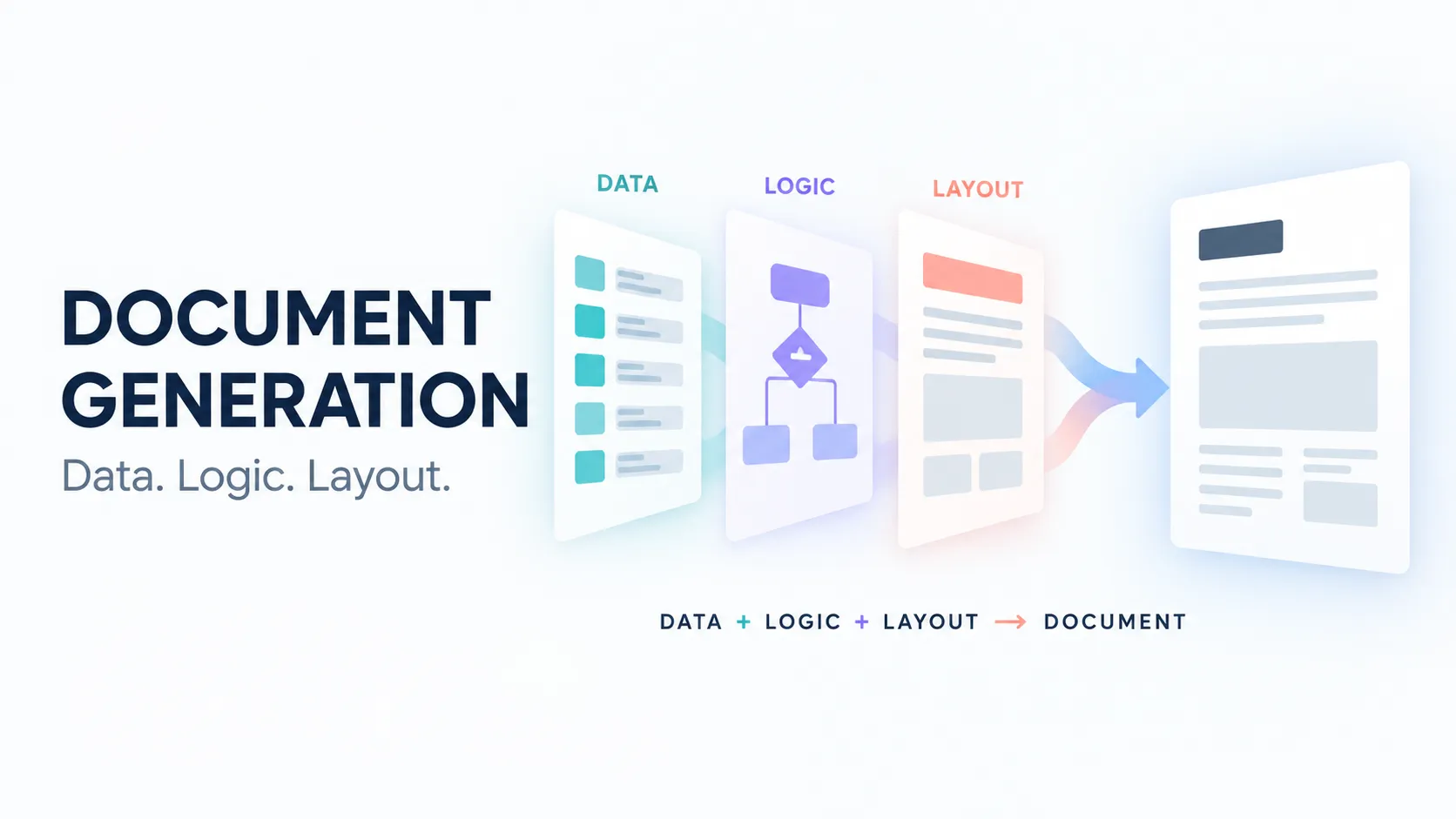
Document generation assembles finished business documents from structured sources. Data merges from your systems. Sections appear or vanish by the rules. Line items loop in as clean tables. The result renders into a formatted file, ready to route.
It is more than templates alone, by exactly two layers. A template with blanks still asks a human to fetch and retype the data. Retyping is the original document bug. Real generation pulls from the systems of record, applies the governed logic, and renders the finished file.
The human contribution moves from typing to judgment, where it earns its salary. The distinction matters at buying time, because plenty of tools sell blanks and call it automation. Ask any vendor which of the three layers their product actually owns, and watch the demo get more honest fast.
Why Manual Documents Fail: The Welded File
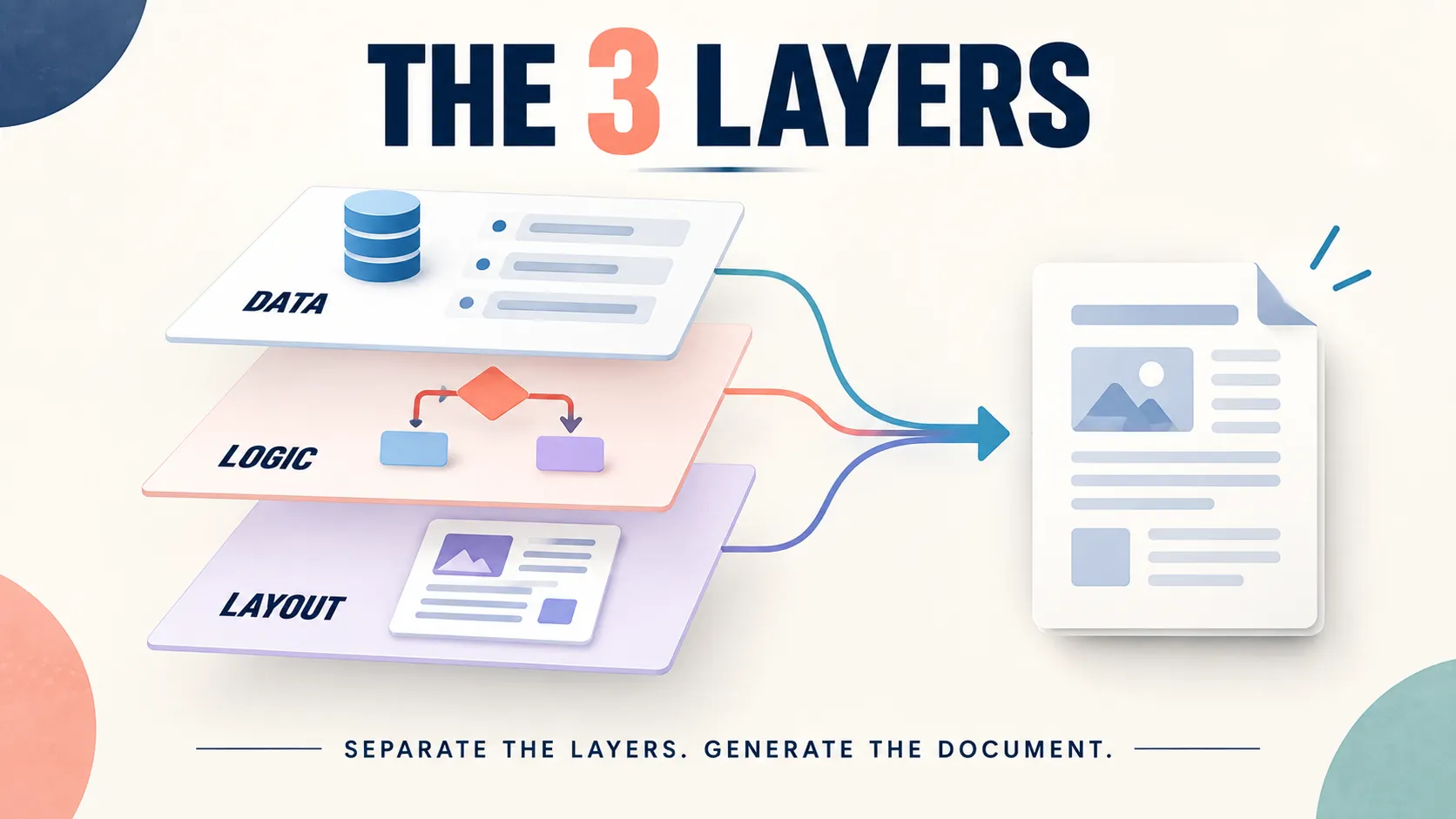
A document is three genuinely different things pretending to be one file. Data: the names, numbers, dates, and terms. Logic: which sections appear, which clause variant applies, how the line items repeat. Layout: the structure and the brand on the page.
Manual drafting welds all three of them together. The data goes stale the moment it is typed into the file, because the source system kept moving without it. The logic lives in whoever drafted it that day, so two drafters produce two different documents from the same facts. The layout gets rebuilt by hand, badly, at the worst hour.
Every welded file is a private fork of the truth. The folder of fifty is fifty separate forks, each one aging alone. The cost hides in three places. The drafting hours. The inconsistencies clients catch. The disputes the inconsistencies seed.
Separation is the fix, layer by layer. The rest of this guide rebuilds each of the three with its own discipline.
Layer 1: The Data
Data lives in systems of record, and it lives only there. The CRM carries the client, the deal, and the contacts. Rate cards and the service blocks from our quoting system carry pricing and scope. Project systems carry delivery facts.
Finance carries the billing terms. Each source owns its slice, and no document argues with any of them. When a source changes, the next render simply reflects it, with no memo required. Generation reads them at render time, fresh. The document inherits today's truth instead of last month's copy.
The rule has no exceptions worth keeping: never retype what a system already knows. Every retyped field is a future discrepancy with a timestamp attached. It will surface, usually in front of the client, always at the wrong moment.
A self-maintaining CRM upgrades this layer further, because the freshest record produces the truest document with the least human help. Garbage in the source becomes garbage in the signed contract, at render speed. Data governance is document governance wearing different clothes.
Layer 2: The Logic
Logic decides what appears in each and every render. Conditional sections, switched by deal type. Clause variants by situation, drawn from an approved library legal already blessed. Loops that turn the line items into clean tables without anyone merging cells at midnight.
Signature blocks that already know their signers and their order. Approval triggers fire only when a generated document carries an exception worth human eyes.
Relocate the logic from heads into the system. It is the same move as our quoting guide's decision relocation. Two drafters. One shared logic. Identical documents from identical facts, every single time.
The clause library gets legal review once, on a calm day, with full attention, instead of fifty partial reviews under deadline. And when a clause retires, it retires everywhere at once, instantly, instead of surviving in seven old copies nobody remembers to open.
Layer 3: The Layout
Layout is the template. Structure, branding, typography, decided once by someone with taste and authority. The render step fills the template, in seconds, identically. Nobody adjusts margins at midnight ever again, because nobody touches the rendered file by hand at all. The brand shows up perfect on every document, which brand teams notice within a week.
Keep the templates few, and keep them versioned. One master per document type beats twelve near-copies fighting for currency. A change-controlled template is the difference between a company rebrand taking a morning and taking a quarter. The template is a contract with your future self: format decisions made once, honored forever, on every render.
What to Generate First
Follow the pain and the volume, in that exact order. The sequence below fits most of the services firms we build for. Quotes, proposals, and SOWs come first in most services firms, and the quoting system is their engine.
One block library feeds all three, so the numbers never disagree between documents. A price that matches across the whole set is a small thing clients quietly notice and trust. Contracts and agreements follow, powered by the clause library legal governs.
Recurring client reports belong to the reporting stack, rendered on schedule instead of assembled monthly by hand. Invoices and onboarding packets round out the set, both fed straight from the deal record with nothing retyped anywhere along the way.
The pattern holds across all of them: high volume, structured data, repeatable logic. Documents matching that profile generate beautifully. Documents that are genuinely one essay each do not, and the honest gate below covers them without apology.
The Lifecycle After the Render
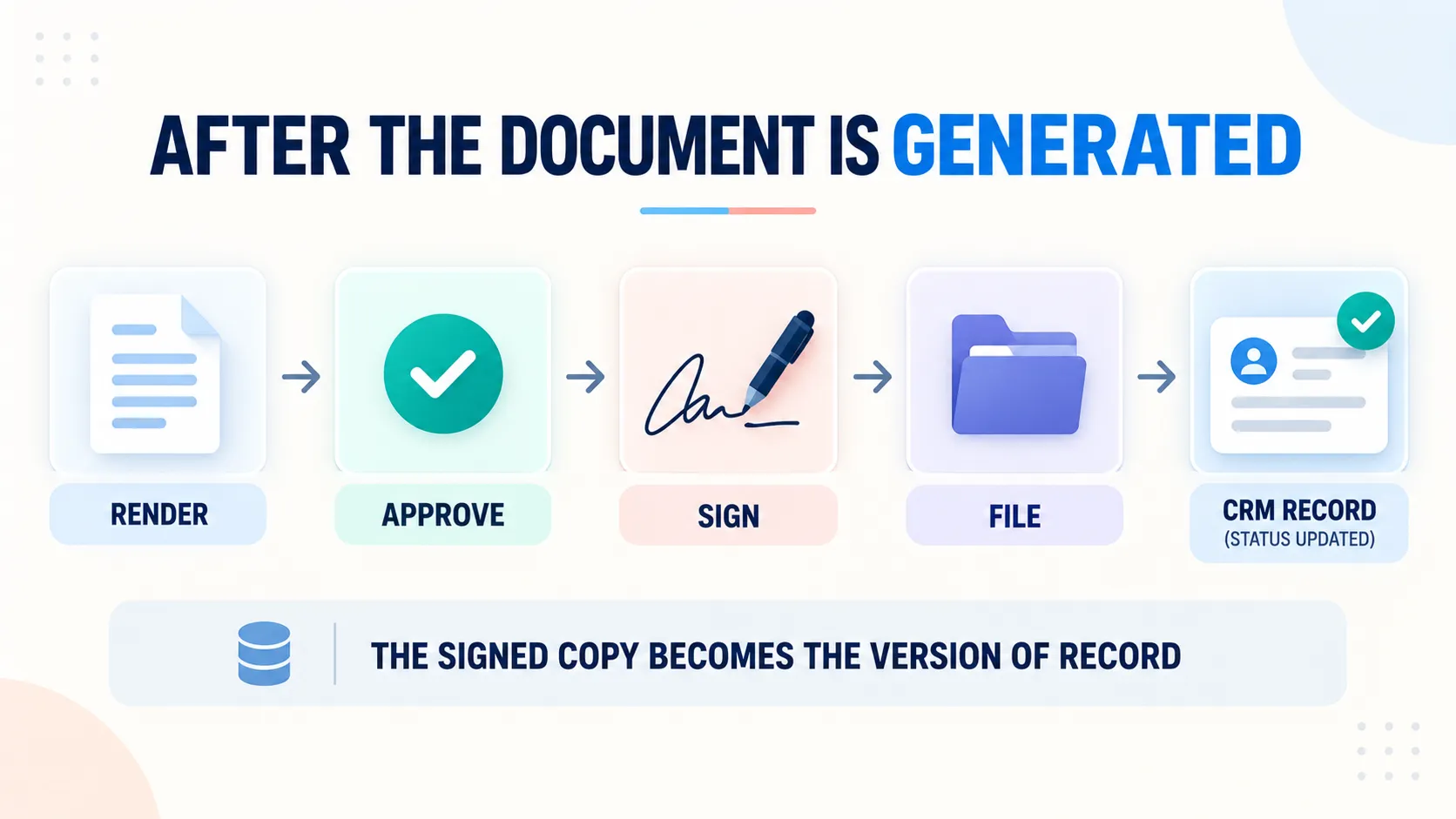
Generation is the start of a pipeline, not the end of a task. Four steps follow the render, and each one automates cleanly on modern tools. The rendered document routes for internal approval only when the exception rules say so.
It goes out for signature through your e-signature tool of choice. The signed copy files itself where it belongs. Status writes back to the CRM, so the deal record knows without anyone reporting it. Sent, viewed, signed, filed. The record tells the whole story itself.
The Version of Record
One rule prevents years of future arguments. The signed version is the version of record, and the system knows exactly which file that is. Drafts stay drafts, marked and superseded automatically as newer renders land. Nobody searches an inbox for "the real one" again, because the record points straight at it.
Filing Is Part of Generation
A generated document that just lands in a downloads folder was only half-generated. Naming conventions, applied automatically at render. Filed to the right client folder, automatically. Linked from the CRM record, automatically. Findability is a feature of the build, not a habit you hope the team keeps under pressure.
Guardrails Legal Will Like
Five, all cheap. A clause library with named owners and review dates, so approved language stays approved language. Template change control, with versions and a changelog behind every single edit.
An audit trail from data to render, showing exactly which sources fed which document. Structural care with sensitive data, rendered only where it belongs and stored only where policy allows it to live. And a kill rule: retired clauses and templates leave the system entirely, not just the style guide.
These five turn legal from the department that slows documents down into the department that governs a library once a quarter. That trade is the quiet win of the whole discipline, and both sides prefer it.
When Not to Automate Documents
The honest gate, stated plainly. Genuinely bespoke narratives, strategy documents, and one-off essays stay human, with layout templates as their only automation worth buying. Volume below a real threshold keeps manual drafting cheaper than the build, and that is a perfectly fine answer.
And ungoverned source data disqualifies the project before it starts. Generation amplifies the source, so a wrong rate card produces wrong contracts at machine speed, with confidence. Govern the source data first, and then generate.
How ACS Builds Document Generation
Three layers as method, wired into the operations spine. Engagements run fixed fee after a paid and refundable discovery. Discovery inventories your document types by volume and by pain. It maps each document type to its live data sources.
It drafts the clause and template governance with your legal owner in the loop. It prices the builds visibly, document type by document type. The document about your documents is yours either way, our favorite sentence to write.
Builds carry the constants: documentation your team keeps, training to named roles, accounts in your name, error-alerted integrations. Middleware carries the standard flows per the platform comparison, and the hard edges get engineered integration instead.
Engagement structure sits on pricing. The record sits in the case studies: 500+ workflows shipped, more than 10,000 hours reclaimed, over $2 million in client savings.
Frequently Asked Questions About Document Generation
What is document generation?
Assembling finished business documents from separated layers. Data reads from systems of record, live. Logic applies from governed rules. Layout renders from templates. The human contribution moves from retyping to judgment, and the output stays consistent at any volume.
What is the difference between document generation and templates?
A template is the layout layer alone, with blanks a human still fills by hand. Generation adds the other two layers: data merged from live systems and logic deciding what appears. Templates save formatting time only. Generation retires retyping entirely, which is the far bigger bill.
Which documents should I automate first?
High volume, structured data, repeatable logic. Quotes, proposals, and SOWs lead in most services firms, with one block library feeding all three. Then contracts built on the clause library, scheduled client reports, invoices, and onboarding packets in turn. Bespoke narratives stay human, happily and permanently.
Can document generation pull data from my CRM?
It should start there. The deal record supplies client, contact, and commercial data at render time, fresh. Document status writes back after signature. The build works from a HubSpot or Pipedrive record the same way, and self-maintaining records make the whole feed cleaner still.
How do e-signatures fit into document generation?
As the lifecycle step after render and approval. The document routes to your e-signature tool. The signed copy files itself. The system marks it as the version of record. Signature is a stage in the pipeline, not a separate errand someone remembers on Friday.
How do I keep legal comfortable with generated documents?
Give legal the library, not the document traffic. Approved clauses with owners and review dates on each. Template change control with a changelog. An audit trail from source to render, on demand. Legal governs the whole library once a quarter instead of reviewing fifty rushed drafts, and comfort follows control, as it always does.
How does version control work for generated documents?
Drafts are marked and superseded as new renders arrive. The signed version is the version of record, and the system points at it from the CRM. Template versions carry a changelog. The old arguments about "which file is real" simply end, because the answer is stored, not remembered by whoever was there.
What data sources can feed generated documents?
Anything with an API or a clean scheduled export. The CRM for commercial data. Rate cards for current pricing. Project tools for delivery facts. Finance systems for the billing terms. One document can merge several sources in a single render, cleanly. The rule stays the same for all of them: read at render time, never retype anything.
Do I need dedicated software, or can middleware build this?
Middleware plus your existing document and e-signature tools covers most mid-market generation needs: merges, conditions, routing, filing. Dedicated platforms earn their seat only at heavy document volume or genuinely complex logic. The placement rule holds here as everywhere: automate at the lowest layer that can own it.
Can document generation handle multi-language documents?
Yes, treated as a logic-layer problem. Language variants live as template and clause versions, selected by one field on the record. The same source data feeds every language. Govern the translations like clauses, with owners and review dates, and the consistency carries across borders intact.
Is document generation safe for contracts?
Much safer than the folder of fifty, honestly. The clause library carries approved language only, nothing else. The audit trail shows exactly what fed each render. The kill rule retires bad clauses everywhere at once, immediately. Risk lives in the ungoverned copies, and generation is precisely how the copies end.
Ready to Separate the Layers?
Three ways forward.
Audit one folder. Pick your proposals or contracts folder and count the forks. Rate mismatches. Retired clauses. Layout drift. That count is the business case, written for you by your own files.
Read the engine upstream. The quoting system covers the block library that feeds your highest-volume documents first.
Book a paid discovery. Your document types inventoried by volume and pain, each mapped to its data sources, clause and template governance drafted, every build priced visibly, one fixed price, refundable if the fit is wrong. Details on pricing.
Data lives in systems. Logic lives in rules. Layout lives in templates. Weld the three together and you get the folder of fifty forks. Separate the three and every document ships fresh, consistent, and findable, at whatever volume the business brings next.